UwView — Huge Files, No Waiting is a viewer for huge logs and text files on Windows, macOS and Linux. It reads without loading the file into memory, so 10GB and 50GB files open right away, and you can jump to the end while it is still opening. There is a free edition (CLI uvf), the paid UwView Pro — Huge Files, No Waiting (uvp), which saves its index so the second search onward is faster, and a Wasm build that runs in the browser.
When people look for a tool to open and read huge logs, the first name that comes up is the free log viewer klogg. This site has published 6 articles comparing klogg and UwView on speed and features, and comparing tools that open huge logs in a browser.
This page collects the answers from those 6 articles in one place. Every number was measured by the developer, so please read them with that in mind. We also say plainly that in July 2026 the free edition opened and searched more slowly than klogg, and that the browser build is still slower than klogg.
Note on file-size notation: the “50GB” on this page is one file of 51,254,526,392 bytes (51.25GB in SI units, 47.73 GiB). Older articles that say “48GB” or “47.73GB” mean the same file.
- The short answer: just opening or just searching, today’s UwView and klogg are on par. The gap appears when you search and read the hits on screen, and when you keep coming back to the same file. The browser build runs at about half the app’s speed
- 1. Open and search — klogg was faster in July, and they drew level in September
- 2. Search and read on screen — reading the file twice or once
- 3. Coming back to the same file — whether the index is saved
- 4. Comparing features — every row klogg wins is in the table
- 5. Opening huge logs in a browser — “it opens” has three levels
- 6. Where we lose, and where it’s a tie
- 7. Choosing a tool by how you work
- Read each article
- Links
The short answer: just opening or just searching, today’s UwView and klogg are on par. The gap appears when you search and read the hits on screen, and when you keep coming back to the same file. The browser build runs at about half the app’s speed
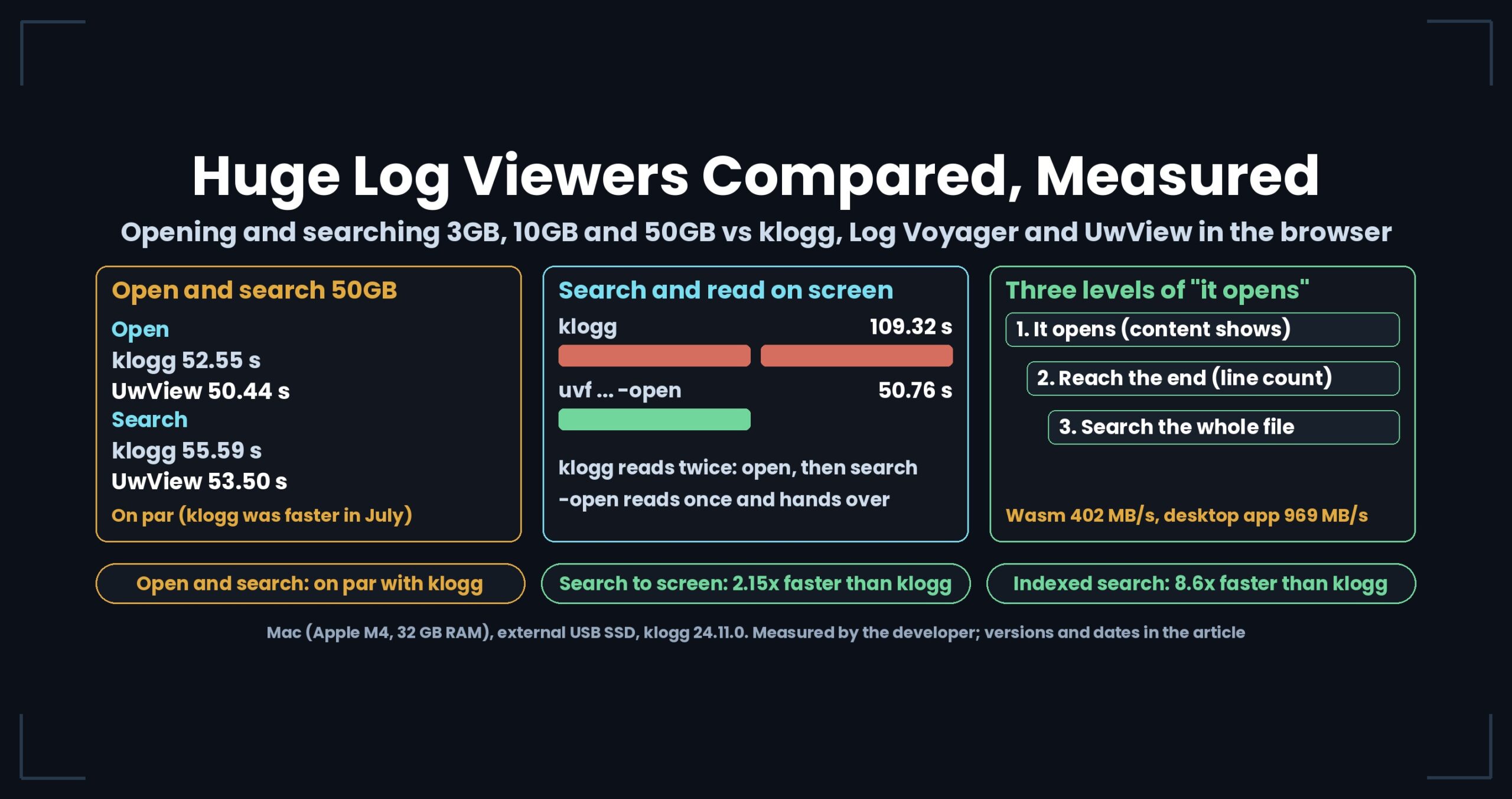
- Opening and searching are on par. Opening 50GB took 52.55 s in klogg and 50.44 s in UwView; searching “東京” took 55.59 s and 53.50 s (Mac, external USB SSD). In July klogg was faster; with v1.6.6 in September the two drew level.
- Searching and reading the hits on screen, end to end, is where it differs. klogg reads the file once to open it and again to search.
uvf <file> <term> -openreads it only once, so a line-numbered hit list is on screen in 50.76 s. klogg took 109.32 s —uvf … -openwas 2.15x faster than klogg. - If you keep coming back to the same file, use UwView Pro. It saves its index, so reopening took 0.01–0.07 s and searching 6.47 s (8.6x faster than klogg).
- The browser build reads at about half the app’s speed. On the same 50GB file, the Wasm build read at 402 MB/s and the app at 969 MB/s. Even so, “open, search and show on screen” took 126.1 s, close enough to compare with klogg’s 108.14 s.
1. Open and search — klogg was faster in July, and they drew level in September
On a Mac (Apple M4, 10 cores, 32 GB RAM), we measured the same 51,254,526,392-byte file after clearing the cache with sudo purge. klogg is 24.11.0. Seconds are compared only within the same machine. Differences under 1.5x are called “on par”.
| 50GB, same file | klogg (s) | UwView free (s) | Result | Version, disk, date |
|---|---|---|---|---|
| Open (July) | ~110 | 128–186 | klogg faster | v1.0 series, external USB drive (0.41 GB/s), July 2026 |
| Search “Tokyo” (July) | 120–135 | 156.2 | klogg faster | Same as above |
| Open (Sept 18) | 52.55 | 100.6 | klogg faster | v1.6.5, external USB SSD, September 2026 |
| Open (Sept 19) | 52.55 | 50.44 | On par | v1.6.6, external USB SSD, September 2026 |
| Search “東京” | 55.59 | 53.50 | On par | v1.6.6, external USB SSD, September 2026 |
July and September used different disks, so compare the direction against klogg rather than the seconds themselves.
Even when we re-measured on September 18, we still lost on opening (we lose to klogg on opening). Converted to read speed, klogg opened 50GB at 930 MB/s, using up the disk’s raw read speed (about 950 MB/s). The free edition’s window ran at 486 MB/s, half of that. The next day’s v1.6.6 fixed the reading, and opening 3GB, 10GB and 50GB took 2.99, 10.13 and 50.44 s (klogg: 3.65, 10.98 and 52.55 s). Reads were 967, 966 and 969 MB/s — the medium’s own speed at all three sizes.
klogg reaching the medium’s speed gave us a measured target. We keep the record that klogg — free and open source — was faster at that point.
2. Search and read on screen — reading the file twice or once
What you actually want is not to open the file but to find something and read it. We measured that whole run (v1.6.6, Mac, external USB SSD).
| Until the hits are readable on screen | 3GB (s) | 10GB (s) | 50GB (s) |
|---|---|---|---|
| klogg (open + search) | 4.21 | 22.73 | 108.14 |
uvf … -open (free) |
3.40 | 10.42 | 50.76 |
With uvf <file> <term> -open, uvf reads the file once, searches it, and hands the hit positions and index markers straight to the window. The window does not search again. klogg reads once to open and once more to search, so the gap opens at 10GB and 50GB, which do not fit in memory. 3GB fits in memory (32 GB), so the second read comes from cache and the gap is small (1.24x against klogg — on par).
The 50GB klogg run is 108.14 s (2.13x) in the September 20 article and 109.32 s (2.15x) in the updates added to several articles on October 16. The short answer on this page uses the newer 109.32 s.
We checked the same thing on one unsplit 258.68GB file with 4.5 billion lines.
| 258.68GB | Time (s) | Read speed (MB/s) |
|---|---|---|
| Until klogg finishes opening | 258 | 956 |
uvf … -open (search and show on screen) |
265.21 | 930 |
Until UwView Pro finishes opening (incl. building .uwvz) |
328 | 752 |
In about the time klogg takes just to finish opening the file, uvf … -open has already searched it and put the hits on screen. klogg starts searching from there.
3. Coming back to the same file — whether the index is saved
klogg rebuilds its index every time you reopen. UwView Pro builds, on the first open, a file holding the compressed contents and the index (.uwvz, about 1/9 of the original), and reads that from then on.
| Same file, from the 2nd time | klogg (s) | UwView Pro (s) | Result | Version, date |
|---|---|---|---|---|
| Reopen 50GB | 52.55 (every time) | 0.01–0.07 | — | v1.6.5, September 2026 |
| Search 50GB (with index) | 55.59 | 6.47 | 8.6x faster than klogg | v1.7.3.1, September 28, 2026 |
| Search 10GB (with index) | 11.75 | 1.80 | 6.5x faster than klogg | v1.6.5, September 2026 |
In the July runs too (external USB drive, 0.41 GB/s), the indexed search took 14.3 s, about 9x faster than klogg’s 120–135 s, and the second open took 0.02–0.07 s (comparing design generations with klogg). The same article confirmed that klogg shows only the beginning of the file until its index is built, and cannot move to the end. UwView lets you jump to the middle or the end while it is still indexing.
4. Comparing features — every row klogg wins is in the table
Apart from speed, we built feature tables (as of v1.0 and the complete edition as of v1.1.1, both July 2026, klogg 24.11.0). The tables have one rule: include every row where we lose.
| In the July 2026 (v1.1.1) table | Rows |
|---|---|
| UwView ahead | Move anywhere the moment the file opens; automatic Shift_JIS / EUC-JP detection; lines around each hit; saving results to a file; minimap; Japanese/English UI; browser build |
| Filled in by v1.1 / v1.1.1 | Color highlighter; right-click instant coloring; search history; session restore; recent files |
| klogg still ahead | Auto-updating search results while following (tail -f); per-file state restore; Scratchpad; line wrapping; package distribution; track record; breadth of supported encodings |
In August, v1.3 added drill-down search (narrowing the results with another term) and sequence search to UwView Pro, which turned the “AND/OR expression search” row around. The table above is a record from July, not the current feature list. At the time of the table, klogg was clearly ahead on distribution and track record.
5. Opening huge logs in a browser — “it opens” has three levels
Some tools advertise that they open huge logs in a browser, and UwView has a Wasm build for technical testing too. Trying a 47.73GB file showed that “it opens” mixes three different things (three levels in the browser).
| Level | Meaning |
|---|---|
| 1. It opens | Memory does not blow up and content is displayed |
| 2. You can reach the end | You can get to the last line (it knows the total line count) |
| 3. You can search all of it | You can search across the whole file |
According to its author, Log Voyager treats the file like a video stream and jumps by byte position without counting the total lines. Not counting lines lets it start faster. It is a design with a different goal, not something to rank against the others.
The Wasm build of UwView completed a search for “東京” across 47.73GB and 892,239,125 lines, finding 94,979 hits (level 3). The seconds were measured on the same Mac (M4, 32 GB, external USB SSD, Chrome) on September 23, 2026.
| 50GB, same file | Open only (s) | Open → search → on screen (s) | Read speed (MB/s) |
|---|---|---|---|
| UwView Wasm build (browser) | 121.5 | 126.1 | 402 |
| klogg 24.11.0 | 52.55 | 108.14 | 930 |
| UwView app (free, v1.6.6) | 50.44 | 53.7 | 969 |
Because the browser build searches while it opens, the search added only 4.6 s on top of the 121.5 s open. The “open → search → on screen” times include our own time to press the button and type the term. The same Wasm build stopped at 51% loading a 250GB file. The browser has a ceiling, and that applies to UwView’s Wasm build too.
We also compared the app and the browser build on a smaller 3.16GB, 100-million-line file (native vs the browser build, July 2026).
| 3.16GB, 100M lines | App | Browser build |
|---|---|---|
| Display at the moment of opening | Instant | Instant |
| Until the index is built | 1 s or less | About 35 s |
| Full-text search for “東京” | Under 1 s | About 15–20 s |
| Jump from a hit to the text, or to the middle or end | Instant | Instant |
Both found the same 6,204 hits. The app had opened this file just before, so the OS cache was warm — keep that in mind.
6. Where we lose, and where it’s a tie
- Opening and searching are on par with klogg. 50.44 s vs 52.55 s and 53.50 s vs 55.59 s at 50GB — not a gap we can call a win.
- With the July version and with v1.6.5 on September 18, klogg opened faster. On September 18 the 50GB open was 52.55 s vs 100.6 s.
- At 3GB there is hardly any difference. At sizes that fit in memory, the cache erases klogg’s cost of reading twice.
- The browser build is slower than klogg. 126.1 s vs 108.14 s end to end, and 121.5 s vs 52.55 s for opening alone.
- On features, klogg still led on several rows. In the July 2026 table, klogg was ahead on auto-updating search while following, per-file state restore, Scratchpad, line wrapping, distribution, track record and breadth of encodings.
- If you only look once, klogg is enough. It opens fast and it is free and open source.
7. Choosing a tool by how you work
| What you want to do | Suited tool |
|---|---|
| Open a file once and look at it | klogg or UwView (on par) |
| Search, then read the hit lines on screen | uvf … -open (free) |
| Keep coming back to the same file, or archive it and reopen it often | UwView Pro |
| Peek in a browser without installing anything | UwView Wasm build, Log Voyager (about half the app’s speed) |
| Use a log-monitoring toolbox such as auto-updating search while following | klogg |
Read each article
- We Lose to klogg on Opening. uvf Wins the Whole Run — Re-measured at 50 GB
- An Honest Comparison with klogg — Every Win and Every Loss, Laid Out in a Table
- An Honest Comparison with klogg [Ver1.1.1, Complete Edition] — Free UwView and Upper-Tier Pro, Every Item
- UwView Pro — We Compared It to the Industry-Standard klogg, and Its Design Turned Out to Be a Generation from 30 Years Ago
- “Opens a Huge Log in Your Browser” Means Three Different Things — Checked at 47 GB
- How much slower is the browser build? — UwView native vs WASM, measured on the same file
Links
- Download UwView (Windows, macOS, Linux)
- UwView Pro (one license covers every OS)
- Benchmarks
- Can’t Open a Huge File? Everything We Measured in One Place
All numbers were measured by the developer and depend on the environment, version and date stated. Your results will vary.