UwView is built out of a long record of losing to other tools.
It lost to klogg on a feature checklist, lost to ripgrep on regular expressions, and I have written more than once that a grep pipeline still wins for automation. Each time, I brought one good idea back. This article is the list of what came back: what each tool does well, how it ended up in UwView, and what I chose not to take, with the reason.
uvfanduvpare the search commands of UwView, which I make (uvfships with the free UwView,uvpwith UwView Pro). There is a GUI as well as the commands. Version numbers are the ones given in the earlier articles that introduced each feature.
- Up front: what came from where
- Tool by tool: what was good, and how it changed on the way in
- klogg — lose on the checklist, then fill it in one row at a time
- grep, uniq -c, sed — putting the pipeline on screen
- PowerGREP — going past “find”, and past plain text
- ripgrep — match on answers, not on feature names
- Rust regex — the lesson was the filter, not the language
- grix — if you have not measured a case, you cannot tell whether it is slow
- tail -f and less — borrowing the habits
- Compression, log platforms and converters
- Tools we only compared against
- The rules behind the borrowing
- Release pet names, and what each one brought
- How uvp writes it
- Test conditions
- Links
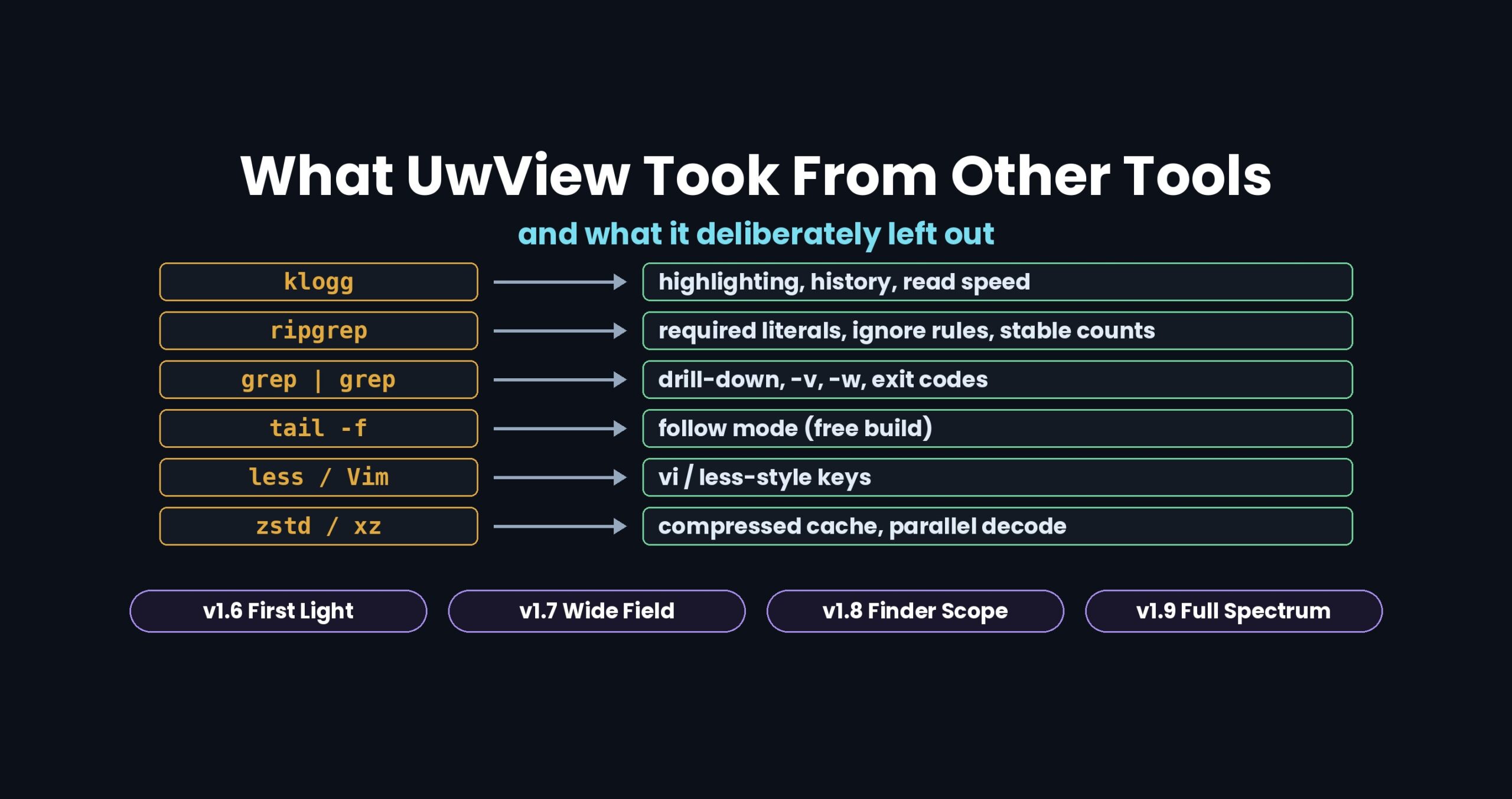
Up front: what came from where
| Tool | Kind | What it does well | What UwView took (version) |
|---|---|---|---|
| klogg | GUI log viewer | Highlighting, search history, follow mode and session restore all in one place; opening runs at the speed of the disk | Color highlighter and search history (v1.1); right-click coloring and session restore (v1.1.1); GUI read speed roughly doubled to match klogg (v1.6.6) |
| grep (with pipes) | CLI search | Simple and fast for a one-off search; runs unchanged in cron, CI and over ssh | grep A \| grep B became drill-down search (up to 8 stages, v1.3.0); -v and -w (v1.5.0); exit codes 0, 1, 2 (v1.6.0) |
| uniq -c, sed | CLI processing | Still the most dependable way to do fixed transformations | sort \| uniq -c became “Tally” (v1.5.0); sed -i became replace-all that never rewrites the original (Edit Upgrade) |
| PowerGREP | High-end grep for Windows | Searches inside Word, Excel and PDF; cuts out ranges, masks values and collects reformatted results, all in one search flow | Ranges (-seq … -range), masking (-mask) and formatted collection (-format, --csv) (v1.8.1.9); search in Word, Excel and PDF (v1.9.0) |
| ripgrep | CLI search | Regex runs about as fast as a fixed string; the same command always gives the same count; honors .gitignore |
Required-literal extraction (v1.6.0); deterministic counts (v1.6.2); ignore rules matched to ripgrep 15 (v1.7.2.5 to 2.6); --json |
| Rust regex | Library | Pre-filters lines on a single byte or byte sequence even when no required literal can be extracted | The same pre-filter in the C# uvf, making those patterns 2.3x to 6.1x faster |
| grix | Indexed grep | Benchmarks on the Linux kernel source (over 90,000 files) | Measuring the many-small-files case too, and cutting the number of file opens (1.7.3.6.6) |
| zstd, xz, gzip | Compression | zstd decompresses fast | zstd inside .uwvz; parallel xz decoding (1.7.2); calling the OS zlib directly for gz |
| less, Vim | Pager | Light when you open a file once | A “vi / less” key-binding template (v1.9.0) |
| tail -f | Following appends | Does one job: streams what gets appended | Follow mode in the free UwView (v1.9.0 also follows rotation and truncation) |
| Elastic EQL, Splunk | Log platforms | Detect ordered flows (A, then B) | Sequence search (v1.3.0, Pro), run locally with no ingestion |
| osmium | OSM converter | The standard tool; turns pbf into XML | uvp reads pbf directly and emits XML byte-identical to osmium’s |
| jq | JSON processing | Saves you from splitting output by hand | --json as JSON Lines, made to pipe into jq |
Tool by tool: what was good, and how it changed on the way in
klogg — lose on the checklist, then fill it in one row at a time
klogg has a full toolbox for reading logs. Around v1.1 I put the features side by side in a table, and UwView lost most of the rows: highlighting, search history, follow mode, session restore.
The rule I set was not to copy klogg, but to rebuild each feature the way I would want to use it every day. The color highlighter (v1.1: 32 colors, regex captures, bundled presets) always draws the search-hit yellow on top and only evaluates the lines on screen. klogg’s within-line AND/OR became drill-down search (v1.3.0), which narrows across lines.
On speed, klogg’s read rate when opening the 51 GB file (930 MB/s) became a measured target. The free GUI read at 486 MB/s, and v1.6.6 (“First Light”) brought it to 967 MB/s. The record that “for just opening, klogg is faster” stays published. klogg still covers more encodings and has more than ten years of track record.
grep, uniq -c, sed — putting the pipeline on screen
grep A | grep B keeps neither the per-stage counts nor the original line numbers. UwView’s drill-down search (up to 8 stages) keeps each stage as a tab with its count and keeps the original line numbers to the end. -v (exclude) and -w (whole word) arrived in v1.5.0 as per-stage options, sort | uniq -c | sort -rn became “Tally”, and > hits.txt became Save (with line numbers and N lines of context).
From v1.6.0 there are commands too (uvf, uvp), with grep’s exit codes: 0 (hits), 1 (no hits), 2 (error).
Left out: awk. As I wrote before, awk is still the right tool for scripted transformations, and UwView does not claim to replace it.
PowerGREP — going past “find”, and past plain text
PowerGREP is a high-end grep for Windows. It searches inside Word, Excel and PDF as well as text, and it does not stop at printing matching lines: cutting out a block from a start line to an end line, masking things like IP addresses, and collecting values captured by a regex into a CSV can all be written as one search flow.
Two things came back from it.
- Ranges, masking and formatting (v1.8.1.9 “Finder Scope”). PowerGREP’s usage examples can now be written in
uvp.-seq 'start,end' -rangecuts each start-to-end block,-grepand-vfilter blocks,-maskmasks only the lines that are printed, and-format '$1,$2' --csvturns captured values into CSV. The output is byte-identical to ripgrep (combined with perl and the like). - Word, Excel and PDF (v1.9.0 “Full Spectrum”). Text is extracted into the index, so the same search, tally, range and format stages work on them.
Deliberately different: nothing is written back to the original format (Word, Excel and PDF are search-only). And there are no speed numbers against PowerGREP here: in that comparison PowerGREP only searched, without the range, mask and format work, so it was not the same job.
ripgrep — match on answers, not on feature names
What came back from ripgrep was less a set of features than a set of properties.
- Regex should not be slow. Required-literal extraction (v1.6.0) pulls out the strings a regex must contain and filters candidate lines first. It errs on the side of extracting too little, so it never drops a hit. A
-Esearch over 50 GB (OpenStreetMap XML, 51,254,526,392 bytes) went from 13.68 s to 7.75 s. - The same command gives the same count. v1.6.2 made “no cap” the default, and 81 checks against ripgrep and sed agree.
- Ignore rules. The order in which
.ignoreand.gitignoreare read,!negation and walking up to parent folders all follow ripgrep 15, and 43 checks againstrg --filesagree on Mac, Windows and Linux.
Deliberately different: the default is a literal search and regex needs -E (the reverse of ripgrep, for speed). .rgignore is not read. The file spec is a single quoted argument, because that string becomes the name of the index.
Rust regex — the lesson was the filter, not the language
I also rewrote uvf in Rust as an experiment. Two things came out of it: the Rust and C# builds ran at about the same speed, and Rust’s regex pre-filters on a single byte or byte sequence even when no required literal exists. Putting that into C# made those patterns 2.3x to 6.1x faster.
grix — if you have not measured a case, you cannot tell whether it is slow
grix reads only candidate files through a trigram index, and its author benchmarked on the Linux kernel source. UwView had only ever been measured on single huge files; on that case it was 19 times slower than ripgrep. The cause was the number of file opens. Version 1.7.3.6.6 cut them, and one uvf query went from 25.82 s to 3.76 s.
Left out: the trigram index itself. grix’s index picks which files to read; uvp‘s .uwvz (UwView Pro’s compression format plus index) keeps the text itself compressed so it can still be searched and restored without the original. Different goals.
tail -f and less — borrowing the habits
tail -f became follow mode in the free UwView; v1.9.0 also follows rotation and truncation. UwView Pro does not have follow mode. Pro tracks edits in a delta file (.ewvz), which does not sit well with an original that keeps changing.
less and Vim gave the keys: choose the “vi / less” template in v1.9.0 and you get j k g G n N m, plus 5j and 120g. Where less throws away line boundaries every time it opens a file, UwView keeps them in the index.
Compression, log platforms and converters
- zstd compresses
.uwvz. It decompresses fast enough that searching the compressed copy beats reading the raw file from disk. - xz, gzip: built-in xz decoding went parallel, closing a gap from “
rg -z6.19x faster” to “rg -z1.08x faster” (under 1.5x, so on par). For gz, calling the OS zlib directly took a 50 GB gz search from 35.65 s to 17.20 s. - Elastic EQL, Splunk: the “A, then B” search (
sequence,transaction) became Sequence search over local huge files (v1.3.0, Pro). - osmium, jq: XML produced from pbf is byte-identical to osmium’s, and
--jsonemits JSON Lines that go straight intojq.
Tools we only compared against
No features came from these, but measuring against them told me where UwView stands.
| Tool | What the comparison showed |
|---|---|
| EmEditor | Up to around 10 GB, fast at both search and replace, with a rich editing feature set. For a replace on a few GB, EmEditor is faster |
| UltraEdit, 010 Editor | Open 48 GB-class files and finish search and replace |
| PilotEdit | Prompted sorting large-file tools into three groups by what you can do right after opening |
| ugrep | With -z, searches seven compression formats at about the same speed as ripgrep and uvf |
| VS Code | Has a safety mode for large files, at the cost of switching features off |
Numbers and conditions are in each comparison article (links below).
The rules behind the borrowing
Looking back, there was a pattern.
- List every row you lose, then fill them one by one. The losing rows of the checklist stayed public, both the filled and the open ones.
- Do not copy; rebuild for daily use. Same feature name, my own feel.
- Define compatibility by matching answers, not by feature names. 43 checks against
rg --files, 81 against ripgrep and sed, byte-identical with osmium. I only say “matched” when the answers are the same. - Use the other tool’s speed as your target. Without klogg’s 930 MB/s, I would not have tried to double the GUI read rate.
- Write down why you left something out.
.rgignore, follow mode in Pro, the trigram index, awk. If I cannot write the reason, I have not thought it through yet.
Release pet names, and what each one brought
Since v1.6, each minor version (the second digit) gets a pet name. All of them are words from watching stars through a telescope, and all start with F.
| Version | Pet name | Main features | Where they came from |
|---|---|---|---|
| v1.6.6 | First Light | The GUI starts searching before the index is finished, so opening and searching share one read. GUI read rate from 486 MB/s to 967 MB/s | klogg (read speed) |
| v1.7.3.6 | Wide Field | Bundle many files into one .uwvz. Ignore rules, seven compression formats, inside zip, OSM pbf, --json. Faster on many small files (1.7.3.6.6 onward) |
ripgrep (ignore rules, --json), xz, osmium, jq, grix |
| v1.8.1.9 | Finder Scope | The GUI’s Command Line dialog takes the same syntax as uvp. Multi-line blocks (ranges), masking, formatted collection |
PowerGREP (ranges, masking, formatting), grep, ripgrep (syntax) |
| v1.9.0 | Full Spectrum | Shift-JIS, EUC-JP and UTF-16 held as UTF-8 inside the index. Search in Word, Excel and PDF. vi/less-style keys. Follow mode survives rotation. {a,b} in file specs |
PowerGREP (Word, Excel, PDF), less, Vim, tail -f, ripgrep (-g syntax) |
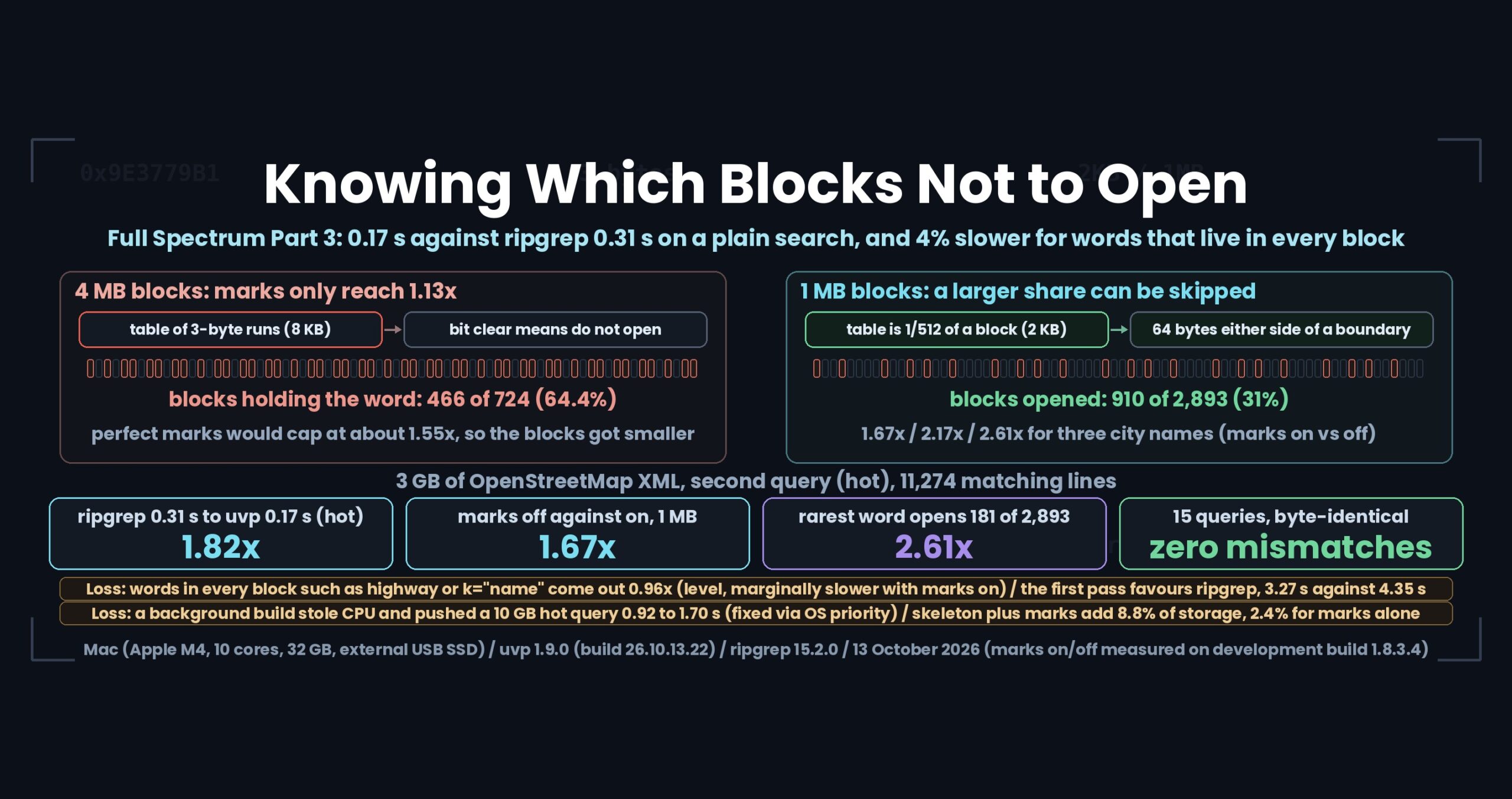
“Full Spectrum” means every combination at the same speed: four encodings, every file type (plain, Word, Excel, PDF, compressed, pbf, zip), GUI and command line, huge and many.
How uvp writes it
What you used to write as a grep pipeline looks like this in uvp (uvf uses the same syntax and reads the file each time without building an index).
# With grep
grep Tokyo japan.osm | grep -v hospital | grep -w Ariake

# With uvp
uvp japan.osm Tokyo                    # first run builds .uwvz, later runs search the index
uvp japan.osm 'k="highway[^"]*"' -E    # regex needs -E
uvp 'logs/**/*.log' ERROR --json | jq -r .file | sort -u   # list of files with hits
Multi-stage narrowing (exclude, whole word) happens in the GUI’s drill-down search, which keeps every stage as a tab.
Test conditions
- Mac (Apple M4, 10 cores, 32 GB of memory), external USB SSD. Every number comes from the linked article where it was measured; versions, dates and the other tools’ versions are given there.
- “50 GB” and “51 GB” refer to the same OpenStreetMap Japan XML (51,254,526,392 bytes, 892 million lines).
- Timings depend on the environment. Please do not compare them across environments.
Links
- The klogg feature table (filled and open rows as of v1.1.1): https://uvp.y42u.net/en/blog/uwview-klogg-feature-comparison-v111-en/
- The color highlighter (filling the rows klogg won): https://uvp.y42u.net/en/blog/uwview-v11-color-highlighter-en/
- v1.6.6, where the GUI caught up with klogg’s read speed: https://uvp.y42u.net/en/blog/uvp-gui-catches-up-v166-en/
- grep, uniq -c and sed mapped to the GUI: https://uvp.y42u.net/en/blog/uvp-cli-to-gui-map-en/
- Giving regex ripgrep’s property (required-literal extraction): https://uvp.y42u.net/en/blog/uwview-fl04-regex-required-literal-en/
- Ignore rules matched to ripgrep (43 checks): https://uvp.y42u.net/en/blog/uwview-wf07-ignore-rules-en/
- Catching up with Rust’s ripgrep in C#: https://uvp.y42u.net/en/blog/uvp-rust-csharp-ripgrep-history-en/
- Following a log that never stops (tail -f): https://uvp.y42u.net/en/blog/uwview-ps19-streaming-log-follow-en/
- When “less is enough” stops being true: https://uvp.y42u.net/en/blog/uwview-ps15-cli-craft-limits-en/
- Sequence search: https://uvp.y42u.net/en/blog/uvp-sequence-search-en/
- Search and replace against EmEditor, klogg, grep and 010 Editor: https://uvp.y42u.net/en/blog/uvp-search-replace-3-10-50gb-en/
- Everywhere ripgrep still wins: https://uvp.y42u.net/en/blog/uwview-wf14-where-ripgrep-wins-en/
- First Light recap: https://uvp.y42u.net/en/blog/uwview-fl13-first-light-recap-en/
- Wide Field recap: https://uvp.y42u.net/en/blog/uwview-wf15-wide-field-recap-en/
- v1.9.0 “Full Spectrum” release notes: https://uvp.y42u.net/en/blog/uwview-v190-full-spectrum-en/
- Source code (GitHub): https://github.com/amru195704/UwView
The free UwView is on GitHub Releases (Mac: brew install --cask amru195704/uwview/uwview; Windows: Scoop; Linux: Snap). If you search the same files again and again, UwView Pro keeps an index for you (one-time purchase or monthly).
From the developer: a full list of my apps, Kindle books and public projects is on GitHub: amru195704.