The BOM decides it.
An old Shift_JIS log, a UTF-16 CSV exported from Windows, and a text file edited on a Mac whose line endings have gone ragged — all three sitting in the same folder. That is an ordinary afternoon for anyone working with Japanese data.
How much of this does a search tool work out by itself? And when it cannot, does it quietly answer “no matches”?
This part sweeps 27 character-encoding cases and 12 newline cases, 39 in all. The answer splits cleanly along one line: whether there is a BOM.
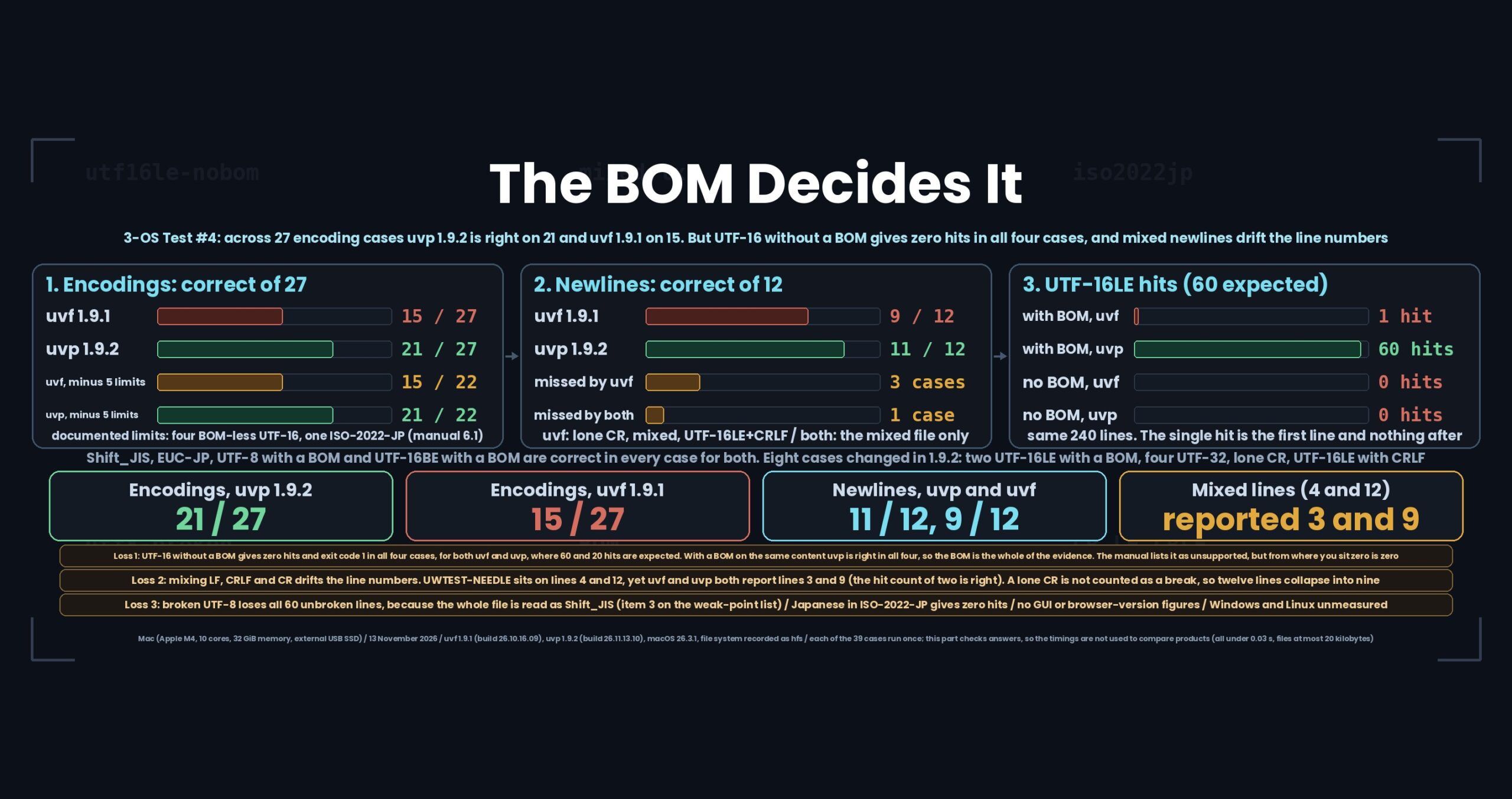
- Up front: uvp is right on 21 of 27 encodings. But UTF-16 without a BOM gives zero hits, and mixed newlines drift the line numbers
- The problem: “could not read it” and “no matches” look identical
- Test conditions
- Results
- The losses: zero on UTF-16 without a BOM, drifting line numbers on mixed newlines
- Correctness: 32 of 39 for uvp, 24 for uvf
- What to take home: four things to do before searching Japanese logs
- How this looks in uvp
- Reproducing this
- Links
Up front: uvp is right on 21 of 27 encodings. But UTF-16 without a BOM gives zero hits, and mixed newlines drift the line numbers
Two losses first.
One. UTF-16 without a BOM gives zero hits — all four cases. Searching UTF-16LE and UTF-16BE for a Japanese word (東京) and for an ASCII string (status=200) gives 0 hits and exit code 1 in both uvf 1.9.1 and uvp 1.9.2. The right answers are 60 and 20 hits. On the same content with a BOM attached, uvp is right in all four cases. In other words, the BOM is the only thing detection has to go on here. The manual (section 6.1) does list this as unsupported, so the behaviour is as documented — but from where you sit, zero is zero.
Two. Line numbers drift in a file that mixes LF, CRLF and CR. UWTEST-NEEDLE is on lines 4 and 12, and both uvf and uvp report it on lines 3 and 9. The hit count of two is correct; only the line numbers are wrong. The cause is that a lone CR is not counted as a line break, so twelve lines collapse into nine and the drift grows the further into the file you go.
With that said, here is what held up.
- On encodings, uvp 1.9.2 is right on 21 of 27 and uvf 1.9.1 on 15. Excluding the five combinations the manual marks unsupported (four for UTF-16 without a BOM, one for Japanese in ISO-2022-JP) leaves 22 cases, where uvp is right on 21 and uvf on 15. The single case uvp misses is broken UTF-8
- Six cases changed in 1.9.2: two for UTF-16LE with a BOM, four for UTF-32. On UTF-16LE with a BOM, uvf 1.9.1 finds only the first line — 1 hit where 60 are expected, and zero hits for the ASCII needle. For UTF-32 the right answer is “say it is unsupported and stop with exit code 2”; uvp 1.9.2 does exactly that, while uvf 1.9.1 tries to read it and returns 0 or 1
- On newlines, uvp is right on 11 of 12 and uvf on 9. Two cases changed in 1.9.2: lone CR endings (uvf reads twelve lines as one and returns 1 hit) and UTF-16LE with CRLF (uvf returns zero hits). The only case both miss is the mixed file
- Shift_JIS, EUC-JP, UTF-8 with a BOM and UTF-16BE with a BOM are correct in every case, in both products. Neither the Japanese needle nor the ASCII one loses any of the 60 and 20 expected hits among 240 lines
- Files with no final newline, files with blank lines, a file of 1,000 empty lines and a file of LF-CR pairs (not a standard line ending) are all correct. The only thing that breaks the line count is how CR is handled
- The five-byte files, the half-width katakana file and the Latin-1 file are correct too. Detection going wrong on files with little to go on did not show up in this range
uvfis the search command of the free UwView;uvpis the one in the paid UwView Pro. Every figure comes from the result CSVs measured on 13 November 2026 on a Mac (Apple M4, 10 cores, 32 GiB memory, external USB SSD). Versions are uvf 1.9.1 (build 26.10.16.09) and uvp 1.9.2 (build 26.11.13.10), on macOS 26.3.1. The uvp column is a newer build because the 24 October run used a stale working copy and was re-measured on 13 November. This part is Mac only; Windows and Linux are unmeasured. How to read these numbers was settled in part zero.Note: this part is about being right, not about speed. Each of the 39 cases was run only once — the files are at most 20 kilobytes, so repeating them buys little — so the timings are not used to compare the two products. All of them finish in under 0.03 seconds.
The problem: “could not read it” and “no matches” look identical
A search command has two kinds of reply: matching lines, or silence.
The trouble is that the silence means two different things.
- There really was nothing — the word is not in the file
- It was never read — the encoding was misjudged, so the bytes became different characters
In case 1 you move on. In case 2, that file has not actually been searched yet. On screen the two look the same. With Japanese data this comes up often: Shift_JIS, EUC-JP, UTF-8, UTF-16, with and without BOMs, ISO-2022-JP mail archives. Open an old project’s archive and all of them are in there.
There is a second trap of the same shape: line numbers. You take “line 1234” from the search result, open the file in an editor, and the line is not there. That happens when the two tools disagree about what ends a line. The count is right, so you find out late.
So this part takes the same 240 lines of content written out in every encoding, and the same 12 lines written out with every kind of line ending, and sweeps them to find where the answer becomes zero and where the line number drifts. It is an answer-checking part, not a stopwatch part.
Test conditions
Machines (Mac only in this part)
| Label | What it is | Memory | Storage | File system | Kind |
|---|---|---|---|---|---|
mac-m4-32g-usbssd |
MacBook Air (Apple M4, 10 cores) | 32 GiB | External USB SSD | hfs (as recorded) |
Real hardware |
linux-vmware-fusion |
— | — | — | — | Unmeasured |
win11-16g |
— | — | — | — | Unmeasured |
macOS 26.3.1 (arm64), no virtualization. The file system is recorded as hfs in env.json.
There are no Linux or Windows CSVs for this part. The series only measures Mac afresh and reuses earlier figures for the other two, but the encoding and newline sweeps have no earlier figures. The VMware allocation therefore does not apply here either.
One Linux record does survive, though not as a number. The development team’s weak-point list (testsuite/weak-points.md, from the 24 October smoke pass with uvf 1.9.1) has an entry (item 2) saying that on UTF-16BE with a BOM the hits are right but each result line ends with a replacement character (U+FFFD) — and that this was seen only on Linux. On this Mac the same four cases came out ok. It is worth noting as an example of behaviour that varies by OS; the source, version and date are above, and no seconds are compared.
Data set 1: encodings (16 files, 27 cases)
The same 240 lines of Japanese text written out in each encoding. 東京 appears on 60 lines and status=200 on 20. The generator is seeded, so the same bytes come out on any OS.
| File | Bytes | SHA-256 |
|---|---|---|
utf8.txt |
10,900 | 019e6381d07df2a2… |
utf8-bom.txt |
10,903 | 5f3f3fdaec2d077d… |
utf16le-bom.txt |
9,882 | 797be6d65d2bfb1d… |
utf16be-bom.txt |
9,882 | 470ab4a9d86df312… |
utf16le-nobom.txt |
9,880 | c1cc2e9908a8dd5d… |
utf16be-nobom.txt |
9,880 | cc0cc4dc141017e5… |
utf32le-bom.txt |
19,764 | 8a5bd2317250e9b9… |
utf32be-bom.txt |
19,764 | 6d674fbb5fed8681… |
cp932.txt |
7,840 | 05c9a42f2c9908e4… |
eucjp.txt |
7,920 | 88da41f7242e0dbd… |
iso2022jp.txt |
9,480 | 9b6949241ed465bb… |
utf8-broken.txt |
10,960 | 3f979c294061ebd2… |
cp932-short.txt |
5 | a20f7c47ae358142… |
eucjp-short.txt |
5 | eb07a37f2ba54d37… |
cp932-hankaku.txt |
841 | 7703fc549ffa6ef7… |
latin1.txt |
634 | c47e1ff4d1a984a7… |
utf8-broken.txt is UTF-8 with invalid bytes placed on lines that are not the matching ones — the expectation being “a few broken bytes should not hide the good lines”. cp932-short.txt and eucjp-short.txt are five bytes each (東京 plus a newline), leaving detection with almost nothing to work from.
Data set 2: line endings (12 files, 12 cases)
The same 12 lines written out with each kind of line ending. UWTEST-NEEDLE is on lines 4 and 12.
| File | Bytes | What it is | SHA-256 |
|---|---|---|---|
lf.txt |
129 | LF | ca231d65d073a251… |
crlf.txt |
141 | CRLF | 5d8604c45d5da02e… |
cr.txt |
129 | Lone CR (classic Mac OS) | 17a31f31ac2b6120… |
mixed.txt |
133 | LF, CRLF and CR mixed | f52d5b50616f3019… |
lf-nofinal.txt |
128 | LF, no final newline | 9b24f42f2068703b… |
crlf-nofinal.txt |
139 | CRLF, no final newline | 4961a05018cfbe71… |
bom-crlf.txt |
144 | UTF-8 BOM + CRLF | 8136ebd2dea973db… |
utf16le-crlf.txt |
284 | UTF-16LE BOM + CRLF | aae3704eaca26f2c… |
cp932-crlf.txt |
117 | Shift_JIS + CRLF | 5254b8ea5204ca3f… |
lfcr.txt |
141 | LF-CR pairs (not a standard ending) | 17567c3cbec04821… |
blank.txt |
21 | With blank lines | ea0c04a9881b1442… |
only-newlines.txt |
1,000 | 1,000 empty lines | a52ad6ba5827cf29… |
mixed.txt lays out like this:
line 01[LF]line 02[CRLF]line 03[CR]line 04 UWTEST-NEEDLE[LF]line 05[CRLF]
line 06[CR]line 07[LF]line 08[CRLF]line 09[CR]line 10[LF]line 11[CRLF]
line 12 UWTEST-NEEDLE last[CR]
The right answer counts CR as a line break too, which is what most editors show. wc -l counts only LF, so it gives a different answer on this file. Finding where tools disagree is the point of these twelve cases.
How it was measured
All 39 cases (27 encodings plus 12 newlines) were run with both uvf and uvp. A case is ok only when the exit code, the hit count and the line numbers all match what was expected. Checking line numbers is what makes this part different.
The data is not distributed. It is generated, verified against SHA-256, and then measured.
Results
Table 1: 27 encoding cases (Mac only, pass/fail)
✓ is ok, ✗ is ng. Brackets give what actually came back.
| Case | File | Needle | Expected | uvf 1.9.1 | uvp 1.9.2 |
|---|---|---|---|---|---|
enc-utf8-tokyo |
utf8.txt |
東京 |
60 hits | ✓ | ✓ |
enc-utf8-ascii |
utf8.txt |
status=200 |
20 hits | ✓ | ✓ |
enc-utf8-bom-tokyo |
utf8-bom.txt |
東京 |
60 hits | ✓ | ✓ |
enc-utf8-bom-ascii |
utf8-bom.txt |
status=200 |
20 hits | ✓ | ✓ |
enc-utf16le-bom-tokyo |
utf16le-bom.txt |
東京 |
60 hits | ✗ (1 hit) | ✓ |
enc-utf16le-bom-ascii |
utf16le-bom.txt |
status=200 |
20 hits | ✗ (0 hits, exit 1) | ✓ |
enc-utf16be-bom-tokyo |
utf16be-bom.txt |
東京 |
60 hits | ✓ | ✓ |
enc-utf16be-bom-ascii |
utf16be-bom.txt |
status=200 |
20 hits | ✓ | ✓ |
enc-utf16le-nobom-tokyo |
utf16le-nobom.txt |
東京 |
60 hits | ✗ (0 hits, exit 1) | ✗ (0 hits, exit 1) |
enc-utf16le-nobom-ascii |
utf16le-nobom.txt |
status=200 |
20 hits | ✗ (0 hits, exit 1) | ✗ (0 hits, exit 1) |
enc-utf16be-nobom-tokyo |
utf16be-nobom.txt |
東京 |
60 hits | ✗ (0 hits, exit 1) | ✗ (0 hits, exit 1) |
enc-utf16be-nobom-ascii |
utf16be-nobom.txt |
status=200 |
20 hits | ✗ (0 hits, exit 1) | ✗ (0 hits, exit 1) |
enc-utf32le-bom-tokyo |
utf32le-bom.txt |
東京 |
Unsupported, exit 2 | ✗ (exit 0, 1 hit) | ✓ |
enc-utf32le-bom-ascii |
utf32le-bom.txt |
status=200 |
Unsupported, exit 2 | ✗ (exit 1) | ✓ |
enc-utf32be-bom-tokyo |
utf32be-bom.txt |
東京 |
Unsupported, exit 2 | ✗ (exit 1) | ✓ |
enc-utf32be-bom-ascii |
utf32be-bom.txt |
status=200 |
Unsupported, exit 2 | ✗ (exit 1) | ✓ |
enc-cp932-tokyo |
cp932.txt |
東京 |
60 hits | ✓ | ✓ |
enc-cp932-ascii |
cp932.txt |
status=200 |
20 hits | ✓ | ✓ |
enc-eucjp-tokyo |
eucjp.txt |
東京 |
60 hits | ✓ | ✓ |
enc-eucjp-ascii |
eucjp.txt |
status=200 |
20 hits | ✓ | ✓ |
enc-iso2022jp-tokyo |
iso2022jp.txt |
東京 |
60 hits | ✗ (0 hits, exit 1) | ✗ (0 hits, exit 1) |
enc-iso2022jp-ascii |
iso2022jp.txt |
status=200 |
20 hits | ✓ | ✓ |
enc-utf8-broken-tokyo |
utf8-broken.txt |
東京 |
60 hits | ✗ (0 hits, exit 1) | ✗ (0 hits, exit 1) |
enc-cp932-short |
cp932-short.txt |
東京 |
1 hit | ✓ | ✓ |
enc-eucjp-short |
eucjp-short.txt |
東京 |
1 hit | ✓ | ✓ |
enc-cp932-hankaku |
cp932-hankaku.txt |
東京 |
1 hit (line 41) | ✓ | ✓ |
enc-latin1-ascii |
latin1.txt |
status=200 |
1 hit (line 31) | ✓ | ✓ |
| Total | 15 / 27 | 21 / 27 |
Set aside the five the manual marks unsupported (the four utf16*-nobom-* cases and iso2022jp-tokyo) and it is 15 of 22 for uvf, 21 of 22 for uvp. The one uvp misses is utf8-broken-tokyo.
Table 2: 12 newline cases (Mac only, pass/fail)
UWTEST-NEEDLE is on lines 4 and 12, and the line numbers count toward the verdict.
| Case | File | Expected | uvf 1.9.1 | uvp 1.9.2 |
|---|---|---|---|---|
nl-lf |
lf.txt |
2 hits, lines 4 and 12 | ✓ | ✓ |
nl-crlf |
crlf.txt |
2 hits, lines 4 and 12 | ✓ | ✓ |
nl-cr |
cr.txt |
2 hits, lines 4 and 12 | ✗ (1 hit) | ✓ |
nl-mixed |
mixed.txt |
2 hits, lines 4 and 12 | ✗ (lines 3 and 9) | ✗ (lines 3 and 9) |
nl-lf-nofinal |
lf-nofinal.txt |
2 hits, lines 4 and 12 | ✓ | ✓ |
nl-crlf-nofinal |
crlf-nofinal.txt |
2 hits, lines 4 and 12 | ✓ | ✓ |
nl-bom-crlf |
bom-crlf.txt |
2 hits, lines 4 and 12 | ✓ | ✓ |
nl-utf16le-crlf |
utf16le-crlf.txt |
2 hits, lines 4 and 12 | ✗ (0 hits, exit 1) | ✓ |
nl-cp932-crlf |
cp932-crlf.txt |
2 hits, lines 4 and 12 | ✓ | ✓ |
nl-lfcr |
lfcr.txt |
2 hits, lines 4 and 12 | ✓ | ✓ |
nl-blank |
blank.txt |
1 hit | ✓ | ✓ |
nl-only-newlines |
only-newlines.txt |
0 hits | ✓ | ✓ |
| Total | 9 / 12 | 11 / 12 |
The eight cases that differ (same machine, same files)
Here are the cases where uvf 1.9.1 fails and uvp 1.9.2 passes. These are differences in the answers on one machine over identical files — and because the versions differ, the gap between uvf 1.9.1 and uvp 1.9.2 is not purely a product difference. The next uvf build is unmeasured.
| Case | uvf 1.9.1 answered | uvp 1.9.2 answered |
|---|---|---|
enc-utf16le-bom-tokyo |
1 hit (first line only) | 60 hits |
enc-utf16le-bom-ascii |
0 hits, exit 1 | 20 hits |
enc-utf32le-bom-tokyo |
exit 0 with 1 hit | Unsupported, exit 2 |
enc-utf32le-bom-ascii |
exit 1 | Unsupported, exit 2 |
enc-utf32be-bom-tokyo |
exit 1 | Unsupported, exit 2 |
enc-utf32be-bom-ascii |
exit 1 | Unsupported, exit 2 |
nl-cr |
1 hit (twelve lines read as one) | 2 hits, lines 4 and 12 |
nl-utf16le-crlf |
0 hits, exit 1 | 2 hits, lines 4 and 12 |
The single hit on UTF-16LE with a BOM is a legible kind of mistake. In UTF-16LE an ASCII character is stored as one byte followed by a zero byte. Read a byte at a time and, after the first line, a zero byte looks like the end of the file. So line one is found and the other 239 vanish. It returns one hit rather than none, which makes it the hardest version to notice.
The UTF-32 cases are less “fixed” than “now stopping”. Rather than half-reading an unsupported format and returning something, the rule here is to say so and stop. uvp 1.9.2 returned exit code 2 with a message in all four cases.
The losses: zero on UTF-16 without a BOM, drifting line numbers on mixed newlines
One. UTF-16 without a BOM gives zero hits in both products. All four cases, exit code 1, nothing printed. Attach a BOM to the same content and uvp gets all four right, so the BOM is the whole of the evidence. Windows applications usually write a BOM into UTF-16, but code that writes it directly often does not. Without one, the file sails past as “not searched”.
Two. Mixed newlines drift the line numbers. Lines 4 and 12 became lines 3 and 9, because a lone CR is not treated as a break. The count is right, so nothing alerts you. You find out when you jump to the reported line and the match is not there. Files like this appear naturally when the same file is edited on Windows, macOS and Linux in turn.
Three. Broken UTF-8 loses the unbroken lines too. utf8-broken.txt leaves the 60 matching lines untouched and puts invalid bytes on other lines. Both uvf and uvp still returned zero hits: once the file does not hold up as UTF-8, the whole file is read as Shift_JIS. It is item 3 on the weak-point list, and it bites as “one file becomes unreadable” rather than “the broken bytes are lost”. This one is not a documented limit, so it is a target to fix rather than a design choice.
Four. Japanese in ISO-2022-JP gives zero hits. The ASCII needle (status=200) is right with 20 hits, but 東京 returns nothing. It is an escape-sequence format, and the manual (section 6.1) lists it as undetected. Old mail archives need converting first.
Five. There are no GUI figures. Only the command’s answers were measured. The procedure has a manual step — open each file and check the encoding shown and whether the text reads correctly — but an unattended run cannot do it.
Six. There are no browser-version figures. This part has uvf and uvp only.
Correctness: 32 of 39 for uvp, 24 for uvf
Since this part is about being right, here is the tally.
- 27 encoding cases plus 12 newline cases is 39
- uvp 1.9.2: 32 correct (21 encodings, 11 newlines). The seven it misses are four for UTF-16 without a BOM, one for Japanese in ISO-2022-JP, one for broken UTF-8, and one for mixed newlines
- uvf 1.9.1: 24 correct (15 encodings, 9 newlines). On top of the seven above: two for UTF-16LE with a BOM, four for UTF-32, one for lone CR, one for UTF-16LE with CRLF
- Excluding the five documented limits, uvp is right on 32 of 34 and uvf on 24 of 34
Against the development team’s weak-point list, this part adds nothing new. Items 1 (first line only on UTF-16LE with a BOM), 3 (broken UTF-8), 4 (CR and mixed line numbers) and 7 (UTF-32) all reproduced. Item 7 is marked “fixed for the next version”, and uvp 1.9.2 indeed stops properly; items 1 and 4 are also right in uvp 1.9.2. What remains is item 3, and the mixed-newline line numbers.
Each case was run once, so the timings are not used to compare products. For reference — and the files are at most 20 kilobytes — all 39 cases finish in under 0.03 seconds. Peak memory stays around 15 MiB for uvf and 18–24 MiB for uvp, with no reaction to file size.
What to take home: four things to do before searching Japanese logs
None of this depends on which tool you use.
One. Check the encoding before you believe a zero. When a search returns nothing, the screen cannot tell you whether the word is absent or the file was never read. Looking at the file itself — with something like file, or your editor’s encoding indicator — is the short path. UTF-16 and ISO-2022-JP are the two that trip up detection in most tools.
Two. Convert UTF-16 without a BOM before searching it. There is no point expecting auto-detection to work where there is no evidence. Converting to UTF-8 first is the reliable move.
# Convert BOM-less UTF-16LE to UTF-8, then search
iconv -f UTF-16LE -t UTF-8 input.txt > input-utf8.txt
Searching the converted file is then an ordinary search, with any tool.
Three. Doubt the line numbers even when the count is right. In a file with mixed line endings the count can be correct while the numbers are not. Before jumping to a line number, look for stray CRs with something like cat -A or od -c. If they are there, normalize the line endings first.
Four. Broken bytes are a whole-file problem, not a one-line problem. A handful of invalid bytes can tip auto-detection into another encoding and take unrelated matches down with it. If Japanese text suddenly stops turning up in a long-lived log, suspect that the detection for the whole file has fallen over. Dropping the broken parts first is the reliable fix.
# Discard invalid bytes and settle on UTF-8
iconv -f UTF-8 -t UTF-8 -c input.txt > input-clean.txt
How this looks in uvp
This is what the test actually ran. There is no encoding flag to set — you just hand over the file.
# Shift_JIS, EUC-JP, UTF-8 with a BOM and UTF-16 with a BOM need no option
uvf cp932.txt 東京
uvf utf16le-bom.txt 東京
The paid version differs only in the command name.
uvp cp932.txt 東京
uvp utf16le-bom.txt 東京
BOM-less UTF-16 and ISO-2022-JP get converted first, as above; searching the result is the same shape.
iconv -f UTF-16LE -t UTF-8 utf16le-nobom.txt > conv.txt
uvf conv.txt 東京
uvp conv.txt 東京
Across many files the form is unchanged. -l prints only the names that matched and -c only the counts — useful for working out which file is not being read.
# Which files matched (a file that cannot be read never appears)
uvf *.txt 東京 -l
uvp *.txt 東京 -l

# Counts per file
uvf *.txt 東京 -c
uvp *.txt 東京 -c
The free version comes from GitHub Releases (brew install --cask amru195704/uwview/uwview on Mac, Scoop on Windows, Snap on Linux).
Reproducing this
The procedure lives in the public repository. If this article and the repository disagree, the repository is right.
- How the numbers are read, and how cold and hot are built: https://github.com/amru195704/UwView/blob/main/testsuite/docs/00-rules.md
- The encoding sweep behind table 1: https://github.com/amru195704/UwView/blob/main/testsuite/docs/05-encoding.md
- The newline and BOM procedure behind table 2: https://github.com/amru195704/UwView/blob/main/testsuite/docs/06-newline.md
- The weak-point list: https://github.com/amru195704/UwView/blob/main/testsuite/weak-points.md
- The suite itself: https://github.com/amru195704/UwView/tree/main/testsuite
To run it yourself, generate the data with tools/gen.py --set encoding and --set newline, verify it with tools/check.py data, then run tools/run.py. The files come to about 30 kilobytes in total, so disk space is not a concern. The results folder itself is not public as of this article.
Links
- Part zero (how cold and hot are made, and how to read these numbers): https://uvp.y42u.net/en/blog/uwview-xt00-rules-en/
- Part one (1 GiB to 100 GiB, and 100 million to a billion lines): https://uvp.y42u.net/en/blog/uwview-xt01-1gb-to-100gb-en/
- Part two (how far apart cold and hot are, and the spread over five runs): https://uvp.y42u.net/en/blog/uwview-xt02-cold-vs-hot-en/
- Part three (a file with no line breaks, and the price of a hit): https://uvp.y42u.net/en/blog/uwview-xt03-one-huge-line-en/
- Encodings and Japanese text, collected (an index of articles): https://uvp.y42u.net/en/blog/uvp-character-encoding-japanese-summary-en/
- All measured results: https://uvp.y42u.net/en/benchmarks-en/
- Source code (GitHub): https://github.com/amru195704/UwView
Part five goes further into Japanese text: the NEC and IBM extension characters where two codes point at one glyph, and the places where 0x5C — the yen sign and the backslash — breaks a search.
And if you open and search a pile of mixed-encoding logs repeatedly, UwView Pro spares you starting from zero every time — a persistent index, search inside the compressed cache, and roughly a ninth of the storage (every OS, one-time purchase or monthly subscription, 14-day free trial; see the pricing page).
From the developer: my apps, Kindle books and public projects are listed at GitHub: amru195704.