UwView is a viewer for huge logs and text files on Windows, macOS and Linux. It reads without loading the file into memory, so 10 GB, 50 GB and 258 GB files open right away, and it searches inside seven compressed formats (gz, zst and others) and Word, Excel and PDF files. There is a free edition (CLI uvf), the paid UwView Pro (uvp), which indexes a file so the second search onward is faster, and the sister tool UwDiff (uvd) for comparing two files or folders.
You found the ERROR line, but not the cause. Someone asks for “the logs from three years ago.” At 2 a.m. you have opened the same log nine times. This site has published 25 problem-solving articles, each taking four real situations from the work of reading logs.
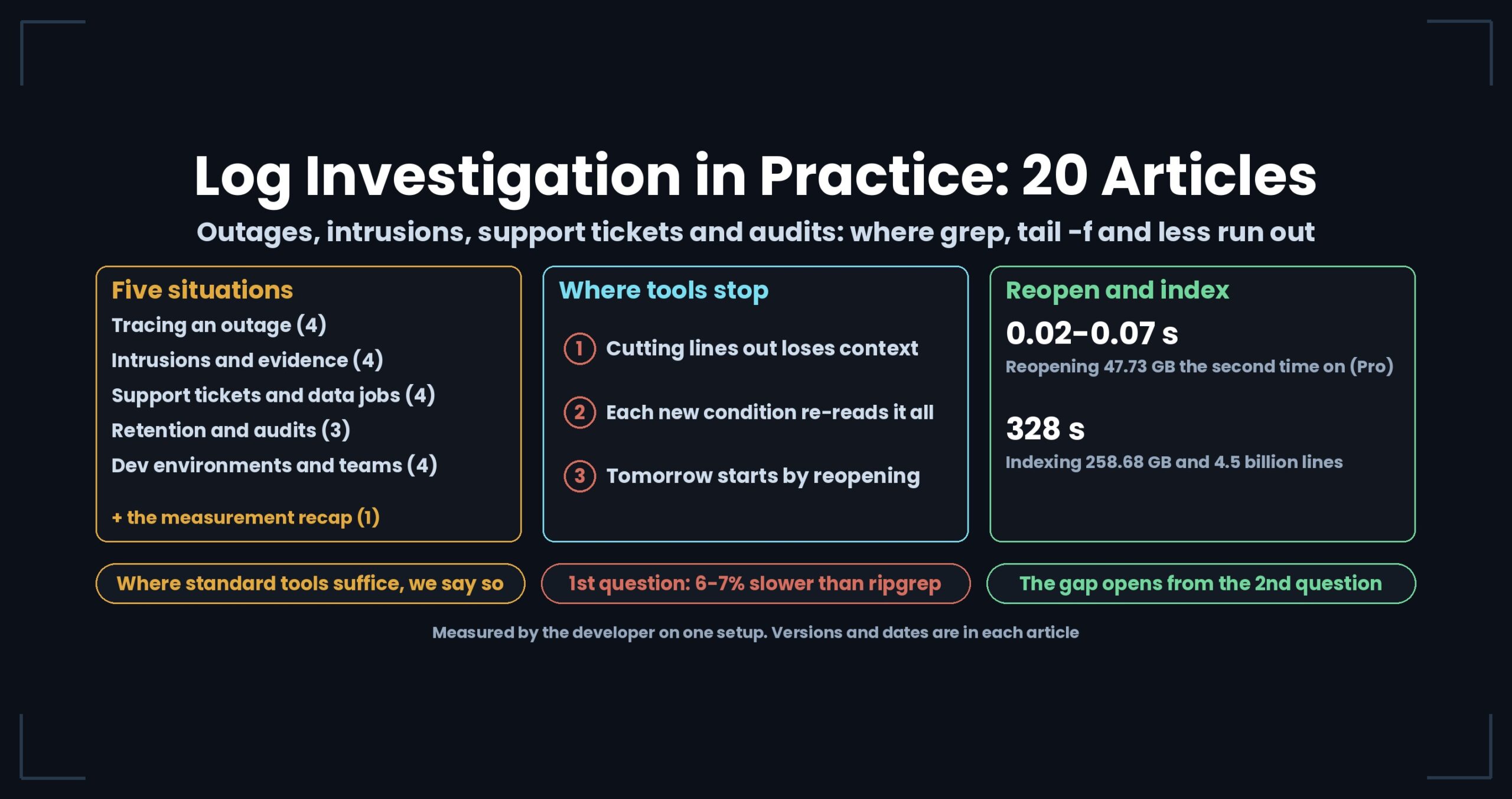
This page is a table of contents for 20 of them, grouped by situation (the other five are about huge files, character encodings and compression, so they are listed separately below under “Five articles on other subjects”). Every article first says what the standard tools — grep, less, tail -f, jq — can do, then what is still left over. Where the standard tool is enough, the article says so.
- The short answer: the situations differ, but the tools stop in the same three places — cutting lines out loses the context, every change of condition re-reads the whole file, and the next day starts from opening the file again
- 1. Tracing the cause of an outage
- 2. Intrusions and logs as evidence
- 3. Support tickets, data jobs and machine-generated logs
- 4. Retention and audits
- 5. Development environments and teams
- 6. The recap — four boundaries where the numbers flip
- Five articles on other subjects
- Where we lose, and where it is a tie
- Read each article
- Links
The short answer: the situations differ, but the tools stop in the same three places — cutting lines out loses the context, every change of condition re-reads the whole file, and the next day starts from opening the file again
Lining up the “what the four had in common” sections of all 20 articles, the stopping points are almost always the same:
- Cutting lines out loses the surrounding lines and the original line numbers. A fragment from
grep -Corsed -nis a separate piece of text. When you want to look further back, you cannot get to that spot in the original. - Every change of condition reads the file from the start again. The
-Cwidth, the filter term, the time range: each is “decide first, and if it was wrong, read everything again.” - The next day starts from opening the file again. The state of the investigation — how far you got, which conditions you used — lives only outside the tool.
UwView eases the first by keeping the original open while you move between the hit list and the file; UwView Pro eases the second and third by saving the index so later passes are fast. Reopening a 47.73 GB text file from the second time on took 0.02–0.07 s (measured on one setup; see the on-call article and others).
1. Tracing the cause of an outage
| Article | The four situations | Key point |
|---|---|---|
| You Found the ERROR. You Still Can’t Find the Cause | Output order vs. event order / Caused-by chains / how the log breaks off / counting erases context | The line just before is not always the cause. Tracing by request ID or thread ID, the context disappears the moment you cut lines out |
| Chasing an Outage by the Clock | Jump to that minute / clocks out of sync between servers / symptoms show in the gaps / one user’s every request | A timestamp is a coordinate inside the file. Even when the file is sorted, the standard tools read all of it every time instead of bisecting |
| Making the On-Call Night Lighter | Reopening the same log nine times / rebuilding search conditions / sporadic 5xx errors / the 30 seconds before a kernel panic | Much of the night’s work can be prepared in daylight: keep the index, give conditions names |
| Following a Log That Won’t Stop Growing | The ERROR that scrolled away / an overnight load test / serial console captures / TRACE at 40 GB an hour | tail -f \| grep --line-buffered makes you choose the condition first, cannot look back, and has no line numbers |
The timestamp article shows that even a 258.68 GB, 4.5-billion-line file can be scrolled from the moment it opens, and that from the second time on it reopens with line numbers so you can jump straight to the line for that time. The load-test example picks up an 18 GB log the next morning, “from where we left off.”
2. Intrusions and logs as evidence
| Article | The four situations | Key point |
|---|---|---|
| The First Hours of an Intrusion Investigation | IP patterns / telling a runaway crawler from an attack / checking against internal IP assignments / accounts of people who left | Traces show up as a sequence of terms, not a set of terms. grep cannot express order |
| The Traces Are in the Raw Log | Lateral movement / just before ransomware encrypted / SQLi that slipped past the WAF / an inventory of personal data | You want to follow four changing IDs at once, and every round trip re-reads the file |
| Logs as Evidence | Before the restart / the gap in log rotation / the ±10 lines for the report / checksums | cp (not mv) before restarting. A preserved log that is too big to read is only half preserved |
| Never Write to the Original | The file changed when you only opened it / “fixing” garbled text / what to teach newcomers first / no original left for the retrospective | In a tool where opening and editing are not separate, reading becomes writing |
For the first hours of an intrusion, drill-down search and Sequence Search (searching by the order of terms) fit well; how to stack the stages on screen is in the drill-down article and the Sequence Search article.
3. Support tickets, data jobs and machine-generated logs
| Article | The four situations | Key point |
|---|---|---|
| “I Ordered It and It Never Arrived” | An e-commerce order ID / a cheating report in a game / matching two huge telecom files / a SaaS log with tenants mixed together | Hopping from order ID to payment ID to shipping number piles up waiting time stage after stage |
| Look at It Before You Feed It to jq | jq never returns / one object per line / a 4 GB SQL dump / TSV before Parquet | The tools assume the input has the expected shape. When it does not, they run out of memory and stop |
| The Morning the Monthly Batch Died | Only a line number was left / the “odd lines” in a 50 GB corpus / the same 31 GB every month / look at the original before converting | The reported position is not where the cause is. Type the line number and you land on line 48,213,996 — in the original, not an extract |
| Ten Thousand Sensors, 1.4 Billion Lines a Day | IoT / medical devices / PLCs in manufacturing / raw values in research | Line counts multiply: devices × items × frequency. You cannot pick the threshold in advance |
The structured-data article shows that JSON, SQL dumps and TSV can be checked without parsing, up to 47.73 GB and about 890 million lines of text, all in the same way (free edition, measured on one setup).
4. Retention and audits
| Article | The four situations | Key point |
|---|---|---|
| Where Finished Logs Go | No retention period / compressed means unreadable / NAS and slow disks / moving servers | The choice “make it small, or keep it readable” is what stalls the decision |
| “Please Produce the Logs from Three Years Ago” | No plan for retrieval / look at the real thing / compression ratio vs. ease of retrieval / will it be readable in seven years | Searching across files with zgrep gives no original line numbers and re-reads everything for each new filter |
| Automating Log Retention | What happens after logrotate / old logs on an external HDD / housekeeping rules / the time spent waiting for files to open | rotate 30 is written in days, not in volume. Start by watching the volume |
The retention article covers how UwView Pro keeps files compressed to about 1/9 and searches them in that form. Once “compressed means unreadable” stops being true, the generation rule can be written as two states, “raw or compressed,” instead of three.
5. Development environments and teams
| Article | The four situations | Key point |
|---|---|---|
| The Day printf Debugging Hit 10GB | 10 GB of printf output / a bug that takes three hours to reproduce / tangled multithreaded logs / diffing “when it worked” against “after it broke” | Useful lines are extremely sparse, and the state of the investigation lives outside the tool |
| Before You Carry Production Logs Home | CI build logs / taking production data home / 30 GB through WSL / “it opened fine on my machine” | Nothing is wrong with the log itself; the friction is between the log and the person reading it — including why reading the Windows drive from WSL is slow |
| Log Investigation Lives in One Person’s Head | Shift handover / no “continue from yesterday” / taking notes while reading / following a log on a screen share | Only conclusions make it into documents. The order of searches and the hypotheses you rejected are lost |
| “less Is Enough” — Until It Isn’t | Line jumps and Japanese search in less / :e in Vim / pipeline craft / the I/O ceiling |
grep is not slow; the disk is the ceiling. 50 GB on an HDD cannot be searched in under four minutes, however clever the program |
The less article tabulates how long reading 50 GB takes by disk type (HDD 100–200 MB/s: about 4–8 min; SATA SSD about 500 MB/s: about 100 s; NVMe SSD 2–7 GB/s: about 7–25 s). Under that ceiling, swapping grep for rg can make no difference.
6. The recap — four boundaries where the numbers flip
Everything We Measured on Huge Files rearranges the earlier measurements by “where the direction changes.”
| Check | Number | What flips it |
|---|---|---|
| Opening 51 GB (klogg) | 52.55 s = 930 MB/s (raw read about 950 MB/s) | Most of the wait is physics; design (make you wait, or build in the background) changes it |
| Search and read (klogg open + search) | 108.14 s (two reads) | How many questions you ask (with one, the gap is small) |
| Indexing 258.68 GB (UwView) | 328 s = about 789 MB/s / 4.5 billion lines | Whether there is a second time (whether the index is kept) |
After the 258.68 GB index was built, a full-text search for “New York” took 34.8 s and returned 100,492 hits.
Five articles on other subjects
Five of the problem-solving articles are mainly about huge files, character encodings or compression, so they are not in this table of contents:
- “This File Is Too Large to Open” and Only the Line Number Survived — see also the huge-file summary
- The Night the Log Wouldn’t Read — Four Character-Encoding Traps and EUC-JP, UTF-16, and a Suspicion of EBCDIC
- Eight Minutes for zgrep, Every Single Time
Where we lose, and where it is a tie
- For a single search, grep and ripgrep are enough. UwView Pro’s first question is a little slower than ripgrep because it builds the index first: 59.0 s against 54.9–55.8 s at 50 GB (6–7%) (the on-call article). The gap appears from the second question.
- On a slow disk, every tool hits the same ceiling. 50 GB on an HDD does not go faster than four minutes, whatever tool you use.
- Where the standard tools are enough, each article says so.
cpbefore a restart, checking withlogrotate -d, sendingiconvoutput to stdout, protecting the original withchmod a-w— none of these needs a different tool. - Following a growing file (
tail -f) is not in UwView Pro’s GUI. It is in the free UwView. - Numbers belong to the version, setup and date when each article was written. The 0.02–0.07 s reopen was measured on a 47.73 GB text file on one setup; yours will differ.
Read each article
- You Found the ERROR. You Still Can’t Find the Cause — Four Ways to Trace Causality in Logs
- Where Finished Logs Go — Deciding Between Delete, Keep, and Compress
- The Day printf Debugging Hit 10GB — Four Ways to Live With Development Logs
- The First Hours of an Intrusion Investigation — Four Steps Through Tens of Millions of Auth Log Lines
- Chasing an Outage by the Clock — Four Ways to Use Timestamps as Evidence
- Look at It Before You Feed It to jq — Four Times You Need the Raw Bytes
- Making the On-Call Night Lighter — Four Things You Set Up for Your 2 A.M. Self
- “I Ordered It and It Never Arrived” — Four Support-Desk Log Investigations
- The Traces Are in the Raw Log — Four Views on Lateral Movement, SQLi, and After-the-Fact Investigation
- “less Is Enough” — Until It Isn’t: Four Limits of Command-Line Craft
- Logs as Evidence — Four Principles for Preserving, Excerpting, and Proving Integrity
- Before You Carry Production Logs Home — Four Points of Friction Between Logs and Your Dev Environment
- Ten Thousand Sensors, 1.4 Billion Lines a Day — Four Fields Where Machines Write the Logs
- Following a Log That Won’t Stop Growing — Four Situations Where tail -f Can’t Keep Up
- “Please Produce the Logs from Three Years Ago” — Four Ways to Survive an Audit by Design
- The Morning the Monthly Batch Died — Four Realities of Running a Data Pipeline
- Log Investigation Lives in One Person’s Head — Four Habits of a Team That Can Hand It Over
- Automating Log Retention — Writing Generation Rules and a Housekeeping Policy That Survive
- Never Write to the Original — Four Habits for Working With Logs
- Everything We Measured on Huge Files — Four Boundaries Where the Numbers Flip
Links
- Download UwView (Windows, macOS, Linux)
- UwView Pro (one license covers every OS)
- Benchmarks
All numbers were measured by the developer and depend on the environment, version and date stated. Your results will vary.