The handover note was three lines long.
The query you built yesterday — could anyone else rebuild it right now?
They can’t, and it isn’t a memory problem. It’s that nothing about it was ever in a shape you could pass along.
Log investigation gets shared as conclusions. The queries that led there, the hypotheses you ruled out, the ranges you already cleared, the words you coloured — everything that constitutes the state of the investigation evaporates the moment the person stands up. Four scenes here — the shift change, the multi-day investigation, taking notes while reading, and screen sharing — each starting from what actually gets lost.
- Up front: UwView Pro saves your queries and your session, so the state you had yesterday is the state your relief starts from. Line numbers stay the original file’s coordinates through every stage of drill-down, so “line 41,284,471” means the same thing in a report, in a chat message, and on someone else’s machine. A file you’ve opened once reopens with line numbers still attached in 0.02–0.07 s (measured on a 47.73 GB text file; one specific setup, results vary — details at the end)
- 1. What the handover note couldn’t say
- 2. There is no “carry on from yesterday”
- 3. You can’t take notes while you read
- 4. Following a log over screen share
- What the four had in common
- The tool I use
- Links
Up front: UwView Pro saves your queries and your session, so the state you had yesterday is the state your relief starts from. Line numbers stay the original file’s coordinates through every stage of drill-down, so “line 41,284,471” means the same thing in a report, in a chat message, and on someone else’s machine. A file you’ve opened once reopens with line numbers still attached in 0.02–0.07 s (measured on a 47.73 GB text file; one specific setup, results vary — details at the end)
This article is about sharing an investigation procedure inside a team. What you may copy, share, or must redact is governed by your organisation’s policy and your client’s.
1. What the handover note couldn’t say
Situation
The incident drags on. It’s evening, and the shift changes.
You write the handover note.
5xx clustered in the 14:00 hour. Searched app.log for ERROR, confirmed timeouts.
DB-side logs not checked yet. Please continue.
Three lines. You believe they’re accurate.
And the person who receives them starts over from roughly zero.
Why it happens
Because only conclusions have a documentable shape. The state of the investigation doesn’t.
“Searched for ERROR” is the final form of something like this:
- Started with
ERROR, got far too many hits, narrowed by time - Added
timeout, then excluded the health-check ones because they were noise - Against what was left, tried the words you had a hunch about
Only the first step made it into the note. When the exclusion in step two drops out, your relief falls into the same hole — and it takes them a while to notice they’re in it.
Three more things never become text at all.
- Colour coding — which word had which highlight. It grows during the investigation, and nobody has the habit of transcribing it
- The cleared ranges — “I’ve already looked at this window.” It’s a bookmark, and there’s nowhere to put it
- Line numbers — “something’s wrong around line 41,284,471” loses its coordinate the moment you hand over an excerpt instead of the file (part 16)
General tools, and where they stop
Keeping the command history is the cheapest thing you can do.
# Leave the commands you actually ran in the handover
history | grep -E 'grep|awk|sed|zcat' | tail -30 > handover-$(date +%F).txt

# Hand over the conditions themselves as a file
cat > patterns.txt <<'EOF'
5[0-9][0-9]
OutOfMemoryError
connection refused
EOF
grep -nE -f patterns.txt app.log | head -50
The pattern file earns its keep. The conditions become an artefact, so the next person can re-run them rather than re-invent them.
Three limits.
First, history only holds what you typed. The hypotheses you rejected, the ranges you cleared by eye, the judgement that something was fine — none of it leaves a command. What survives is a record of attempts, not a record of decisions.
Second, grep -f is nothing but OR. Five patterns give you every line matching any of them. A real investigation has order: narrow by A, remove B, then look for C. Flattening it into a file destroys the order, which is to say the shape of the reasoning.
Third, handing over the output kills the original coordinates. grep -n keeps the numbers, but the moment your relief wants more context around one of them, they’re reopening the original — and the original is tens of gigabytes.
2. There is no “carry on from yesterday”
Situation
The cause is still unclear. Day three.
In the morning you open the same file. It takes several minutes. To get back to where you were, you rebuild the queries from memory.
By late morning you have returned to yesterday evening.
Why it happens
Because the state of an investigation has nowhere to live except outside the application.
Most tools do launch → load → search from zero every time. Whatever you were holding when you quit — the position, the stack of narrowing steps, the highlights, the second file you had open for comparison — is gone at close.
Across several days this bites in three ways.
- The conditions drift daily. Yesterday you excluded
timeout; today you forget. When the count changes, you can’t tell whether the data changed or your query did - The log keeps growing. Production ran all night. The same query returns more hits, and you cannot separate what you already read from what is new
- The waiting compounds. Three minutes a day is nine minutes over three days — and more importantly, “reopening is expensive, so I’ll skip that idea” starts entering your decisions (part 10)
General tools, and where they stop
Write “how far I got” somewhere outside the tool.
# At the end of the day, record the size
wc -c < app.log > .checkpoint-$(date +%F)

# Next morning, look only at what arrived since
tail -c +$(cat .checkpoint-2026-09-15) app.log | grep -n 'ERROR'

# Freeze the conditions in a script
cat > recheck.sh <<'EOF'
#!/bin/sh
grep -nE '5[0-9][0-9] ' "$1" | grep -v 'healthz' | tail -40
EOF
chmod +x recheck.sh
The checkpoint is cheap and effective. Seeing only the delta lets you concentrate on the delta.
Two limits.
First, a byte offset dies at rotation. If logrotate ran overnight, this morning’s app.log is a different file and your recorded number points at a meaningless position in it. You can compare inodes instead — but if you’re going that far, this ought to be a facility, not a chore.
Second, tail -c +N | grep -n produces numbers that aren’t the original’s. What you get is “line N of the slice”. Yesterday’s note says 41,284,471; this morning’s output says 1,203; connecting them is arithmetic. Across a night, the base of that arithmetic is exactly the thing you forget.
3. You can’t take notes while you read
Situation
You’ve found the cause. Time to write the incident report.
You shuttle between the log window and the document window. Copy the line, paste it, type the line number by hand. You need surrounding context, so back to the log.
By the time you’re done, you’re no longer certain which line number belongs to which quotation.
Why it happens
Because reading and writing happen in two different applications, joined by human short-term memory.
Specific things fall through that joint.
- Copying drops the line number. You select the text; the number lives in the gutter and isn’t part of the selection
- Screenshots can’t be reused. They capture the number, but they aren’t searchable, aren’t quotable, and they capture whatever sensitive thing happened to be on screen as well
- You can’t size the context. One line is meaningless; twenty lines make the report unreadable. The right amount is decided by reading — and by the time you paste, the source window is closed
- An excerpt file erases its own provenance. It’s convenient to cut a fragment and quote it, but the fragment doesn’t record where it came from
General tools, and where they stop
The trick is to extract without losing the number.
# Numbered, with five lines of context, appended as you go
grep -n -C 5 'OutOfMemoryError' app.log | tee -a findings.md

# Keep a ledger of just the line numbers
grep -n 'OutOfMemoryError' app.log | cut -d: -f1 > hits.txt

# Regenerate context from the ledger later
while read -r n; do
  sed -n "$((n-5)),$((n+5))p;$((n+6))q" app.log
  echo '---'
done < hits.txt
The ledger of line numbers is the good idea here. Keep the coordinates and you can re-decide the amount of context afterwards.
Three limits.
First, grep -n -C output is awkward to quote. Hits are separated with 41284471: and context lines with 41284466-, with -- between blocks. Paste that into a report and you begin by explaining punctuation.
Second, regeneration is one full pass per entry. That loop runs sed once per line in hits.txt. Forty hits means counting from the top of a multi-gigabyte file forty times (part 15).
Third, a pasted fragment can’t be verified later. When a reviewer asks “is this quotation really in the original?”, the only way to answer is to open the original and look. Writing the report and checking the report both pay the same wait.
4. Following a log over screen share
Situation
Remote investigation. You share your screen and the two of you follow along.
“A bit further up.” “Ah, too far.” “Can you zoom in on that connection line?”
Your scrolling reaches them a second late over the wire. Thirty minutes of talking, one screenful of progress.
Why it happens
Because screen sharing shares a video, not a position.
That difference becomes four separate frictions.
- They can’t search. Any place they want to see has to be requested verbally and reached by your hands. Their hypotheses can only be tested through you
- Characters blur. Compressed video mangles small monospace text.
lversus1, a full-width space versus a normal one — this series keeps landing on one-character differences, and one character is precisely what video loses - Your hands are blocked. While they read, you can’t scroll. Two people sharing one cursor
- You can’t send the file. It would solve everything, except tens of gigabytes won’t transfer and anything sensitive mustn’t
General tools, and where they stop
Send coordinates instead of video.
# Turn the position into a number and paste it in chat
grep -n 'transaction_id=8f21' app.log | head -3
#=> 41284471:2026-09-16T14:02:11 [worker-7] transaction_id=8f21 ...

# They open the same number on their own machine
sed -n '41284451,41284491p;41284492q' app.log

# If you must hand over a fragment, redact first
sed -n '41284451,41284491p;41284492q' app.log \
  | sed -E 's/([0-9]{4})[0-9]{8}/\1********/g' > share.txt
The cheapest move is saying the line number. “Look at 41,284,471” fits in one chat message, and from there the other person moves under their own power.
Three limits.
First, it assumes they have the same file. Without it the coordinate means nothing — and “having it” requires it to be openable on their machine.
Second, sed -n counts from the top every time. Two people, separately, walking the same file from byte zero, repeatedly. Too heavy to trade coordinates at conversational speed.
Third, forgetting to redact is the accident waiting to happen. Handing over fragments puts a human judgement in the path every single time. It gets skipped when you’re in a hurry — which makes it an accident that only happens when you’re in a hurry.
What the four had in common
| Scene | What gets lost | Where it jams | General-tool approach | What’s left over |
|---|---|---|---|---|
| Shift change | Queries, colours, cleared ranges | Only conclusions are documentable | history / pattern file |
Order and rejected hypotheses don’t survive |
| Multi-day investigation | Yesterday’s state | The tool restarts from zero | Byte offset, scripted checks | Dies at rotation; numbers aren’t the original’s |
| Notes while reading | Line numbers and context | Reading and writing are separate apps | grep -n -C, a ledger of numbers |
Regeneration is a full pass; quotes can’t be verified |
| Screen share | The other person’s agency | Video is shared; position isn’t | Send line numbers in chat | Assumes they hold the file; nothing outside the fragment |
In all four, what’s lost is not data. The original is still sitting there. What disappears is the investigation-side information: where you looked, in what order, and how.
The right-hand column rhymes because all four collapse onto one point — the original file’s line numbers don’t travel, not from person to person, not from day to day. A line number means something only inside the original, and becomes a bare integer the moment you excerpt, copy, or close.
We usually discuss this as a difference in people’s ability. What’s actually happening is that no tool provides anywhere to save the state of an investigation. So the strongest people accumulate the most in their heads, and the most disappears when they walk away.
Three conditions, then.
- Line numbers stay the original’s coordinates — through narrowing, across days, across people, the same integer means the same line
- Queries can be saved as artefacts — a condition is as worth handing over as a conclusion
- The second open is cheap — your relief, and tomorrow’s you, both always start from the second open
Back to those three lines of handover. The writer wasn’t being lazy. Three lines was all there was in a shape that could be written down.
The tool I use
I build UwView (free), a viewer that makes huge text readable, scrollable and searchable from the moment it opens. It doesn’t pull the file into memory, so files larger than RAM open fine. Indexing runs in the background and line numbers appear when it completes (most viewers show you only the head until indexing is done). It never splits or extracts, so the original stays one file, unmodified.
- Jump by line number. Part 4’s “look at 41,284,471” becomes a single action. You land in the original, so you widen the context as far as you like — and because it isn’t a fragment, the other person can move on from there themselves
- Colour highlighting. This is the thing part 1’s handover note couldn’t carry. Reading with words coloured is the shape of the investigation (highlighting article)
- Switch encodings without reopening (UTF-8 / Shift-JIS (CP932) / EUC-JP / UTF-16, auto-detected). If it renders as mojibake on your colleague’s machine, you fix it there instead of producing a converted copy
- Everything runs on your own machine. The log under investigation is never sent to an external service
Beyond that is UwView Pro.
- Save the queries, resume tomorrow. Part 2, directly. The conditions persist as artefacts, so the morning starts with re-applying rather than re-inventing. Sessions restore too, so the state at close becomes the starting point the next day (archive × session restore)
- The index and compression are saved. From the second open onward the file comes back with line numbers, instantly (0.02–0.07 s measured on a 47.73 GB text file; one specific setup, results vary). Your relief, and day-three you, are both always on the second open
- Drill-down search. Part 1’s “narrow by A, remove B, look for C” survives as visible stages. Tabs carry
term (count), so the order of the narrowing is itself on screen — and the original line numbers survive to the last stage (drill-down article) - Filter popups in separate windows. Against part 3’s shuttling, a filtered result stays open alongside the original while you read (filter popup article)
- Store at roughly 1/9 and still search it. When whoever inherits the incident needs to revisit older material, storage and rechecking stop being a trade-off (part 8)
Stated plainly: UwView is not a team collaboration tool.
- No co-editing, no real-time sharing. It doesn’t replace part 4’s “two people watching one screen” — it turns that into two people opening the same coordinate separately
- Saved queries and sessions live on that machine. You can pass them around via shared storage, but team sharing is not a built-in facility
- No ticketing, no report generation, no screenshot annotation. Part 3 gives you the raw material for quotations, not the report
- There is no redaction feature. Part 4’s sensitive-data removal needs a different tool
- It handles text. Binary dumps and database files are out of scope
The same things, from the command line
v1.6.0 added a uvp command (and uvf for the free build). It uses the same .uwvz as the GUI, so an index built from the shell is already there when you open the file in the app. Mapped onto this article’s four parts:
# Part 1: put the conditions themselves in the handover — both words on one line, with context
uvp app.log 'ERROR' 'timeout' -C 5

# Part 2: next morning, re-apply the same conditions to the same file (the index is already there)
uvp app.log.uwvz 'ERROR' 'timeout' -C 5

# Part 3: write out the raw material for quotations, compressed
uvp app.log 'OutOfMemoryError' -C 10 -out findings-20260916.txt.gz

# Part 3, continued: get the breakdown of exception types before you write the prose
uvp app.log -uniq 'ERROR ([A-Za-z]+Exception)' -head 20

# Part 4: send a one-line command instead of a fragment; let them open the same place in the GUI
uvp app.log 'transaction_id=8f21' -C 20 -open
Exit codes are grep’s — 0 found, 1 not found — plus 2 when a limit is hit and the output is cut off (no limit by default; only when you set one with -limit N). if uvp app.log 'ERROR'; then works as written, so it drops straight into part 2’s recheck script.
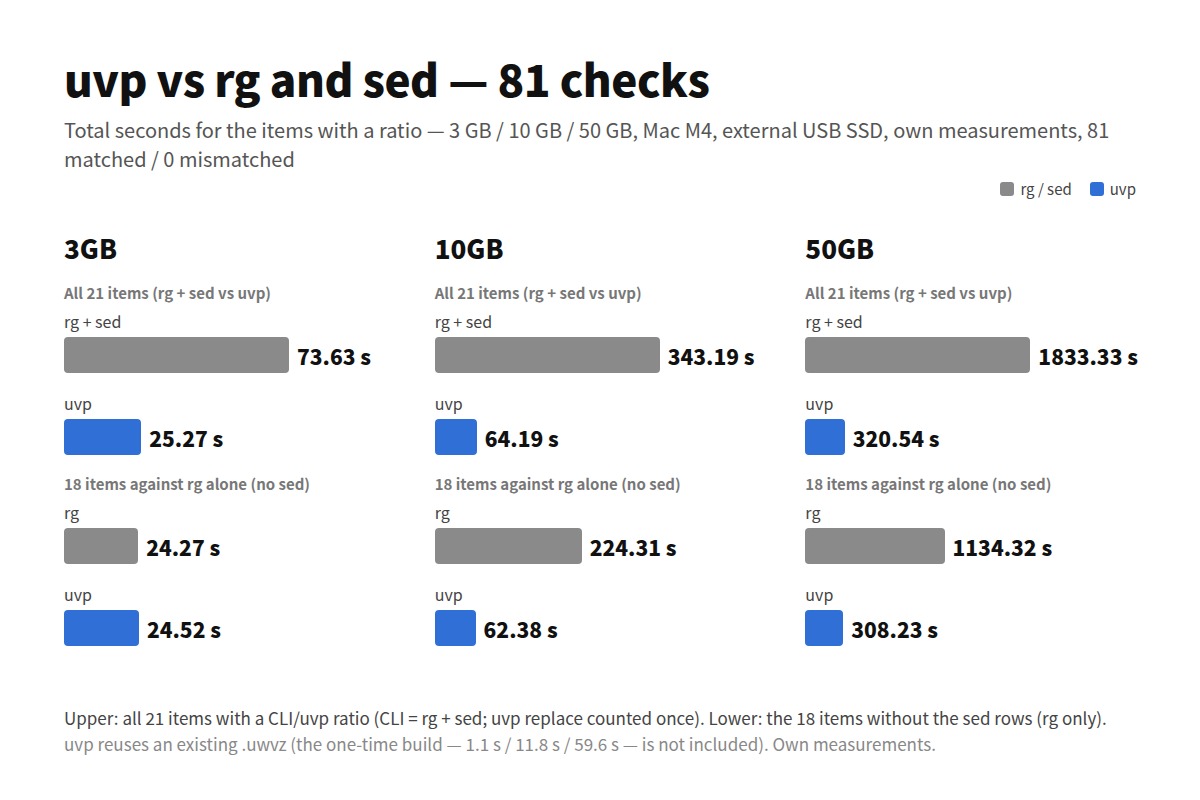
Stated honestly: on the first question uvp is a little slower than ripgrep — it builds its .uwvz (a compressed cache plus index) first, 59.0 s against 54.9–55.8 s at 50 GB, 6–7%. In v1.6.6.1 it searches while building the index instead of re-reading it afterwards, which cut 6.7 s. It starts paying from the second question: the same 50 GB search takes 6.6 s against ripgrep’s 55–57 s — 8.4×. On a small file such as 3 GB the two are level, because an index has little to earn there. The free uvf is level with ripgrep at every size (the measurements; Mac M4, external USB SSD, OpenStreetMap XML — one setup, results vary).
What it does is find things, point at them with the original’s own coordinates, and leave the conditions in a shape you can apply again. If your investigations reset to zero at every handover, try it.
- And if a huge log is eating your disk and you want it compressed for storage while staying searchable at speed, give UwView Pro a look — persistent index, compressed-cache search, and ~1/9 storage make both reopening and searching a step faster (all OS, one-time or monthly).
Links
- Part 1 — Four standard tools that sink under a huge file: https://uvp.y42u.net/en/blog/uwview-ps01-huge-file-tool-limits-en/
- Part 8 — Compressed storage and searchability at once: https://uvp.y42u.net/en/blog/uwview-ps08-compressed-archive-search-en/
- Part 10 — Four things to set up for 2 a.m. you: https://uvp.y42u.net/en/blog/uwview-ps10-oncall-night-preparation-en/
- Part 15 — Four limits of command-line craft: https://uvp.y42u.net/en/blog/uwview-ps15-cli-craft-limits-en/
- Part 16 — Four principles for logs as evidence: https://uvp.y42u.net/en/blog/uwview-ps16-log-as-evidence-en/
- Part 17 — Friction between logs and your dev environment: https://uvp.y42u.net/en/blog/uwview-ps17-dev-env-log-friction-en/
- Part 20 — Surviving an audit by design: https://uvp.y42u.net/en/blog/uwview-ps20-audit-log-retrieval-en/
- Reopen it tomorrow right where you left off (archive × session restore): https://uvp.y42u.net/en/blog/uwview-archive-session-restore-workflow-en/
- Drill-down search: https://uvp.y42u.net/en/blog/uvp-drilldown-search-en/
- Filter popups — jump without losing context: https://uvp.y42u.net/en/blog/uwview-filter-popup-jump-save-context-en/
- Colour highlighting: https://uvp.y42u.net/en/blog/uwview-v11-color-highlighter-en/
- We shipped a
uvpcommand (measured against ripgrep): https://uvp.y42u.net/en/blog/uvp-cli-release-vs-ripgrep-en/ - Source code (GitHub): https://github.com/amru195704/UwView
From the developer: A full list of my apps, Kindle books and open-source work lives at GitHub: amru195704.
A note
This article is provided for reference and makes no guarantee of accuracy or completeness. The log excerpts, line numbers, file sizes and counts are illustrative and do not refer to any real system or engagement. Command examples may need adjusting for your environment (GNU vs BSD, differences amonggrep,sedandawk, your shell, and howhistoryis configured). Always confirm option names and defaults against your localman. Log rotation behaviour depends on yourlogrotateconfiguration and on the application itself. Figures described as measured come from one specific setup and are not a guarantee of the same result; disk type, filesystem, fragmentation, encryption, page-cache state and concurrent processes change outcomes substantially. Sharing, copying and redaction of logs are governed by your organisation’s policy, your client’s, and applicable law. If you spot an error, please leave a comment and I’ll check and correct it.