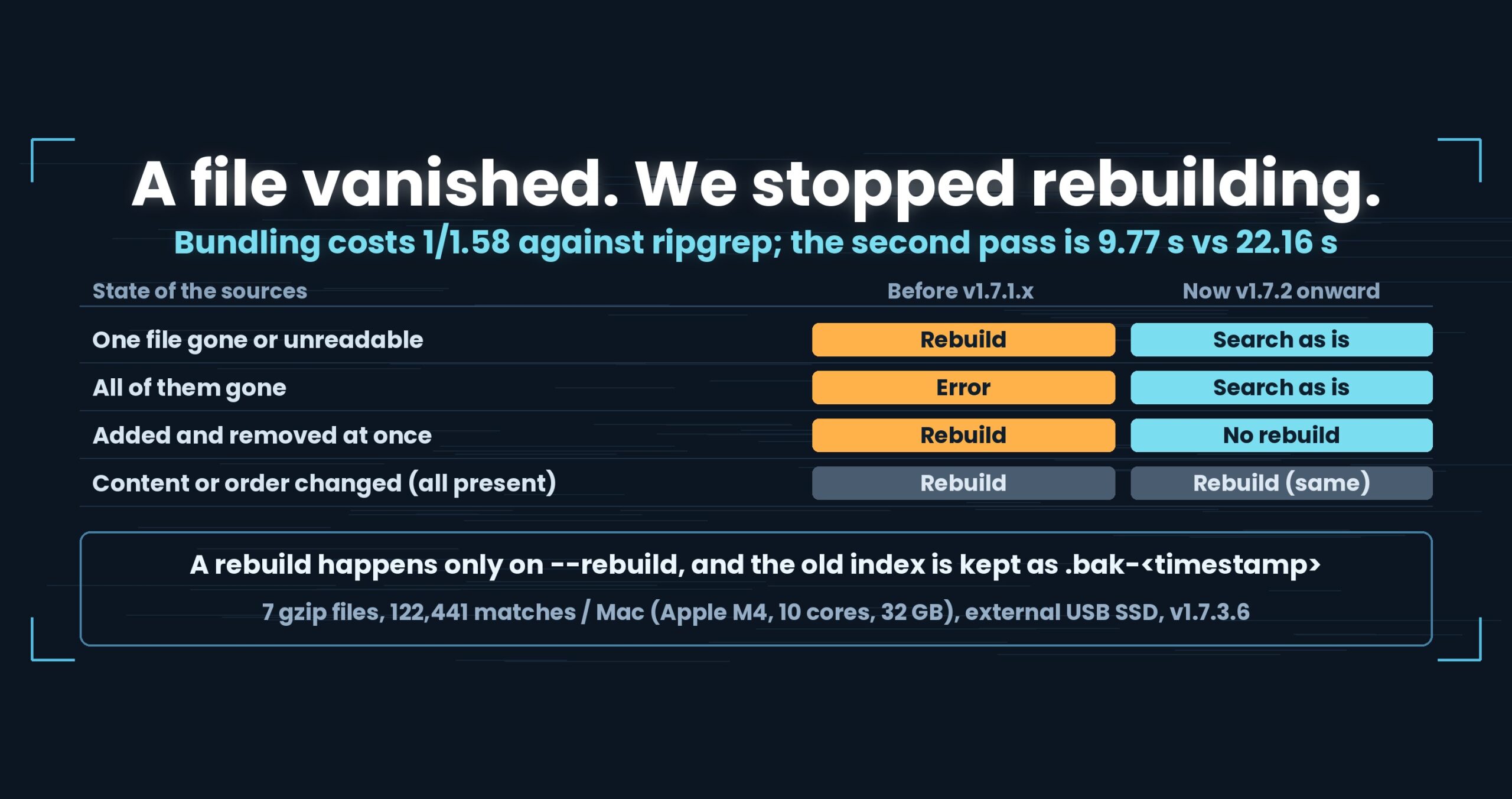
[Update 2026-10-04] On Windows, ripgrep was faster on some compressed formats
“Zero items lost by 1.5× or more” below is a Mac result and still holds. Running the same test set on Windows (v1.7.3.6.8, 3 October 2026),
uvfwas slower than ripgrep in four places on the first + second run total: xz (1/1.69 at 3 GB), zst (1/1.61 at 1 GB) and lz4 (1/2.09 at 1 GB, 1/1.51 at 3 GB). The cause is still being investigated. On Linux (2 cores), these formats were on par or better. The three-OS results are in the Wide Field Part 13: the same test suite on macOS, Windows and Linux.
On xz, we were six times slower.
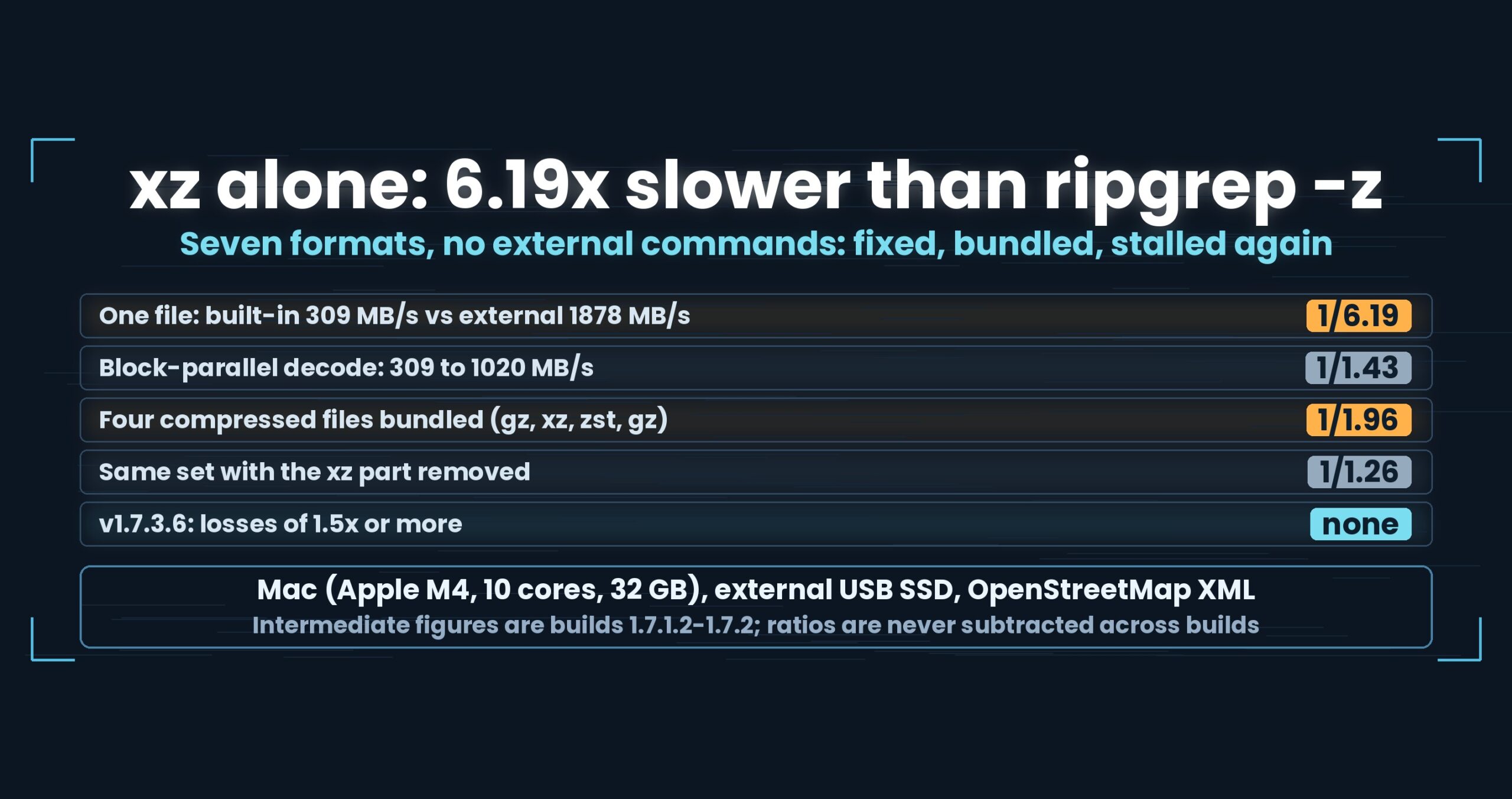
The same lzma2 payload, decoded by both sides: rg -z at 1878 MB/s, us at 309 MB/s. The other six formats were on par. Only xz was off by an order of magnitude. The algorithm is the same on both sides.
So what was different?
- The short version: the gap was parallelism, not the algorithm. Block-parallel decoding took the built-in decoder from 309 to 1020 MB/s (3.3x) — and then bundling four files stopped that parallelism, dropping us to 1/1.96 of rg -z. Swapping one part out pinned the cause on xz; it is fixed now
- Where we lose, first
- First, what rg -z actually does
- Act one: xz alone was 6.19x behind
- The fix: read the block headers and split the work
- Act two: bundling stopped the parallelism
- Where it stands: v1.7.3.6
- What generalises
- Being straight about it
- The tools used here
- Links
The short version: the gap was parallelism, not the algorithm. Block-parallel decoding took the built-in decoder from 309 to 1020 MB/s (3.3x) — and then bundling four files stopped that parallelism, dropping us to 1/1.96 of rg -z. Swapping one part out pinned the cause on xz; it is fixed now
A .xz file can be split into several blocks, and the external xz command decodes those blocks on multiple threads. We were decoding them one after another. The same decoder was 1.27x faster than rg -z on .lzma — a single-stream container that cannot be parallelised — while losing 6.19x on .xz, which pointed at parallelism rather than the algorithm. Reading the block headers and splitting the work took the built-in decoder from 309 MB/s to 1020 MB/s. Then bundling four compressed files into one search dropped uvf to 1/1.96 of rg -z (3G; 1/2.03 on the hot run), and taking the xz part out brought it back to 1/1.26 — on par, which settled where the cause was. It is fixed: the v1.7.3.6 integration test shows zero losses of 1.5x or more in the per-format tests on Mac (1G and 3G). Mac (Apple M4, 10 cores), 32 GB RAM, external USB SSD, OpenStreetMap XML.
uvfanduvpare the search commands of UwView v1.7.3.6 “Wide Field” (released 28 September 2026), which I make.uvfships in the free edition;uvpis part of the paid UwView Pro. This article follows a sequence of fixes, so the intermediate numbers come from the development builds they were measured on (1.7.1.2 to 1.7.2); only the closing figures are v1.7.3.6.
Where we lose, first
.Z(compress) is not supported.rg -zhandles it, so when I list formats I write “not supported” rather than leaving a blank.uvp‘s first pass is slower thanuvfin every format, because it writes the.uwvzwhile searching. On the Mac at 3G it drops to 1/1.37 ofrg -zon xz and 1/1.49 on the eight-file mix with plain text (both under 1.5x). The gain starts on the second pass.- The intermediate numbers here come from different builds and different source files. As you will see below, I do not subtract “6.19x” from “1.43x” and call it an improvement. That arithmetic is not available.
First, what rg -z actually does
One piece of context. rg -z handles compression by launching the external decompressor and reading its output — gzip, bzip2, xz, zstd, lz4, brotli, as needed.
That is a strong design. Decoding is done by each format’s reference implementation, in a separate process, so decoding and searching overlap naturally. It also has a weak spot: if the command is not installed, the file is silently skipped. No error; zero matches, very fast.
We call no external commands. All seven formats (gz, bz2, xz, lzma, zst, lz4, br) are decoded in-process. The result is the same on a machine with nothing installed — but decode speed becomes our problem. Which is how the 6.19x above happened.
Act one: xz alone was 6.19x behind
From the first per-format run (a 2892.3 MB XML file, uvf 1.7.1.2), as a ratio of two-run totals with rg -z as 1:
- gz 1.05, bz2 1.01, lzma 1.27, br 1.13, zst 1/1.06, lz4 1/1.24 — all on par
- xz alone at 1/6.19
All 16 correctness checks matched, so this was not the “fast because it did not search” failure mode. As throughput, rg -z decoded at 1878 MB/s and we managed 309 MB/s.
How we knew it was not the algorithm
.xz and .lzma carry the same family of compressed data, and the same decoder handles both. On .lzma we were 1.27x faster than rg -z.
One implementation, winning on one container and losing 6x on another. That puts the difference outside the algorithm.
Outside it, the obvious candidate is the container. A .lzma file is a single stream; you cannot start decoding in the middle, so it cannot be parallelised. A .xz file may hold several blocks, and since version 5.4 the xz command decodes a multi-block .xz on several threads. Counting the blocks in the test file gave 82.
The external xz shared 82 blocks between threads; we decoded 82 blocks in a row. That was the whole story.
The fix: read the block headers and split the work
We now read the .xz block headers and, when there is more than one, decode them in parallel (uvf 1.7.1.3).
The built-in decoder went from 309 MB/s to 1020 MB/s — about 3.3x on the same machine, measured the same way.
“6.19x became 1.43x” is not a sentence I can write
This is exactly the place where a flattering subtraction is available, so it gets its own heading.
After the fix, xz measured 1/1.43 against rg -z — on par. From 6.19 to 1.43. Reporting that as a 4.3x improvement would be wrong.
The reason is simple: the source file changed. The first run used a 2892.3 MB XML file, the post-fix run a 979.2 MB one. rg -z‘s own throughput moved too, from 1878 MB/s to 1554 MB/s. When the denominator moves, the change in the ratio is not the size of your improvement.
The only figure that held its conditions was MB/s. So there are exactly two claims available: the built-in decoder went from 309 to 1020 MB/s (3.3x), and the gap to rg -z came inside the on-par range. The before/after in seconds and ratios goes unused.
Act two: bundling stopped the parallelism
One file at a time was settled. But the point of Wide Field is several files. Searching four compressed files (gz, xz, zst, gz) in one command gave this:
- 1G:
rg -z0.59 s againstuvf1.09 s = 1/1.85 - 3G: 1/1.96 (the hot run alone: 1/2.03)
One at a time, every format was on par. Bundled, we were nearly 2x behind — with the same parts and the same decoder.
What broke it open was comparing a “serial estimate” with the measurement. Take the per-file hot times, add them, divide by the number of parts, and you have a rough answer to “what would this cost with no parallelism at all?”
- Four compressed parts (3G): estimate 1.34 s,
uvfmeasured 1.52 s — essentially serial - Same estimate for
rg: 1.49 s, measured 0.75 s — roughly two parts at a time - A different set including plain text (plain + gz + zst + br): estimate 1.23 s,
uvfmeasured 0.61 s — parallel here
Some sets parallelise and some do not. The difference between the two sets was whether an xz part was present.
The isolation: remove one part
A hypothesis is only a hypothesis, so we swapped one part and measured again — xz replaced by lz4 (gz, zst, lz4, gz):
- gz + xz + zst + gz … 1/1.85
- gz + zst + lz4 + gz … 1/1.26 (on par)
The replacement’s hot time of 0.22 s is faster than the 0.38 s serial estimate, so the parts were being decoded in parallel.
One xz part in the set was enough to stop parallelism between parts. Making a single file decode in parallel had consumed the threads. The act-one fix had become the act-two bug.
After the thread allocation was corrected, the same shape of four compressed files measured uvf at 1.06 of rg -z (3G) and 1.05 (1G). Note that by then the parts had changed to gz, xz, zst and bz2 — so 1/1.96 and 1.06 cannot be subtracted either. Different sets.
Where it stands: v1.7.3.6
On 29 September 2026 the released v1.7.3.6 went through an integration test on three operating systems, and on the Mac the per-format speed (3G) was measured again. Only the Mac figures belong in this article.
3G (2,937.7 MB of XML compressed in each format, 3,435 hits for 東京). Seconds for the first run right after dropping the cache plus the second run straight after.
| Format | rg -z |
uvf |
vs rg -z |
uvp (1st + 2nd) |
uvp 2nd only |
|---|---|---|---|---|---|
| gz | 2.66 | 2.07 | 1.29 | 1.50 | 0.34 |
| bz2 | 47.26 | 45.53 | 1.04 | 23.41 | 0.33 |
| xz | 3.53 | 3.81 | 1/1.08 | 2.80 | 0.34 |
| lzma | 20.80 | 16.99 | 1.22 | 9.03 | 0.33 |
| zst | 3.26 | 3.04 | 1.07 | 2.10 | 0.33 |
| lz4 | 1.87 | 1.70 | 1.10 | 1.44 | 0.34 |
| br | 5.05 | 4.13 | 1.22 | 2.56 | 0.33 |
| 4 plain + gz, xz, zst, bz2 (8 files) | 6.63 | 6.47 | 1.02 | 5.38 | 0.37 |
| 4 compressed (gz, xz, zst, bz2) | 13.31 | 12.13 | 1.10 | 7.09 | 0.36 |
uvfis on par withrg -zin all seven formats and both mixes (1/1.08 to 1.29). On xz,rg -zis still slightly faster (1/1.08), but under 1.5x.- The four-compressed-file set that caused trouble in act two now measures 1.10. With xz in the mix, the parallelism across parts no longer stalls.
uvp‘s first pass is slower because it writes the.uwvz: againstrg -z, 1/1.37 on xz and 1/1.49 on the eight-file mix with plain text (both under 1.5x). The second pass takes 0.33–0.37 s whatever the format.- In the integration test’s 1G run there were also zero losses of 1.5x or more (
uvp‘s second pass 0.14–0.18 s, except bz2 at 0.72 s). - 66 input-type checks and 36 multi-file checks all passed, with zero mismatches
What generalises
(1) If the same implementation wins on one input and loses on another, the cause is outside the algorithm. Winning on .lzma and losing 6x on .xz was the first clue. An asymmetry between two inputs that share an implementation points at the container or the environment.
(2) Quote an improvement only in the metric whose conditions held. Seconds and ratios both move when the source file does. Here only MB/s survived. Before writing “N times faster”, check whether the denominator moved.
(3) Local parallelism can starve global parallelism. Parallelising inside one file stopped the parallelism across files. When a higher layer draws on the same resource, optimising the lower layer can cost you throughput — and you cannot see it without measuring across layers.
(4) Test a hypothesis by changing exactly one part. “It might be xz” became a fact only after xz was swapped for lz4 and the number moved back. Once the candidates narrow to one, move only that one.
Being straight about it
- All numbers are examples measured on Mac (Apple M4, 10 cores), 32 GB RAM, external USB SSD, OpenStreetMap XML. Other environments will differ
- The intermediate figures come from different builds and different source files. 6.19x is 1.7.1.2 (2892.3 MB); 1.43x and 1020 MB/s are 1.7.1.3 (979.2 MB); 1/1.85 and 1/1.96 are 1.7.1.4; 1.06 is 1.7.2; the closing figures are v1.7.3.6. No seconds or ratios are subtracted across builds
- The bundled set changed composition partway through (gz, xz, zst, gz → gz, xz, zst, bz2), so
1/1.96and1.06describe different sets - “3G” is the same 979 MB content concatenated three times, which is not the same thing as a real 3 GB log
- Anything under 1.5x is not called a difference. That threshold was tightened from 2x to 1.5x on 25 September 2026, and the earlier records are re-read under the new line (
1/1.85was “under 2x” at the time; today it is a loss) - Windows and Linux results are not brought in. The same integration test passed on all three with zero mismatches, but the machines and media differ, so seconds are never compared across operating systems
.Z(compress) is not supported- I develop one side of this comparison. Discount it accordingly
The tools used here
UwView is a CLI and GUI for working with very large text files and logs. In v1.7.3.6 “Wide Field” it decodes seven compression formats without any external command and searches several files in one pass.
The same thing on the command line
# search a compressed file in place (free)
uvf app.log.xz ERROR

# mixed formats, one pass (free)
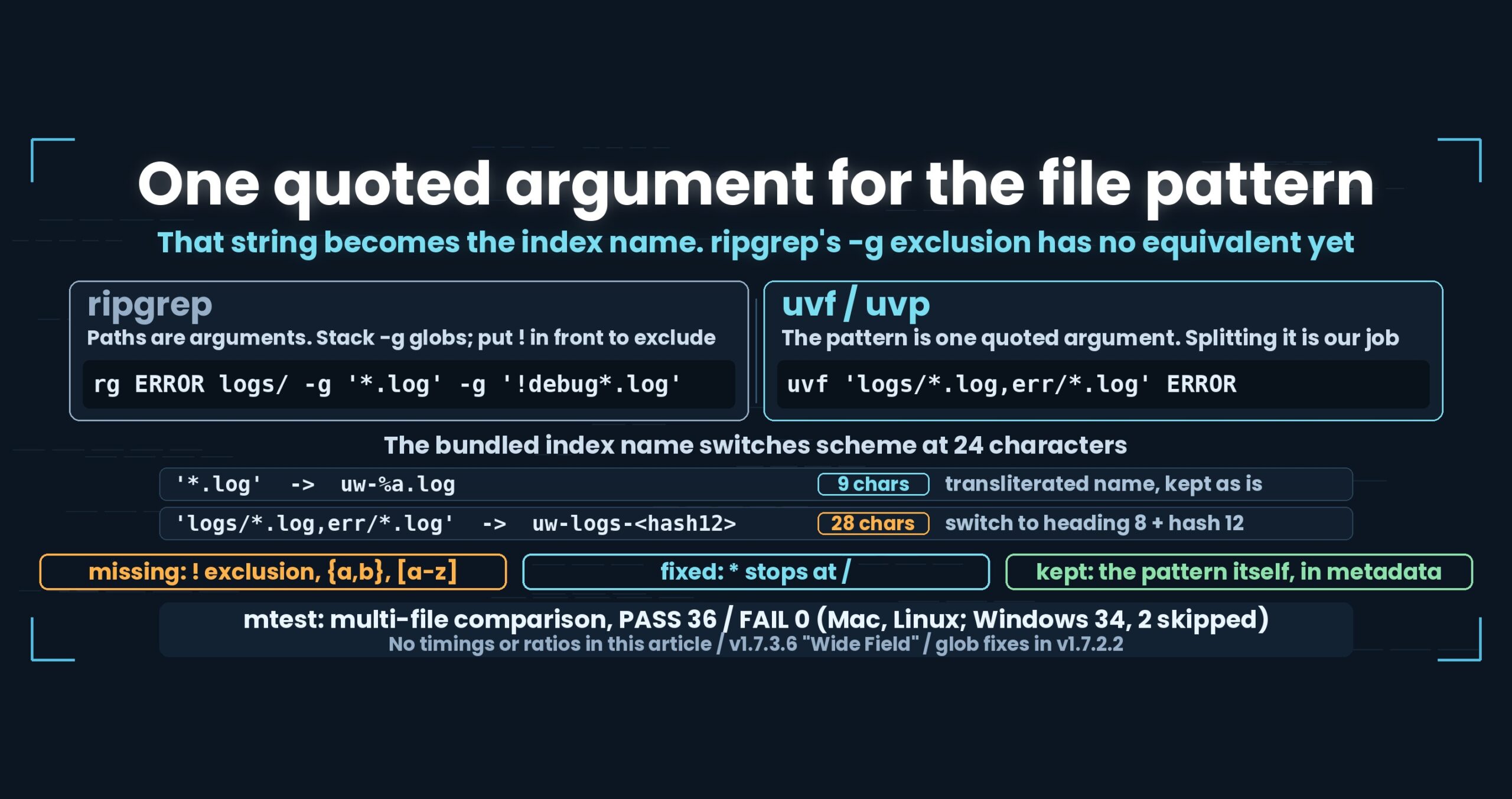
uvf 'app.log,app.log.*.gz,archive/*.xz' ERROR

# open the results straight in the viewer (free)
uvf 'archive/*.xz' ERROR -open

# first pass: search while writing the bundled .uwvz (UwView Pro)
uvp 'archive/*.xz' ERROR

# second pass onward: the same command reuses the .uwvz (UwView Pro)
uvp 'archive/*.xz' ERROR

# take the parts back out (plain, gz and zip come back as-is; others come back as text)
uvp archive.uwvz -extract -out ./restored/
Exit codes follow grep: 0 = found, 1 = not found, 2 = error or incomplete result.
The free edition is on GitHub Releases. On Mac, brew install --cask amru195704/uwview/uwview; on Windows, Scoop (scoop bucket add uwview https://github.com/amru195704/scoop-uwview then scoop install uwview).
Links
- Searching compressed logs against ugrep, ripgrep and zgrep (seven formats, six tools): https://uvp.y42u.net/en/blog/uwview-ugrep-ripgrep-zgrep-compressed-logs-en/
- Compressed logs are faster to search (how the formats shrink, and what they cost to make): https://uvp.y42u.net/en/blog/log-compression-format-choice-en/
- Searching gzip without extracting it (removing the pipe and the CRC): https://uvp.y42u.net/en/blog/uwview-fl08-gz-without-extract-en/
- Building a
.uwvz, searching inside it, and taking it back out: https://uvp.y42u.net/en/blog/uwvz-compressed-archive-search-extract-en/ - All measurements (benchmarks): https://uvp.y42u.net/en/benchmarks-en/
- Source code (GitHub): https://github.com/amru195704/UwView
And if your huge logs are eating storage and you want them kept compressed and still searchable fast, take a look at UwView Pro — a persistent index, search inside the compressed cache, roughly 1/9 storage, and both reopening and searching a step faster (all OSes; one-time purchase or a monthly plan).
From the developer: my apps, Kindle books and public projects are listed on GitHub: amru195704.