Two and a half minutes of waiting.
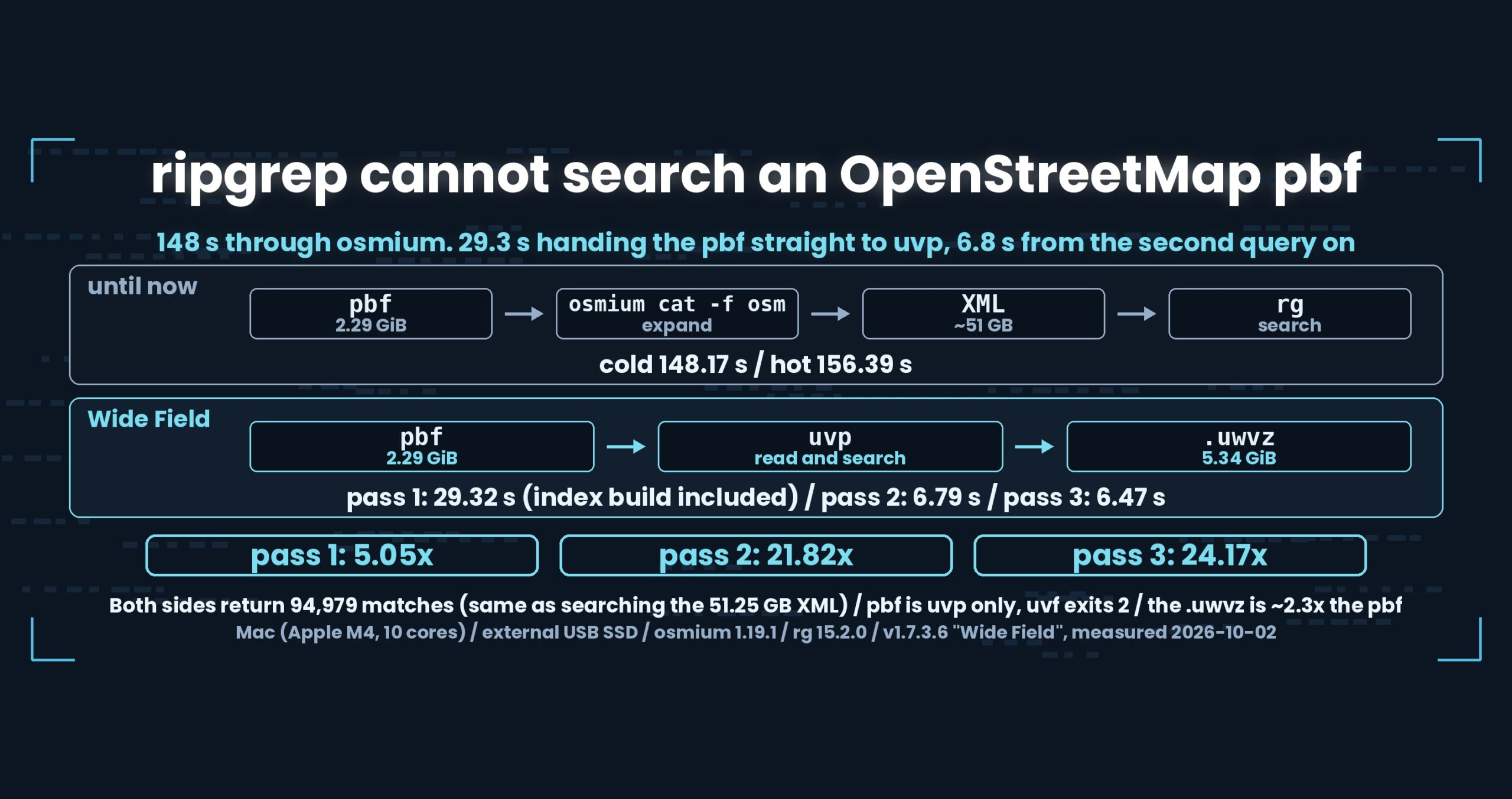
That is one query: osmium cat expands an OpenStreetMap pbf into XML, rg reads the stream, 148 seconds pass. A pbf is a compressed binary, so handing it to rg directly shows you nothing.
Is expanding it really the only way in?
- Up front: uvp reads a pbf directly. Where osmium cat … -f osm | rg takes 148.17 s cold and 156.39 s hot, uvp takes 29.32 s on the first pass (index build included), 6.79 s on the second and 6.47 s on the third — 5.05x, 21.82x and 24.17x. Both sides return the same 94,979 matches. The catch: only the paid uvp reads pbf, and the free uvf refuses by name
- The limits, before anything else
- Why you cannot hand it to rg
- The numbers
- We decided the XML would be byte-identical
- Why we wrote the protobuf reader ourselves
- Refusing is part of the design too
- How this was checked
- What generalises
- Being straight about it
- The tools behind this
- Links
Up front: uvp reads a pbf directly. Where osmium cat … -f osm | rg takes 148.17 s cold and 156.39 s hot, uvp takes 29.32 s on the first pass (index build included), 6.79 s on the second and 6.47 s on the third — 5.05x, 21.82x and 24.17x. Both sides return the same 94,979 matches. The catch: only the paid uvp reads pbf, and the free uvf refuses by name
The file is japan-latest.osm.pbf, 2.29 GiB (312,270,548 nodes, 44,696,689 ways, 226,670 relations). Mac (Apple M4, 10 cores), 32 GB RAM, external USB SSD; the other side is osmium 1.19.1 and ripgrep 15.2.0.
uvfanduvpare the search commands of UwView v1.7.3.6 “Wide Field” (released 28 September 2026), which I make.uvfships in the free edition;uvpis part of the paid UwView Pro. pbf support landed in the v1.7.6 work, and the timings here were measured on the v1.7.3.6 binaries on 2 October 2026.
The limits, before anything else
Nothing in this round is slower than the alternative. So instead of a loss, here is what it costs.
- The free edition cannot read it. Only
uvphandles pbf. Give one touvfand it does not scan it as text and report “no matches” — it refuses by name and exits 2. - The index needs room. The
.uwvzcomes out at 5.34 GiB, about 2.3x the 2.29 GiB pbf. We read one compressed format and write a different compressed format that carries an index, so it gets bigger. - You cannot get the pbf back.
-extractwrites the XML (<name>.osm). Rebuilding a pbf would mean reordering elements and rebuilding the string table, so we do not — and we say so before starting, because writing XML under a.pbfname would hand you a file nothing can open. - The other side is not ripgrep alone.
rgdoes not read pbf, so the comparison is againstosmium catplusrg. This is not “faster at the same job”; it is one less job to do. - Non-zlib blobs are refused. In practice pbf blobs are zlib, but lzma, lz4 and bzip2 are possible. Rather than half-support them, we refuse by name when one turns up.
Why you cannot hand it to rg
A pbf (.osm.pbf) packs OpenStreetMap data as protobuf — binary. The same content as the XML, far smaller. The 2.29 GiB file here becomes roughly 51 GB of XML.
It is not text, so searching it with rg tells you nothing useful. The usual move has been to expand it first:
osmium cat japan-latest.osm.pbf -f osm | rg -n -F '東京'
osmium is the standard tool for OpenStreetMap data. -f osm writes XML to stdout and rg consumes the stream. Nothing touches the disk, so no extra space is needed.
In exchange, every query expands the whole thing.
The numbers
Cache dropped, ten seconds of waiting, then the first pass (cold) and immediately the second (hot). The other side is osmium 1.19.1 plus ripgrep 15.2.0.
| Pass 1 | Pass 2 | Pass 3 | Matches | |
|---|---|---|---|---|
osmium cat … -f osm \| rg |
148.17 s (cold) | 156.39 s (hot) | — | 94,979 |
uvp japan-latest.osm.pbf 東京 |
29.32 s (index build included) | 6.79 s (reuse, cold) | 6.47 s (hot) | 94,979 |
| Ratio | 5.05x | 21.82x | 24.17x | identical |
Note on file-size notation: the pbf is 2.29 GiB (bytes ÷ 1024³), which macOS shows as 2.46 GB (SI units, ÷ 1000³). Expanded to XML it is the same content as
japan-latest.osm(51,254,526,392 bytes), which earlier articles call “48GB” or “51.25GB”.
That 94,979 is the same count we get from searching the 51.25 GB XML. Change the shape of the input, keep the answer — that is what this row checks.
The other side is slower the second time
Look at the first row again: osmium cat | rg goes from 148.17 s cold to 156.39 s hot. Warming it up made it slower.
If disk reads were the bottleneck, the second pass would benefit from the cache. It does not, because almost all of the time goes into decompressing and assembling XML. Reading 2.29 GiB is small next to producing 51 GB of text. There is nothing for a cache to save.
The same shape turned up in Part 8 of the First Light series, with gzip: when decompression is the bottleneck, cold and hot land in the same place. The slight inversion here is within the noise.
If you only ever ask once
uvp‘s first pass (29.32 s) includes building the .uwvz. If you run exactly one query, compare that 29.32 s against the other side’s 148.17 s — still 5.05x.
The 21.82x and 24.17x that follow come from reading a .uwvz (UwView Pro’s compression format plus index) instead of the file, so the number of bytes read is not the same.
These line up with an earlier run on a different build (1.7.3.5) on 28 September: 27.34 s, 6.43 s, 5.01 s.
We decided the XML would be byte-identical
There is latitude in how you turn a pbf into XML: attribute order, whitespace, where the line breaks fall. All of it can be waved through as “close enough”.
We did not. The XML uvp produces is byte-identical to osmium’s — only the generator attribute differs.
The reason is that every measurement and article we have published is against that exact shape. 94,979 matches from the 51.25 GB XML; 94,979 matches from the pbf. For those two to count as agreement, the intermediate form has to match too. With “close enough”, a matching count could be luck and you cannot tell.
Checking it is simple: cmp against osmium’s output. A small real file (127 nodes around Tokyo) is in the test suite and compared on every run, and the Kantō pbf that expands to 6.94 GB comes out without a single differing byte.
Why we wrote the protobuf reader ourselves
The pbf reader has no external library behind it.
Adding a protobuf library would have been quicker. Two reasons we did not.
There are only a handful of message types. The OSM pbf format is small and well-defined; we read a short list of messages. Carrying a general-purpose implementation buys nothing.
We wanted to choose how bad input is refused. A non-zlib blob, a truncated file, a header from a different version — what the tool says when it stops is the user’s experience. Rather than surfacing a library’s exception, we stop with what happened and what to do about it.
Decompression runs per blob (chunks of roughly 8,000 elements), which are independent, so a single input still saturates the CPU. The 29.32 s first pass depends on that.
Refusing is part of the design too
Hand a pbf to uvf and it stops with this:
uvf: japan-latest.osm.pbf は OSM の pbf です。UwView Pro(uvp)が扱います:
     uvp osm17/japan-latest.osm.pbf 語
Exit code 2.
Not scanning it is the important part. Searched as text, a compressed pbf yields no matches at all — and “0 results” wears the face of a correct answer. The reader concludes there is no Tokyo in the data.
Detection is not by name but by the leading [4-byte length][BlobHeader("OSMHeader")], because .pbf is also a generic protobuf extension. And that check is shared between uvf and uvp: if the free and paid editions disagreed about what counts as a pbf, the advice in the refusal would not be trustworthy.
How this was checked
- Other side: osmium 1.19.1 (
osmium cat PBF -f osm) plus ripgrep 15.2.0 (rg -n -F). The XML is piped, never written to disk - Version:
uvfanduvpboth v1.7.3.6 “Wide Field” - Data:
japan-latest.osm.pbf, 2.29 GiB (312,270,548 nodes / 44,696,689 ways / 226,670 relations); the same content as the 51.25 GB XML - Method:
sync→ purge → 10 s wait → pass 1 → immediately pass 2. Foruvpthe.uwvzis deleted before pass 1, and the cache is dropped again before pass 2 - Machine: Mac (Apple M4, 10 cores, 32 GB RAM), external USB SSD
- Agreement: not just counts — the set of matching lines (line numbers stripped, sorted) is compared. No ratios are printed when they disagree
- No cross-OS timing comparisons. Every number here is from the Mac
What generalises
(1) When decompression is the bottleneck, caching buys nothing. The other side’s second pass was slower than its first because the time went into producing, not reading. Measure where the bottleneck is before adding a cache, and if it is decompression, the only lever is decompressing fewer times.
(2) Pin the output format to the byte. “Close enough” XML would mean a matching count proves nothing. If you want to diff it later, emit something diffable. Choosing an output shape is a question of verifiability, not speed.
(3) Never return a silent zero for input you cannot read. Zero results looks like a correct answer. Refusing by name with a non-zero exit code is kinder — and the detection has to be shared between editions, or the advice contradicts itself.
(4) Say out loud that the playing field is smaller. The 5.05x here is not “the same work, faster”. The other side expands and then searches; we search without expanding. When the comparison means something different, that goes above the ratio.
Being straight about it
- Nothing here is slower on our side. The costs instead: the free edition cannot read pbf, the
.uwvzis about 2.3x the pbf (5.34 GiB), and there is no way back to pbf - The other side is not ripgrep alone.
rgdoes not read pbf, so this isosmium catplusrg. Not the same playing field - We may not have tuned osmium.
osmium cat … -f osmwas run with its defaults - Expanding to a file and then searching was not measured. Writing 51 GB of XML to disk did not fit the free space we had
- The other side’s hot being slower than its cold (148.17 → 156.39) looks like decompression being the bottleneck, but we did not isolate it
- This run did not split the first pass into conversion and search. An earlier run on 28 September gave 21.6 s of conversion plus 5.61 s of search
- The
.uwvz(5.34 GiB) is larger than the pbf. It does not save storage; it makes repeated queries fast - Non-zlib blobs (lzma, lz4, bzip2) are not supported and are refused by name
- I am the developer of one side of this comparison. Discount accordingly
The tools behind this
UwView is a CLI and GUI tool for examining very large text files and logs. In v1.7.3.6 “Wide Field” it searches many files, seven compression formats, zip archives and OpenStreetMap pbf — with no external commands.
The same things, from the command line
# Search a pbf directly. Pass one builds the .uwvz; later passes read it (UwView Pro)
uvp japan-latest.osm.pbf '東京'

# Case-insensitive / as a regular expression
uvp japan-latest.osm.pbf 'TOKYO' -i
uvp japan-latest.osm.pbf 'k="name[^"]*"' -E

# Narrow by a second term / with three lines of context
uvp japan-latest.osm.pbf k="amenity" v="parking"
uvp japan-latest.osm.pbf k="amenity" -C 3 k="name"

# Count what the capture group caught
uvp japan-latest.osm.pbf 'k="amenity"' -uniq 'v="([^"]+)"' -sort count -head 20

# Read the hits in the GUI
uvp japan-latest.osm.pbf '東京' -open

# What is in this index? (free)
uvp japan-latest.osm.pbf.uwvz --info

# Write the XML back out (there is no way back to pbf)
uvp japan-latest.osm.pbf.uwvz -extract -out out/
Exit codes follow grep: 0 = found, 1 = not found, 2 = error or incomplete result. Handing a pbf to the free uvf also exits 2, pointing you at uvp.
The free edition is on GitHub Releases. On Mac, brew install --cask amru195704/uwview/uwview; on Windows, Scoop (scoop bucket add uwview https://github.com/amru195704/scoop-uwview, then scoop install uwview).
Links
- Searching gzip without expanding it (why cold and hot match): https://uvp.y42u.net/en/blog/uwview-fl08-gz-without-extract-en/
- Seven formats without calling an external command: https://uvp.y42u.net/en/blog/uwview-wf02-seven-formats-no-external-en/
- Reusing a bundled index, and not rebuilding when a file vanishes: https://uvp.y42u.net/en/blog/uwview-wf04-bundle-keep-en/
- Many files in one command: https://uvp.y42u.net/en/blog/uwview-wf01-multi-file-one-command-en/
- Building a
.uwvz, searching inside it, extracting from it: https://uvp.y42u.net/en/blog/uwvz-compressed-archive-search-extract-en/ - Thirteen rounds of reading the file fewer times: https://uvp.y42u.net/en/blog/uwview-fl13-first-light-recap-en/
- Every measurement we publish: https://uvp.y42u.net/en/benchmarks-en/
- Source code (GitHub): https://github.com/amru195704/UwView
And if huge logs are eating your storage and you want them compressed and fast to search, take a look at UwView Pro: a persistent index, search inside the compressed cache, roughly 1/9 the storage, and a faster reopen every time (all operating systems; one-time purchase or monthly plan).
From the developer: my apps, Kindle books and public projects are listed at GitHub: amru195704.