The AI grade sheet gave letter grades. This time I extract just two steps — search and replace — and put the actual seconds side by side.
Two caveats first. The measurements come from two machines, a Windows laptop and a Mac, and seconds cannot be compared across environments, so the tables are kept separate by environment. Search terms, run counts, and replace methods also vary slightly between source articles (noted per table), so only comparisons inside the same table are valid. I develop UwView; every number is my own measurement.
One more note on sizes: the largest target is one and the same file (OpenStreetMap Japan, ~892M lines), written variously as 50 GB / 51.25 GB / 47.73 GiB across the source articles. This article standardizes on 48 GB (51.25 GB is the same file in decimal units).
Windows (Windows 11, 16 GB RAM, internal SSD, laptop)
Replace — two replacements (東京→Tokyo, 大阪→Osaka)
| Size | EmEditor | UwView Pro + Edit Upgrade | Gap |
|---|---|---|---|
| 3 GB / 100M lines | 0.9 s | 6.3 s | EmEditor 7.0× faster |
| 10 GB / 100M lines | 28.6 s | 12.41 s | UVP+Edit ~2.3× faster |
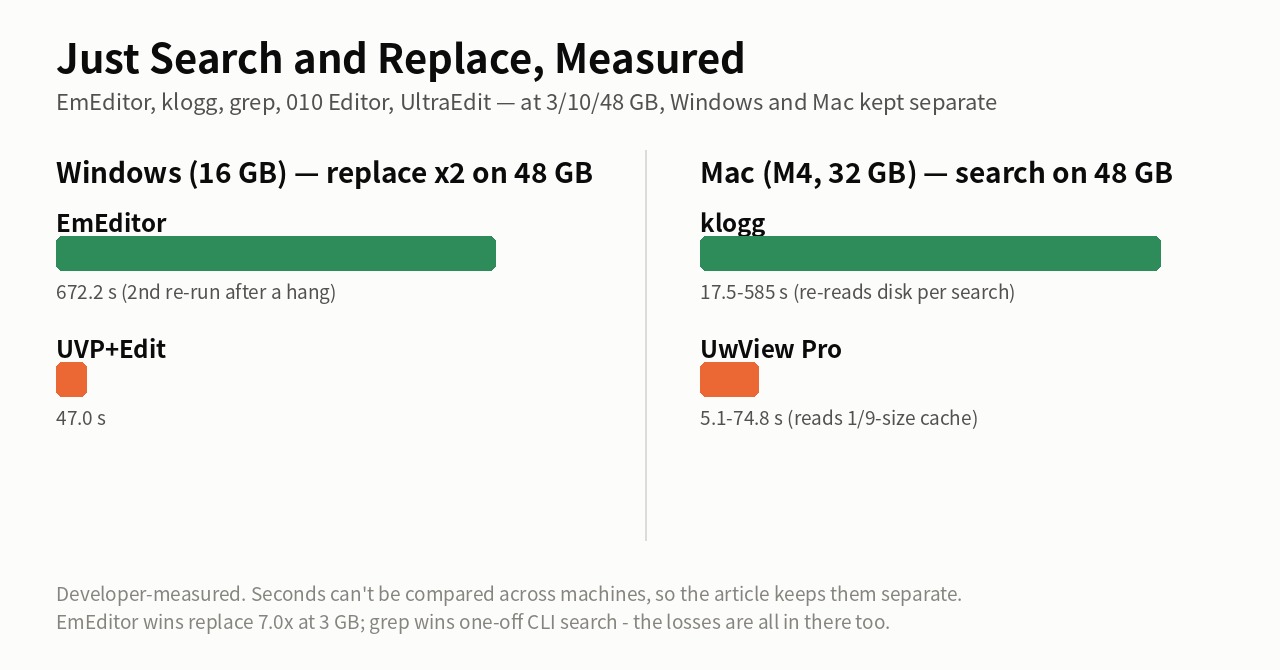
| 48 GB / 892M lines | 672.2 s (11 min 12 s)* | 47.0 s | UVP+Edit ~14.3× faster |
* EmEditor’s second replacement at 48 GB hung on the first attempt (unfinished after 13 minutes), so the figure uses the value re-measured after a PC reboot (301.1 s).
At 3 GB the replace belongs to EmEditor, full stop. The flip comes at 10 GB, and at 48 GB — past the 16 GB of RAM — the gap opens to 14.3×.
Search — full-text search for 東京 (“Tokyo”), 48 GB / 892M lines
| Measurement | EmEditor | UwView Pro family | Gap |
|---|---|---|---|
| 48 GB, single run (viewer test) | 160 s | 12.5 s | ~12.8× |
| 48 GB, average of two runs (editing test) | 194.7 s (245.3 / 144) | 23.9 s | ~8× |
I did not measure standalone search at 3 GB and 10 GB on Windows (—). For reference, EmEditor’s search is also fast while the file fits in RAM.
Mac (MacBook Air, Apple M4, 32 GB RAM)
Search (GUI) — vs klogg, 10-word sequential search, three storage types
Searches average a 10-word sequence (real-use simulation); 48 GB was measured as single runs.
| Size | klogg | UwView Pro | Ratio (3-storage totals) |
|---|---|---|---|
| 3 GB | ~2 s (each storage) | 0.40–0.72 s | ~3.9× |
| 10 GB | ~2–3 s | 1.14–2.41 s | ~1.7× |
| 48 GB | 17.5 s (internal SSD) – 585 s (USB HDD) | 5.1–74.8 s | ~7.7× |
At 3–10 GB klogg’s search also returns in seconds — the practical gap is small. Past the 32 GB of RAM, klogg re-reads the disk on every search while UwView Pro reads only a ~1/9-size compressed cache, and the gap opens to 7.7×.
Search (CLI) — vs grep / ripgrep, one search over the same 48 GB file
External USB storage (0.41 GB/s measured) — an I/O-bound setup. One search for 東京 over the same 48 GB file (51.25 GB in the source article’s decimal units):
| Tool | First run | Repeats |
|---|---|---|
| grep | 64.64 s | about the same every time |
| ripgrep (rg) | 71.49 s | about the same every time |
| UwView Pro | 54.7 s (index built during it) | 14 s |
For a one-off, grep is plenty — and beats rg here, since parallelism doesn’t pay on a single huge file. The gap appears from the second search on.
Search & replace — vs 010 Editor and UltraEdit (search 東京, replace-all 東京→Tokyo)
| File | Tool | Search | Replace all |
|---|---|---|---|
| 3.07 GB | UltraEdit | 5.3 s | 14.1 s |
| UwView Pro + Edit Upgrade | 0.94 s | 1.31 s | |
| 10.19 GB | 010 Editor | 11.5 s | 16.5 s* |
| UwView Pro + Edit Upgrade | 2.2 s | 3.6 s | |
| ~48 GB | 010 Editor | ― | 12 m 45.3 s (one run)* |
| UltraEdit | 1 m 23 s** | not tested |
UltraEdit warns above 5 GB, so at first it was only measured at 3.07 GB. (At measurement time the UwView product carried its old name, UwEditor Pro.)
** Re-measured 2026-09-14: at ~48 GB UltraEdit opens in 1 m 11 s and completes the 東京 search in 1 m 23 s — practical up to 50 GB for viewing and search. Replace-all and save are not tested.
* 010 Editor was re-measured on 2026-09-08. The 10.19 GB replace is 大阪 → Osaka at 16.5 s (the byte-length-changing Tokyo → 東京 takes 18.5 s). At ~48 GB it opened in 56.7 s and completed one 東京 → Tokyo replace in 12 m 45.3 s (too slow for a second run) — but the save did not finish after 15+ minutes in my environment, so no final file could be produced.
Summary — even on these two steps alone, the boundary is RAM
- Replace: EmEditor is 7.0× faster at 3 GB; the ranking flips at 10 GB and reaches a 14.3× gap at 48 GB
- Search: the UwView family leads at every size, but at 3–10 GB klogg and EmEditor also answer within seconds — the moment a file outgrows RAM, only the other tools drop into minutes
- The exception is the one-off CLI search, where grep is the simplest and fastest (beating rg in this I/O-bound setup)
Full disclosure
- Windows and Mac seconds are not mutually comparable, and cross-table comparisons are inexact because terms, run counts and replace methods differ
- Some combinations are unmeasured: standalone search at 3/10 GB on Windows, EmEditor on the Mac, and others
- Every number is my own measurement on specific hardware, storage, files and product versions — not an independent benchmark. Rerun any of it and I will update this article to match
The tool used
UwView Pro is on sale (Windows, macOS, Linux — one license covers all three; one-time or monthly, with a 14-day free trial — editing features included). For a one-off look, the free UwView is enough.
Source articles (full conditions per measurement)
- Losing at 3 GB, a Cliff at 50 GB — the EmEditor replace benchmark
- A 48 GB File “Opens” — That Doesn’t Mean You Can Investigate It (EmEditor, search)
- Editing a 48 GB File (EmEditor, search & replace)
- UwView Pro Benchmark, Complete Edition — 9 Cells vs klogg
- Is ripgrep Really the Fastest on a 51 GB Single File?
- 010 Editor, UltraEdit, and UwView Pro + Edit on Mac ARM
- The AI Grade Sheet
From the developer: a list of my apps, Kindle books and public projects is on GitHub: amru195704.
A note
The information in this article is provided for reference purposes only, and we do not guarantee its accuracy or completeness. All measurements reflect the specific environments described above and may differ on other hardware. If you notice any errors or inaccuracies, please let us know in the comments and we will review and correct them.