Ask one file five questions in a row. Then narrow the result, tally it, replace something, and write it out.
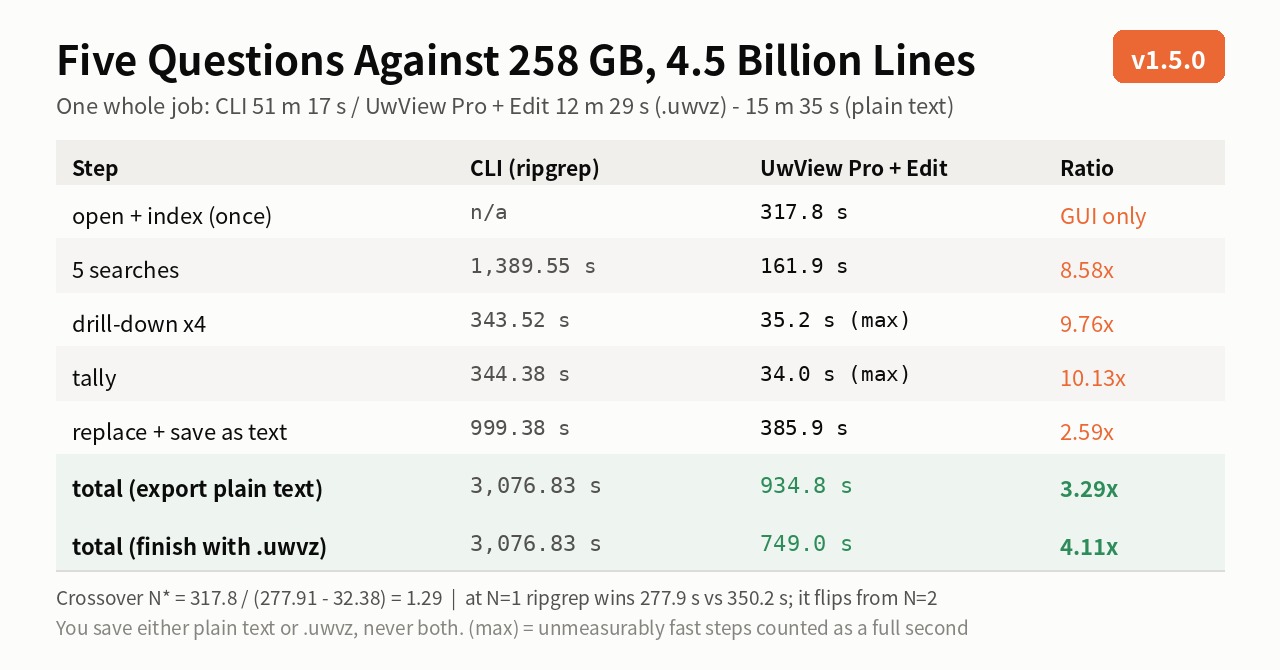
Measured as one whole job: 51 minutes 17 seconds on the CLI, 15 minutes 35 seconds in the GUI — or 12 minutes 29 seconds if you finish with a .uwvz save, as you would in real use.
But — if you only have one question, ripgrep wins. So I also worked out exactly where the crossover is.
- What was measured
- First, the physical floor
- Single searches — ripgrep runs at the floor +2%
- Asking five questions
- Narrowing and counting
- Tally
- Replace, then write it out
- The whole job
- So where is the crossover?
- Proving both sides did the same job — six cross-checks
- Differences that are not numbers
- To be straight about it
- The tool
- Related
What was measured
| Item | Value |
|---|---|
| File | us-260726.osm (OpenStreetMap, whole United States, expanded to XML — a single unsplit file) |
| Size | 258,679,440,228 bytes = 258.68 GB |
| Lines | 4,509,830,821 (4.5 billion) |
| Machine | Apple M4 / 32 GB RAM / macOS 26.3.1 |
| Storage | External SSD |
| CLI | BSD grep 2.6.0 (macOS stock) / GNU grep (Homebrew) / ripgrep 15.2.0 / BSD sed / GNU sed 4.10 |
| GUI | UwView Pro v1.5.0 + Edit Upgrade, which I develop |
Measurement rules (to give the other side its best shot):
LC_ALL=Cfor grep — it is faster than a UTF-8 locale- Measure with
-c(count only). Printing hit lines to a terminal measures rendering, not searching sudo purge(drop the page cache) before every run, and a 150-second cooldown between runs (M4 thermals)- Times are
realfrom/usr/bin/time -p
First, the physical floor
$ /usr/bin/time -p wc -l us-260726.osm
4509830821
real 268.49
268.49 seconds = 963 MB/s. That is what it costs to read the file through once. No tool can beat it. Read every number below as a distance from those 268.49 seconds.
Single searches — ripgrep runs at the floor +2%
Three patterns:
| Pattern | Hits | BSD grep | GNU grep | ripgrep | amber | BSD grep (UTF-8) |
|---|---|---|---|---|---|---|
| New York | 100,492 | 342.19 | — | 276.77 | 355.24 | 363.54 |
| Statue of Liberty | 88 | 373.34 | — | 277.06 | 357.69 | 416.78 |
k="highway" |
60,471,216 | 474.40 | 273.66 | 275.04 | — | 503.43 |
Three things came out clearly.
1. ripgrep runs in constant time. 88 hits or 60.47 million hits, it takes 275–277 seconds, a spread of ±2 seconds. It burns only 11–16 seconds of CPU — it is purely I/O-bound. That is the physical floor plus 2%; there is nowhere left to go.
2. macOS stock BSD grep is 1.73× slower than GNU grep. 474.40 vs 273.66 seconds. CPU time is 383.53 vs 66.54 seconds — a 5.8× efficiency gap. BSD grep is the only tool here that cannot keep the disk busy.
GNU grep from
brew install grep(ggrep) was neck and neck with ripgrep. If you work with huge files on macOS, that is worth knowing.
3. Written in Rust does not mean fast. I also measured amber (ambs) — the only tool here that splits a single file across threads (grep and ripgrep are single-threaded on one file). It came in at 357.69 seconds: 29% slower than ripgrep, and about the same as BSD grep. The parallelism does work — --max-threads 1 takes 421.12 s, so threading buys 15%. But amber burns 401 seconds of CPU, 25–36× what ripgrep uses, and that inefficiency swallows the gain. Instructions per byte matter more than whether the work is parallel. Hit counts were 88 and 100,492 — identical to grep and ripgrep.
Last time, on a 48 GB file, grep beat ripgrep: 64.64 vs 71.49 seconds. This time it is the other way round, and I can explain why. That storage ran at 0.41 GB/s, so every tool was I/O-bound and they bunched together. At 963 MB/s, CPU efficiency becomes visible. “grep is faster on a single huge file” was a conclusion that only held on slow storage. I am correcting it.
Asking five questions
New York / Brooklyn / Central Park / Statue of Liberty / coffee_shop, one after another.
| Tool | Five questions | Per question |
|---|---|---|
| BSD grep | 1,789.22 s (29 m 49 s) | 357.84 |
| ripgrep | 1,389.55 s (23 m 10 s) | 277.91 |
| UwView Pro | 161.90 s (2 m 42 s) | 32.38 |
Hit counts: 100,492 / 30,871 / 14,306 / 88 / 36,506 — not one hit differed between CLI and GUI.
The CLI re-reads 258 GB for every question. The GUI builds an index once and then consults it. 8.58×.
Narrowing and counting
Four-stage drill-down — from New York, exclude hospital and school, then keep only Brooklyn.
grep 'New York' us-260726.osm | grep -v hospital | grep -v school | grep -c Brooklyn
→ 35 hits / 343.52 s
UwView Pro’s drill-down search: 35.2 seconds. The breakdown shows the structural difference.
stage 1  New York          32.2 s    → 100,492
stage 2  exclude hospital   under 1 s → 100,491
stage 3  exclude school     under 1 s → 100,484
stage 4  Brooklyn           under 1 s →      35
Stages 2 through 4 were too fast for my stopwatch. The count changes as the click lands. “Under 1 s” is the resolution limit of my measurement, not the actual cost — the real figure is lower. The 35.2 s above counts each unmeasurable stage as a full second, so it is an upper bound.
The structure explains it: each stage after the first only looks at the previous stage’s 100 thousand lines. A CLI pipeline has to stream the whole file once, so it costs 343.52 seconds. 9.76× — and since the GUI side is an upper bound, the real gap is a little wider.
(For this comparison I set the GUI’s context to ±0. A CLI pipeline is a line stream, so the counts only line up if the settings match. With them matched, the final 35 was an exact match.)
Tally
Pull k="..." out of the hit lines and rank by frequency.
grep 'New York' us-260726.osm | grep -oE 'k="[^"]+"' | sort | uniq -c | sort -rn | head -20
→ 344.38 s
UwView Pro’s Tally: 34.0 seconds (10.13×). Of that, 32.0 s is the search; the tally itself and the return to the hit list were each too fast to measure (34.0 s counts them as a second apiece, so it too is an upper bound). The result:
| Value | Count | Share |
|---|---|---|
k="source" |
29,976 | 29.83% |
k="operator" |
17,815 | 17.73% |
k="addr:city" |
14,756 | 14.68% |
k="addr:street" |
8,458 | 8.42% |
k="name" |
8,147 | 8.11% |
The top 10 matched the CLI exactly. And the top 20 plus the 2,583 in “other” sum to 100,492 — the same as the New York hit-line count. OSM XML puts one tag per line, so “count the lines” and “count the occurrences” coincide.
Replace, then write it out
sed 's/New York/NYC/g' us-260726.osm > /dev/null      → 741.48 s (transform only)
sed 's/New York/NYC/g' us-260726.osm > us-nyc.osm     → 999.38 s (including a 258 GB write)
Replacing costs 2.76× what reading costs (741.48 ÷ 268.49). 680 seconds of CPU, and the disk sits half idle.
I measured GNU sed (
gsed4.10) too: 896.39 seconds — BSD is faster. GNU grep was 1.73× faster, but GNU sed is slower. “GNU is faster” is not a general rule.
On the UwView Pro + Edit Upgrade side:
| Step | Time |
|---|---|
Replace all New York → NYC |
62.0 s (100,992 occurrences) |
Save (.uwvz, 28.61 GB) |
138.1 s |
| Save (plain text) | 323.9 s |
The replace itself takes 62.0 seconds — 11.96× faster than sed’s 741.48-second transform. The original file is never rewritten; edits accumulate as a diff, and the file is written out once, at the end.
The whole job
You save either plain text or .uwvz, never both, so the total comes in two rows.
| Step | CLI (ripgrep) | UwView Pro + Edit | Ratio |
|---|---|---|---|
| Open + index | — | 317.8 | GUI only (once) |
| Five searches | 1,389.55 | 161.9 | 8.58× |
| Four-stage drill-down | 343.52 | 35.2 (max) | 9.76× |
| Tally | 344.38 | 34.0 (max) | 10.13× |
| Replace | (in the save row) | 62.0 | — |
| Save as text (258.68 GB) | 999.38 | 323.9 | 2.59× with the replace |
Save as .uwvz (28.61 GB) |
no equivalent | 138.1 | — |
| Total (exporting plain text) | 3,076.83 s = 51 m 17 s | 934.8 s = 15 m 35 s | 3.29× |
Total (finishing with .uwvz, real use) |
3,076.83 s = 51 m 17 s | 749.0 s = 12 m 29 s | 4.11× |
Against BSD grep those become 3.72× and 4.64×.
“(max)” counts each step that was too fast for the stopwatch as a full second. The GUI totals are upper bounds for the same reason, so the real gap can only be wider than this table, never narrower.
Why two rows
The first total produces the same artifact as the CLI — 258 GB of plain text. The second is how you actually finish a session in UwView Pro: the result folds down to 28.61 GB and reopens without rebuilding the index, so that is what you pick.
The artifacts differ, and that needs saying. A .uwvz is not plain text. If you have to hand the result to another tool, you need the text export — that is the 3.29× row. If instead you are the one coming back to it, the second row is the sensible one: 28.61 GB, and next time you skip the 317.8-second index. The CLI has no way to keep state at all, so tomorrow’s first question costs 277.91 seconds again.
So where is the crossover?
The CLI scales with the number of questions; the GUI pays for the index once and then adds a small increment. Here is the intersection.
CLI(N)  = N × 277.91                (ripgrep, measured)
GUI(N)  = 317.8 + N × 32.38         (index 317.8 s, 32.38 s per question, measured)

N* = 317.8 ÷ (277.91 − 32.38) = 1.29
| Questions | ripgrep | BSD grep | UwView Pro | Ratio (ripgrep ÷ UwView Pro) |
|---|---|---|---|---|
| 1 | 277.9 | 357.8 | 350.2 | 0.79× (ripgrep wins) |
| 2 | 555.8 | 715.7 | 382.6 | 1.45× |
| 3 | 833.7 | 1,073.5 | 415.0 | 2.01× |
| 5 | 1,389.6 | 1,789.2 | 479.7 | 2.90× |
| 10 | 2,779.1 | 3,578.4 | 641.6 | 4.33× |
| 20 | 5,558.2 | 7,156.8 | 965.4 | 5.76× |
With one question, ripgrep wins (277.9 vs 350.2 seconds). Building an index does not pay for itself. Against BSD grep it is roughly a tie.
From question two onward it flips, and the gap widens with every question after that — 2.01× at three, 2.90× at five, 5.76× at twenty. The line has always been in the same place; this time I could draw it with numbers.
Proving both sides did the same job — six cross-checks
Before comparing speed, you have to establish that both sides actually did the same work. All six matched.
| # | Check | Value |
|---|---|---|
| 1 | Total lines | 4,509,830,821 (wc -l = the GUI’s index) |
| 2 | Five hit counts | 100,492 / 30,871 / 14,306 / 88 / 36,506 |
| 3 | Drill-down final | 35 |
| 4 | Tally top 10 and total | k="source" 29,976 … total 100,492 |
| 5 | Replacements | 100,992 |
| 6 | Text output size | 258,678,935,268 bytes |
Number 6 is the decisive one. The file written out from the GUI’s non-destructive edit was not one byte different from sed’s output. “Does a diff-based editor really produce the same result?” is a fair question, and this answers it byte for byte.
Number 5 is the interesting one. grep -c counted 100,492 lines; sed replaced 100,992 occurrences. The difference of 500 is lines that contained “New York” more than once. The GUI reported 100,992 as well.
Differences that are not numbers
Readable from the moment it opens. The index takes 317.8 seconds, but time to first visible text was too fast for the stopwatch (under a second). While the index is still building you can read the tail, or the middle — that sub-second sits inside the 317.8 s, not before it, so the totals are unchanged. grep is silent until it finishes.
You can go back. Jumping from drill-down stage 4 back to stage 1’s tab was too fast for the stopwatch (under a second). On the CLI you rebuild the pipeline and pay another 343 seconds. The cost of “maybe I excluded too much” differs by an order of magnitude.
You can stop. Closing mid-session and reopening to resume were both too fast to measure (under a second each). You can put a 258 GB editing session down and pick it up the next day, instantly — nothing needs flushing, because the original was never touched.
To be straight about it
- All of this is measured on my machine (Apple M4, 32 GB, external SSD). It may be a configuration issue on my side — if you know better, please tell me. I will correct it
- I develop one of the two things being compared (UwView Pro). Discount accordingly
- The GUI figures include stopwatch timing of on-screen operations. The CLI figures are
/usr/bin/time -p - Where I write “under 1 s” on the GUI side, it means the step was too fast for my stopwatch. Totals and ratios count those steps as a full second each, so they are upper bounds — the real gap can only be wider than what is printed here, never narrower
- The CLI drill-down and tally numbers are BSD grep. GNU grep would likely be faster there, but I have not measured it
- One-off searches, scripts, cron jobs, piping into something else — the CLI is the right answer. A GUI does not replace that
- Where the GUI helps is interactive investigation, when you do not yet know what to throw away. Incident work is usually that
The tool
UwView Pro is on sale (Windows, macOS and Linux — one license covers all three; one-time purchase or monthly, 14-day free trial — editing features included). Drill-down search and Tally are Pro features; replace-all is part of Edit Upgrade.
Related
- The CLI-to-UwView-Pro cheat sheet
- grep -v in a GUI
- uniq -c in a GUI
- Opening 258.68 GB and 4.5 billion lines
- Is ripgrep still fastest on a 51 GB single file?
From the developer: my apps, Kindle books and OSS are listed at GitHub: amru195704.
Note
This article is provided for reference and does not guarantee accuracy or completeness. All measurements are from the specific environment described and may differ on other hardware. If you spot an error, please leave a comment — I will verify and correct it.