UwView — Huge Files, No Waiting is a viewer for huge logs and text files on Windows, macOS and Linux. Add the Edit Upgrade — Huge Files, No Rewriting to the paid UwView Pro — Huge Files, No Waiting, and you can search, replace and delete without rewriting the original file. On this page we call that combination UwView Pro + Edit Upgrade (UVP+Edit for short). Older articles show it under the build name used when it was measured, UwEditor Pro.
You need to fix one spot in a huge file. The editor did open it, but the replace never finishes, the save takes half an hour, or the window freezes. This site has published 7 articles about that moment. We measured three sizes, 3GB, 10GB and 48GB, against EmEditor, 010 Editor, UltraEdit and PilotEdit.
This page collects the answers from those 7 articles in one place. Every number was measured by the developer, so please read them with that in mind. Where EmEditor is faster — on files that fit in memory — we say so.
Note on file-size notation: In this article, “48GB” is a rounded value of 47.73 GiB (bytes ÷ 1024³). macOS’s capacity display (SI units, ÷1000³) shows this as 51.25GB. Both refer to the same file (51,254,526,392 bytes); older articles that say “50GB” or “51GB” mean the same file.
- The short answer: if the file fits in memory, EmEditor is faster. Past memory, the difference is in saving. If the work spans several days, editing without rewriting the original pays off
- 1. Why huge-file editing never finishes — the whole file is rewritten on every save
- 2. At sizes that fit in memory, EmEditor is faster — replace and save at 3GB, 10GB and 50GB
- 3. Editing 48GB and saving mid-way — EmEditor on the same Windows laptop
- 4. 010 Editor and UltraEdit on a Mac — they pause and resume differently
- 5. Re-testing “handles huge files” — PilotEdit and lnav
- 6. Fixing over several days — a five-day estimate
- 7. Where we lose, and where it’s a tie
- 8. Choosing a tool by size and job
- Read each article
- Links
The short answer: if the file fits in memory, EmEditor is faster. Past memory, the difference is in saving. If the work spans several days, editing without rewriting the original pays off
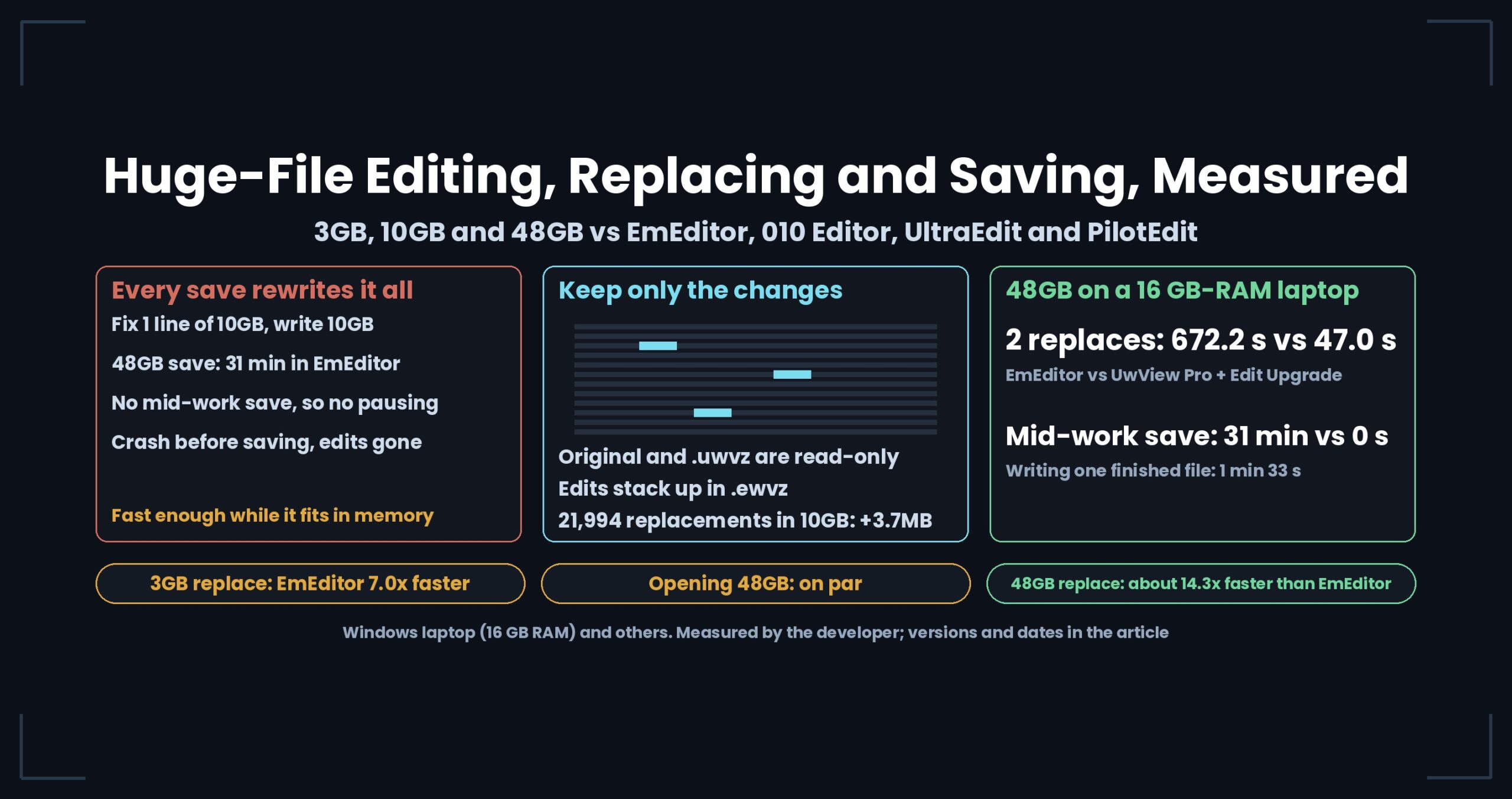
- For files that fit in memory, an ordinary editor is enough. On a 16 GB-RAM laptop, two replaces on 3GB / 100 million lines took 0.9 s in EmEditor and 6.3 s in UVP+Edit. EmEditor was 7.0x faster.
- Past memory, replace and save pull apart. On the same laptop, the same two replaces on 48GB (890 million lines) took 672.2 s in EmEditor and 47.0 s in UVP+Edit. Saving took 31 minutes in EmEditor; in UVP+Edit, a mid-work save took 0 s (done the moment you press it) and writing one finished file took 1 min 33 s.
- The difference comes from how saving works. An ordinary editor rewrites the whole file on every save. UVP+Edit never rewrites the original; it keeps only a small file recording what changed where. Replacing 21,994 places in a 10GB, 100-million-line file added 3.7MB.
1. Why huge-file editing never finishes — the whole file is rewritten on every save
A text editor writes out the whole file when it saves. Fix one line in a 10GB file and 10GB gets written again. At sizes that fit in memory nobody notices, but at 48GB one save took 31 minutes (editing 48GB and saving mid-way).
A 31-minute save cannot be slipped in between steps — before lunch, before switching tasks, or just because you don’t want to lose what you have. So you end up editing 48GB from start to finish without saving once.
UVP+Edit avoids this by design (21,994 replacements in 10GB):
- The original file and the file holding the compressed contents plus the index (
.uwvz) are never rewritten — only read - Replacements and deletions are stacked in a separate small file (
.ewvz) as “what changed where” - The window shows the two layered together
Here is the run that replaced “東京” (Tokyo in Japanese) with “Tokyo” in a 10.09GB, 100-million-line XML file (macOS, external USB SSD reading at 0.41 GB/s).
| Operation | Measured (s) |
|---|---|
| Search for “東京” (21,948 lines hit) | 3.7 |
| Replace all “東京” → “Tokyo” (21,994 places) | 16.8 |
| File | Size | Did its date change? |
|---|---|---|
| Original XML | 10.09GB | No |
.uwvz (compressed + index) |
1.38GB | No |
.ewvz (the edits) |
3.7MB | Created on the day of the replace |
The added 3.7MB is 0.037% of the original. All 20,000-plus replacements undo with a single Undo. The .ewvz stays on disk while you edit, so the edits survive even if the app goes down before you press Save. Search says 21,948 and replace says 21,994 because search counts lines and replace counts occurrences (46 lines contained “東京” twice).
2. At sizes that fit in memory, EmEditor is faster — replace and save at 3GB, 10GB and 50GB
On the same 16 GB-RAM Windows laptop, one set was “open → two replaces (東京→Tokyo, 大阪→Osaka) → save and close” (the 16 GB laptop article, September 2026).
| Data | Step | EmEditor (s) | UVP+Edit (s) |
|---|---|---|---|
| 3GB, 100M lines | Open | 5.0 | 4.6 |
| Two replaces | 0.9 | 6.3 | |
| Save and close | 5.1 | 3.2 | |
| Total | 11.0 | 14.1 | |
| 10GB, 100M lines | Open | 14.0 | 29.3 |
| Two replaces | 28.6 | 12.41 | |
| Save and close | 187.3 | 10.2 | |
| Total | 229.9 | 51.91 | |
| 50GB, 890M lines | Open | 301.1 | 76.1 |
| Two replaces | 672.2 | 47.0 | |
| Save and close | 1,860 (31 min) | 49.9 | |
| Total | 47 min 13 s | 173.0 (2 min 53 s) |
- 3GB goes to EmEditor. Replace alone was 7.0x faster in EmEditor, and we also lost on the total, 11.0 s to 14.1 s.
- At 10GB, EmEditor opens faster, and replace and save turn it around. The totals were 229.9 s and 51.91 s.
- At 50GB, the two replaces took 672.2 s and 47.0 s (UVP+Edit about 14.3x faster). EmEditor’s second replace did not finish within 13 minutes on the first attempt; the value used (301.1 s) is from a re-run after restarting the PC. The time of the attempt that did not finish is not in the total.
The boundary is probably the 16 GB of memory. While the file fits, the editor is fast; once it doesn’t, the job turns into reading and writing the disk. That is our guess from the outside — we did not examine EmEditor’s internals.
3. Editing 48GB and saving mid-way — EmEditor on the same Windows laptop
On a 16 GB-RAM HP Spectre x360 (Windows 11, Intel Core i7-1165G7, internal SSD) we compared EmEditor Professional 26.2.5 with UVP+Edit (v1.3.3) in August 2026. EmEditor is the average of two runs; UVP+Edit is a single run.
| Operation | EmEditor (s) | UVP+Edit (s) | Result |
|---|---|---|---|
| Open the file | 103.6 (116.8 / 90.4) | 107.1 | On par (EmEditor slightly faster) |
| Full-text search for “東京” (94,979 lines hit) | 194.7 (245.3 / 144) | 23.9 | About 8x faster than EmEditor |
| Replace all “東京” → “Tokyo” | 210.5 (257 / 164) | 35.9 | About 6x faster than EmEditor |
| Save mid-work | 1,860 (31 min) | 0 (instant) | — |
| Write one finished file | 1,860 (31 min) | 93 (1 min 33 s) | About 20x faster than EmEditor |
Both found the same 94,979 lines. The ~8x on search includes a difference in parallelism. With threads set to 8, EmEditor appeared to run on one thread (probably its own decision based on memory and file size); UVP+Edit ran on 8. On a PC with spare memory the gap should shrink.
On the same PC and file we also compared just opening and searching (opening 48GB isn’t the same as investigating it, UwView Pro v1.2.2).
| Operation | EmEditor (s) | UwView Pro (s) |
|---|---|---|
| Until you can move anywhere in the file | 246 (4 min 06 s) | Right after opening |
| Until the index is built | 246 | 74 |
| Full-text search for “東京” | 160 | 12.5 |
We also tabulated fixing the file two days in a row. Day 1 (“open, search and replace, save mid-work”) took about 39.5 min in EmEditor and about 2.8 min in UVP+Edit. Day 2 (“reopen, search and replace, write out”) took about 39.5 min in EmEditor and about 2.5 min in UVP+Edit. UVP+Edit’s reopen was too fast to time with a stopwatch (milliseconds).
4. 010 Editor and UltraEdit on a Mac — they pause and resume differently
On an Apple-silicon Mac we compared 010 Editor and UltraEdit for Mac with UVP+Edit (the Mac ARM comparison). The plan was one 50GB file for all three, but 010 Editor could not finish the sequence at 50GB in a practical time, and UltraEdit warned that it slows down above 5GB, so each pair uses a different file size. 010 Editor’s and UltraEdit’s seconds cannot be compared with each other.
010 Editor (10.19GB)
| Operation | 010 Editor (s) | UVP+Edit (s) | Result |
|---|---|---|---|
| First open | 11.1 | 10.9 | On par |
| Full-text search for “東京” | 11.5 | 2.2 | About 5.2x faster than 010 Editor |
| Replace all | 16.5 (“大阪” → “Osaka”) | 3.6 (“東京” → “Tokyo”) | About 4.6x faster than 010 Editor |
| Stop mid-work | 161.5 (save) | 0 | — |
| Produce plain text | 161.5 | 12.3 | About 13.1x faster than 010 Editor |
| Reopen next time | 12.3 | Almost 0 | — |
010 Editor also finished the byte-growing “Tokyo” → “東京” replace in 18.5 s. Its numbers were re-measured on September 8, 2026, and the 2 min 41.5 s save reproduced almost exactly.
UltraEdit (3.07GB)
| Operation | UltraEdit (s) | UVP+Edit (s) | Result |
|---|---|---|---|
| First open | 4.4 | 3.54 | On par |
| Full-text search for “東京” | 5.3 | 0.94 | About 5.6x faster than UltraEdit |
| Replace all “東京” → “Tokyo” | 14.1 | 1.31 | About 10.8x faster than UltraEdit |
| Stop mid-work | 4 (save) | 0 | — |
| Produce plain text | 4 | 3.5 | On par |
| Reopen next time | 6 | Almost 0 | — |
One pause-and-resume cost about 173.8 s in 010 Editor (10.19GB), about 10 s in UltraEdit (3.07GB), and almost 0 s in UVP+Edit.
We also tried the 48GB class. 010 Editor opened it in 56.7 s and finished one “東京” → “Tokyo” replace in 12 min 45.3 s, but saving as plain text had not finished after 15 minutes. UltraEdit, re-measured on September 14, 2026, opened it in 1 min 11 s and searched “東京” in 1 min 23 s. For viewing and searching, UltraEdit is usable even at the 48GB class (replace and save were not measured).
5. Re-testing “handles huge files” — PilotEdit and lnav
We asked several AIs which other tools we should compare, and PilotEdit (Windows) and lnav (Mac and Linux) came up, so we measured them too (the follow-up tests, September 2026).
| PilotEdit (Quick Mode, 16 GB-RAM Windows) | 3GB | 10GB | 48GB |
|---|---|---|---|
| Open | 15.4 s | 44 s | 4 min 32 s |
Replace all (Tokyo → 東京) |
App exited at 2 min 10 s | No response for 5+ min | No response for 5+ min |
PilotEdit’s replace result is quite likely specific to our environment. We contacted the developer, who replied that they could not reproduce it and sent verification videos (September 12, 2026). Opening 48GB took about the same as EmEditor’s 4 min 06 s.
lnav (0.14.1, a TUI for log investigation) read 3GB / 100 million lines in 35.5 s and 10GB / about 100 million lines in 1 min 38.8 s, and searched in a little under 2–3 s at 3GB and about 10 s at 10GB. lnav does not claim huge-file support and sets a deliberate limit of 134,217,728 lines per file. The 48GB file has 890 million lines, outside its design, so we left it out of the comparison.
6. Fixing over several days — a five-day estimate
From the measurements in section 2, we estimated doing the same two replaces once a day for five days (the 16 GB laptop article). For UVP+Edit, only the first day’s open and the last day’s close use measured values; closing and reopening on the days in between count as almost 0 s.
| Data | EmEditor | UVP+Edit |
|---|---|---|
| 3GB | 55.0 s | 39.3 s |
| 10GB | 19 min 09.5 s | 1 min 41.55 s |
| 50GB | 3 h 56 min 07 s | 6 min 01 s |
EmEditor writes out the whole file every time it saves, so every day costs the same. UVP+Edit writes only the changes (.ewvz) when it closes, so from the second day almost all the waiting on open and close disappears. This is an estimate, not five days of measured runs.
7. Where we lose, and where it’s a tie
- At sizes that fit in memory, EmEditor is faster. Replace at 3GB was 7.0x faster in EmEditor and we lost on the total too. EmEditor also opens 10GB faster (14.0 s vs 29.3 s). If you open a 10GB log every day, we recommend EmEditor.
- Opening 48GB is a tie. EmEditor 103.6 s, UVP+Edit 107.1 s — EmEditor slightly ahead. Both have to read 48GB once.
- EmEditor, 010 Editor and UltraEdit have far more editing features. Macros, CSV editing, fine regex control, binary analysis — much of that is not in UVP+Edit. UVP+Edit does one narrow thing: fixing files too big for memory, safely, across many pauses.
- UltraEdit’s plain-text save is a tie (4 s vs 3.5 s). For both 010 Editor and UltraEdit, we may not have found their speed-up settings.
- The number of runs differs. EmEditor at 48GB is the average of two runs; UVP+Edit is one run each. All of it comes from one PC and one family of files.
- A “0 s mid-work save” is not the write-out time. Producing one finished file takes 1 min 33 s at 48GB.
8. Choosing a tool by size and job
| What you want to do | Suited tool |
|---|---|
| Edit files that fit in memory (roughly up to 10GB) every day | An editor such as EmEditor |
| Make full use of macros, CSV or binary editing | EmEditor, 010 Editor, UltraEdit |
| Only view and search files bigger than memory | UwView, UwView Pro (UltraEdit also finished search at the 48GB class) |
| Fix files bigger than memory over several days, keeping the original | UwView Pro + Edit Upgrade |
Read each article
- Opening a 48 GB File Isn’t the Same as Investigating It — EmEditor vs UwView Pro on a 16 GB-RAM Laptop
- I Replaced 21,994 Occurrences in a 10GB, 100-Million-Line File in 16.8 Seconds. It Cost 3.7MB
- Editing a 48GB File — and Saving Mid-Way: EmEditor vs UwView Pro (Edit) on the Same Windows Laptop
- Editing a Huge File Is Not About “Can You Open It” — It’s About How Many Times You Can Stop: 010 Editor, UltraEdit and UwView Pro (Edit) on Mac ARM
- Losing at 3 GB, a Cliff at 50 GB — EmEditor vs UwView Pro + Edit Upgrade on a 16 GB-RAM Laptop
- Search and Replace Only — EmEditor, klogg, grep, 010 Editor and UltraEdit at 3/10/48 GB, Windows and Mac Kept Separate
- Follow-up Tests — What I Learned by Re-testing the “Handles Huge Files” Claim (PilotEdit and lnav)
Links
- Download UwView (Windows, macOS, Linux)
- UwView Pro and the Edit Upgrade (one license covers every OS)
- Benchmarks
- Can’t Open a Huge File? Everything We Measured in One Place
All numbers were measured by the developer and depend on the environment, version and date stated. Your results will vary. EmEditor is a product of Emurasoft, Inc.