Every loss, listed. But losses alone hide the overall shape, so the wins and losses come first, on one page.
Every part of this series opened with “first, where we lose”. Thirteen parts of those scattered admissions now fit on one page.
What is still slow? And is each loss something we can fix, or the price of carrying an index?
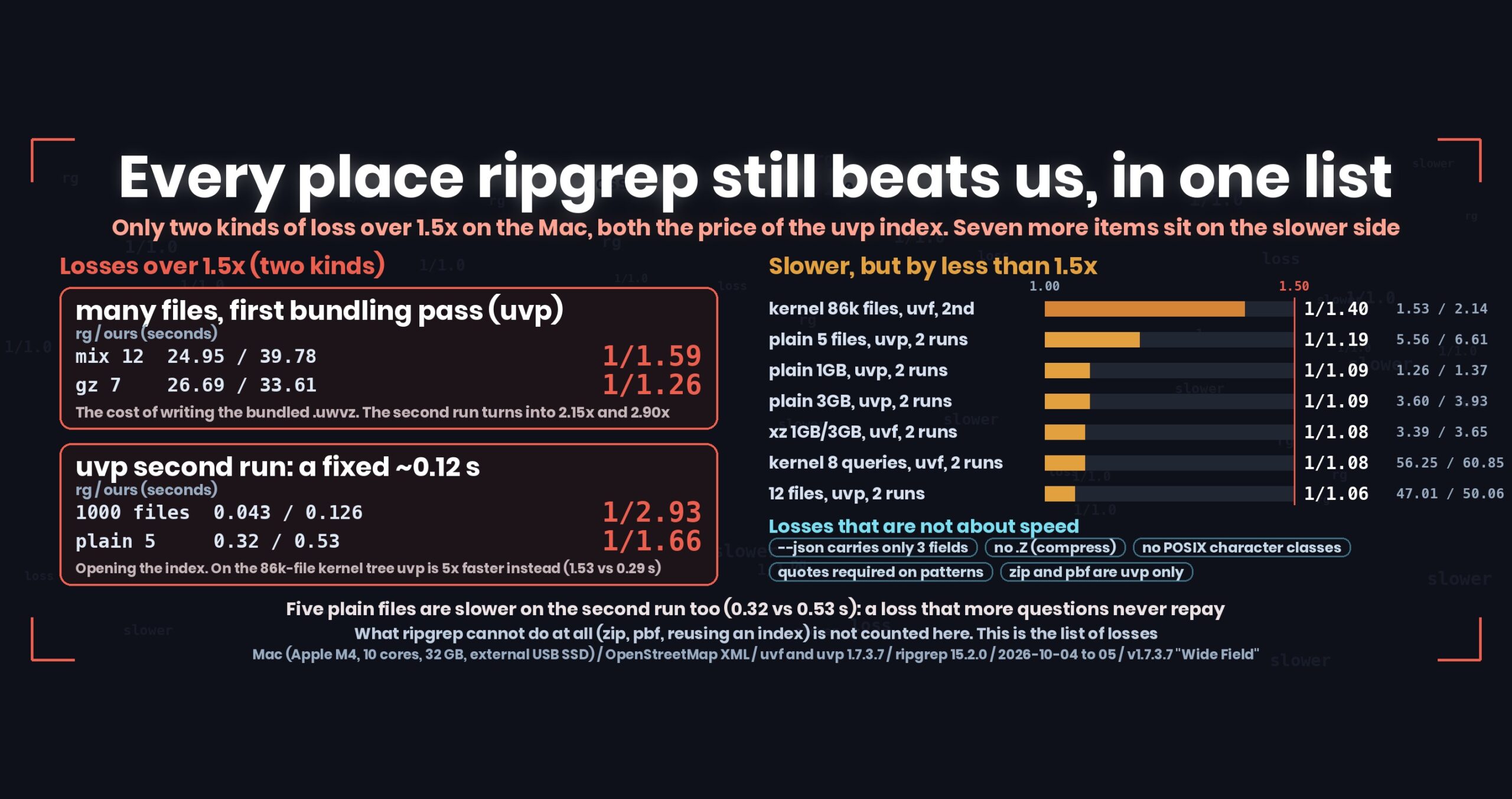
- The short answer: in the Mac suite measured on 4–5 October 2026 (one large file, many files, seven compressed formats, and a tree of many small files), only two kinds of item lose to ripgrep by more than 1.5×, and both are the price of the paid uvp index. One is the first pass that bundles many files (12 mixed plain and gz files: 24.95 s against 39.78 s = 1/1.59). The other is a fixed cost of about 0.12 s on every second run (1,000 split files: 0.043 s against 0.126 s = 1/2.93; 5 plain files: 0.32 s against 0.53 s = 1/1.66). The free uvf has no loss above 1.5×. Everything else is under 1.5×, which this series calls on par — but seven items still sit on the slower side
- The whole picture first: wins and losses on one page (ripgrep = 1)
- What was measured
- Loss 1: the first pass that bundles many files, 1/1.59
- Loss 2: a fixed cost on every uvp second run, about 0.12 s and 1/2.93
- Slower, but by less than 1.5× (seven items)
- Losses that are not about speed
- Not measured yet
- Losses we fixed (history)
- For the record
- The general lesson: a list of losses splits into two kinds
- The tool
- Links
The short answer: in the Mac suite measured on 4–5 October 2026 (one large file, many files, seven compressed formats, and a tree of many small files), only two kinds of item lose to ripgrep by more than 1.5×, and both are the price of the paid uvp index. One is the first pass that bundles many files (12 mixed plain and gz files: 24.95 s against 39.78 s = 1/1.59). The other is a fixed cost of about 0.12 s on every second run (1,000 split files: 0.043 s against 0.126 s = 1/2.93; 5 plain files: 0.32 s against 0.53 s = 1/1.66). The free uvf has no loss above 1.5×. Everything else is under 1.5×, which this series calls on par — but seven items still sit on the slower side
uvfanduvpare the search commands of UwView (v1.7.3.7 “Wide Field”), which I build.uvfis in the free edition,uvpin the paid UwView Pro. Every number here comes from a Mac (Apple M4, 10 cores), 32 GB of memory, an external USB SSD and OpenStreetMap XML. Windows and Linux results are kept out of this article — different machines, so the seconds do not compare.
The whole picture first: wins and losses on one page (ripgrep = 1)
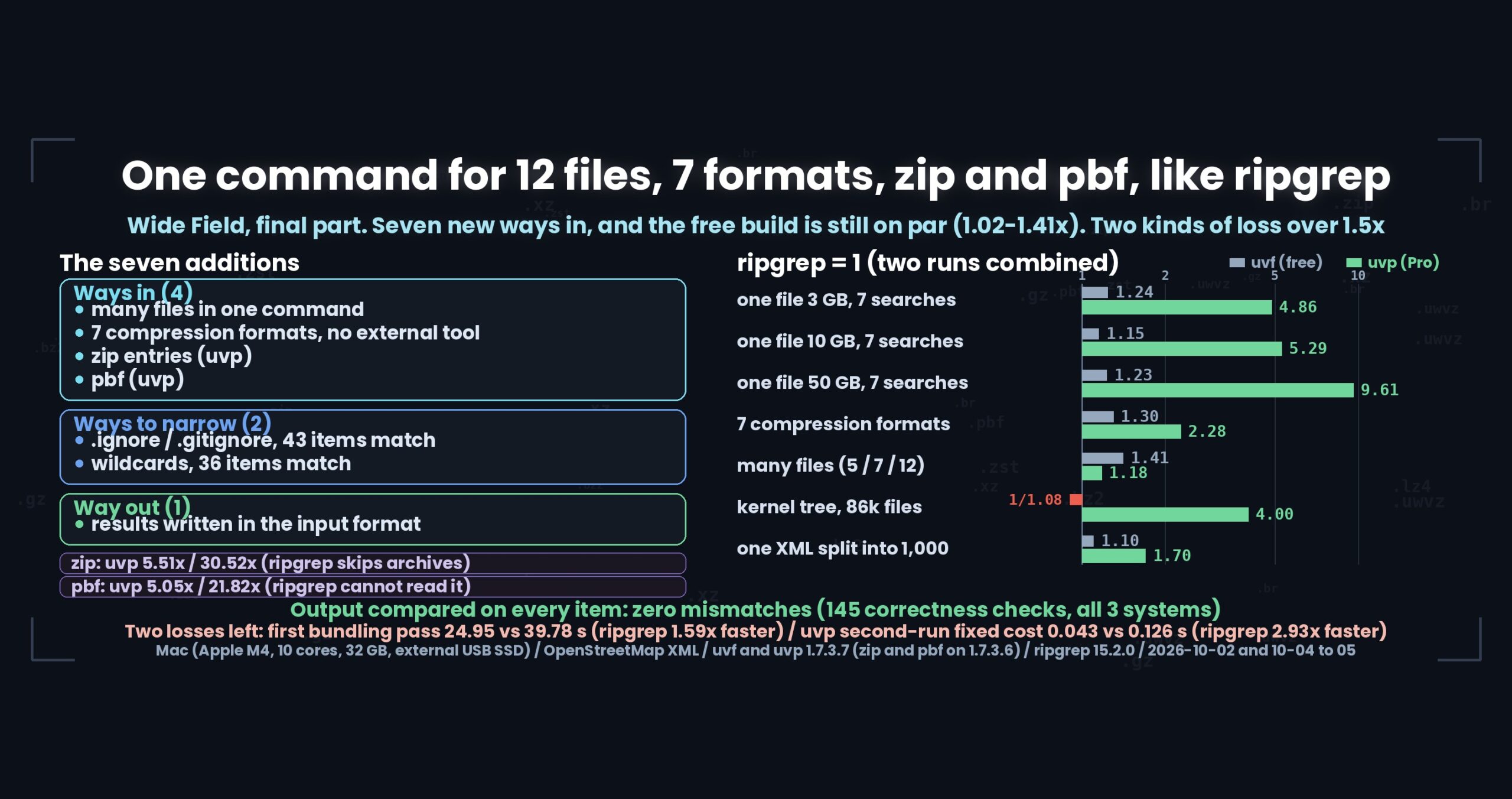
A list of losses alone hides the overall shape. So first, here is the total time for searching twice, with ripgrep as 1. Each number is “ripgrep’s time ÷ ours”: above 1 means we are faster, 1/x means we are slower. Anything under 1.5× is treated as on par, with the direction noted.
| Case (two runs) | ripgrep | free uvf |
paid uvp |
|---|---|---|---|
| Linux kernel, 86,000 files, 8 queries | 1 (56.25 s) | 1/1.08 (60.85 s), on par, slower side | 4.01× (14.02 s) |
| One 3 GB plain file, 7 queries | 1 (31.49 s) | 1.06× (29.66 s), on par, faster side | 2.65× (11.87 s) |
| One 10 GB plain file, 7 queries | 1 (89.42 s) | 1.08× (83.02 s), on par, faster side | 3.09× (28.97 s) |
| One 50 GB plain file, 7 queries | 1 (821.43 s) | 1.12× (732.54 s), on par, faster side | 5.12× (160.35 s) |
| 3 GB as gz, 2 queries | 1 (4.61 s) | (not measured in this run) | 3.05× (1.51 s) |
| 10 GB as gz, 2 queries | 1 (17.38 s) | (same) | 2.44× (7.12 s) |
| 50 GB as gz, 2 queries | (not measured on a near-final v1.7.3.7 build) | ||
| 1 GB and 3 GB in seven compressed formats (1 query each) | 1 | 1.02–1.30× in six formats (gz, bz2, lzma, zst, lz4, br; on par, faster side), xz alone 1/1.08 (on par, slower side) | 1.21–2.28× in all seven (e.g. gz 1.78×, bz2 2.01×, lzma 2.28×) |
uvpis 2.4–5.1× ripgrep over two runs in every case in this table. The time to build the index on the first run is included.uvfstays inside 1.5× everywhere (1/1.08 to 1.30×), close to ripgrep. It sits on the slower side in two places: the kernel tree and xz.- The seven plain-text queries are plain search,
-i,-E, anchored-E,-E -i,-vand-E -v. The two gz queries are plain search and-E. - The
uvpplain-text numbers come from seven queries in a row. The index built by the first query is reused from the second, so it wins by a wide margin. With a single query,uvploses even on 3 GB of plain text, at 1/1.09 (see “Slower, but by less than 1.5×” below). - No loss above 1.5× appears in this way of counting. Those appear only for the first pass that bundles many files and when comparing the second run alone, and they are listed from the next section on.
- All builds are v1.7.3.7 development builds: 26.10.05.14 for the kernel; 26.10.05.10 for 3 GB plain and gz; for 10 GB and 50 GB plain, 26.10.04.23 for ripgrep and
uvfand 26.10.05.10 (10 GB) / 26.10.05.08 (50 GB) foruvp; 26.10.05.08 for 10 GB gz; 26.10.04.23 for the seven formats. For 10 GB we left out a run in which another app took the memory and the second run fell out of the cache. Every machine is a Mac (Apple M4, 10 cores).
What was measured
| Machine | MacBook Air, Apple M4 (10 cores), 32 GB, external USB SSD |
| Builds | uvf/uvp 1.7.3.7, ripgrep 15.2.0 |
| Data | OpenStreetMap XML (1, 3, 10 and 50 GB, plus the same material split into several files) and the Linux kernel source (86,000 files) |
| Method | sync, drop caches, wait 10 s, first run (cold), then a second run (hot) |
| Rule | “their time divided by ours”. Under 1.5× is on par, not a difference |
The first uvp run includes building the compressed cache and index (.uwvz, UwView Pro’s compression format plus index). The second run reads it.
Loss 1: the first pass that bundles many files, 1/1.59
uvp bundles many files into one .uwvz. That first pass is slower than ripgrep, which only reads.
| First run (cold), seconds | ripgrep | uvp first |
Ratio | uvp second |
Second-run ratio |
|---|---|---|---|---|---|
| 5 plain files (4.78 GiB) | 5.24 | 6.08 | 1/1.16 | 0.53 | 1/1.66 |
| 7 gz files (7.13 GiB) | 26.69 | 33.61 | 1/1.26 | 7.57 | 2.90 |
| 12 plain + gz files | 24.95 | 39.78 | 1/1.59 | 10.28 | 2.15 |
This loss is by design. Decompressing, recompressing, indexing and writing take longer than reading. It pays back from the second question: 7 gz files are 1.18× over two runs. The 12 mixed files are still 1/1.06 over two runs, and pull ahead on the third (69.07 s against 60.34 s over three runs).
Plain files are the exception. Five plain files are slower for uvp on the second run too (0.32 s against 0.53 s = 1/1.66), and more runs never repay it. Plain text needs no decompression, so a straight read is simply faster. If you keep searching only plain files, uvf or ripgrep is enough.
Loss 2: a fixed cost on every uvp second run, about 0.12 s and 1/2.93
Every uvp second run takes about 0.12 s, however small the search — the time to open the index and decide what to read.
| Second run (hot), seconds | ripgrep | uvp |
Ratio |
|---|---|---|---|
XML split into 1,000 files (981 MB), 東京 |
0.043 | 0.126 | 1/2.93 |
| Same, a word that is not there | 0.041 | 0.124 | 1/3.02 |
One XML file (979 MB), 東京 |
0.108 | 0.122 | 1/1.13 |
Linux kernel, 86,000 files, EXPORT_SYMBOL |
1.608 | 0.286 | 5.62 (uvp wins) |
A fixed cost shows most when the other side reads little. Where ripgrep finishes 1 GB in 0.04 s, 0.12 s is a 3× gap. On 86,000 files, where ripgrep spends its time opening each one, uvp turns that around and wins by more than 5×.
Slower, but by less than 1.5× (seven items)
We call these on par, but they point the wrong way. Here they are.
| Item | ripgrep | Ours | Ratio |
|---|---|---|---|
Linux kernel, 86,000 files, uvf, second run |
1.53 | 2.14 | 1/1.40 |
5 plain files, uvp, two runs |
5.56 | 6.61 | 1/1.19 |
3 GB [ぁ-ん]{3,}, uvf, second run |
0.285 | 0.408 | 1/1.43 |
One plain file, 1 GB / 3 GB, uvp, two runs |
1.26 / 3.60 | 1.37 / 3.93 | 1/1.09 |
xz 1 GB and 3 GB, uvf, two runs |
1.20 / 3.39 | 1.29 / 3.65 | 1/1.08 |
Linux kernel, 8 queries, uvf, two runs |
56.25 | 60.85 | 1/1.08 |
12 plain + gz files, uvp, two runs |
47.01 | 50.06 | 1/1.06 |
Three things stand out.
Where there are many small files, uvf‘s second run is still on the slower side. Opening 86,000 files puts a fixed cost of about 2.1 s on every search (ripgrep: 1.5 s). uvf is faster on the first run, so over two runs the gap shrinks to 1/1.08.
xz is the only format where uvf loses on the Mac. The other six (gz, bz2, lzma, zst, lz4, br) are 1.02–1.30× in uvf‘s favour; xz alone is 1/1.08. The external xz command’s parallel decompression is faster than our built-in decoder. Part 3 narrowed a 1/6.19 loss with parallel decompression, but we have not overtaken it.
uvp always loses a little on plain text. 1/1.09 at both 1 GB and 3 GB — the cost of writing the compressed cache. On compressed files it wins big (gz 1.78×, bz2 2.01×, lzma 2.28×); on plain text it cannot. uvp pays off when the data is compressed or when you search it more than once; it does not help a single search of a plain file.
Losses that are not about speed
Some losses never become a number.
--jsoncarries fewer fields than ripgrep. We emitfile,lineandtextonly — notype, nosubmatches(match positions), no closing stats, no base64 for binary. Ajqrecipe that pulls match positions will not work as is (Part 11)- No
.Z(compress) support. The seven supported formats are gz, bz2, xz, lzma, zst, lz4 and br (Part 2) - No POSIX character classes or script names.
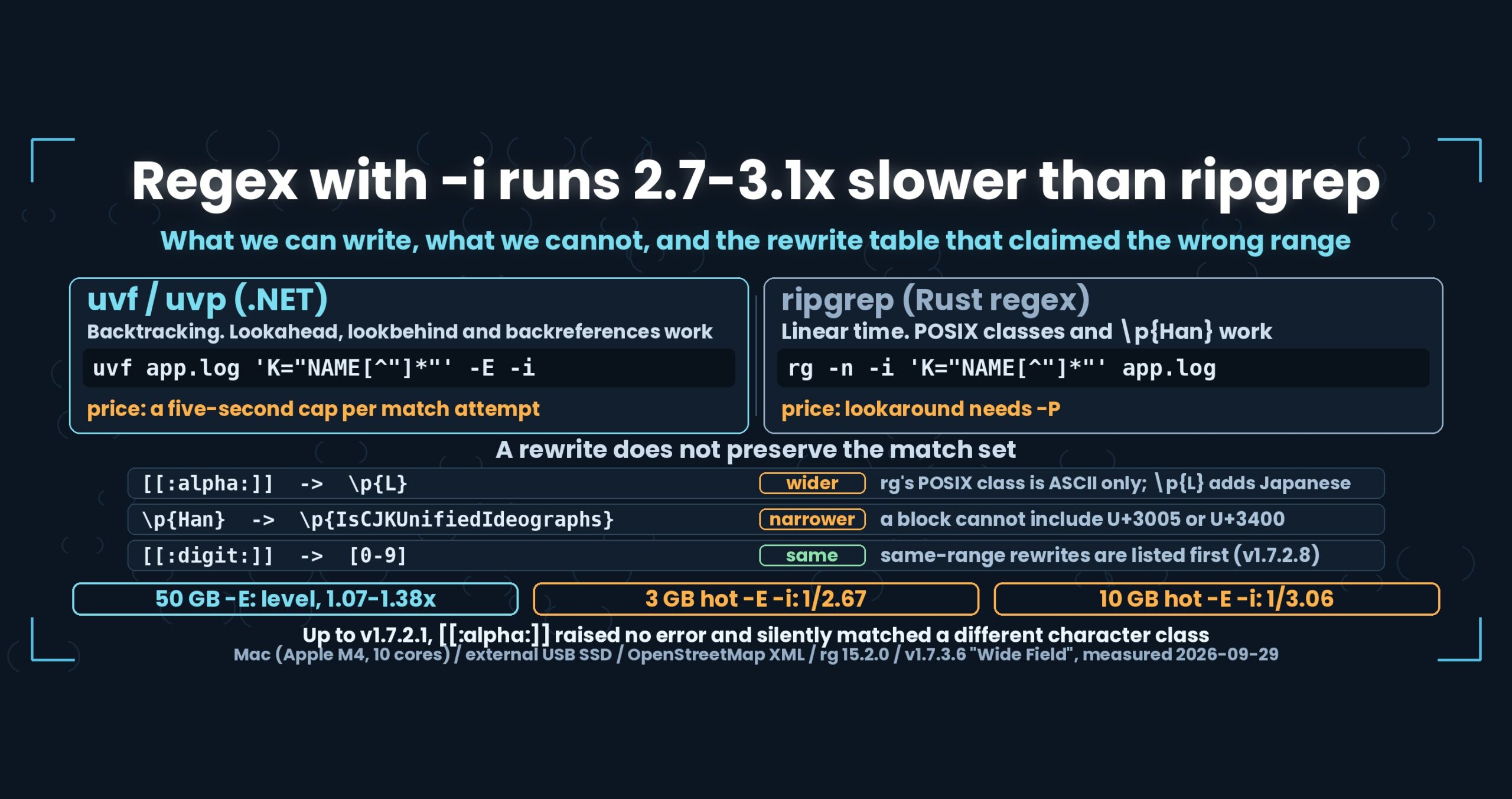
[[:alpha:]]and\p{Han}cannot be written in .NET regular expressions, so we suggest rewrites such as[a-zA-Z]. The rewrite does not always match the same set (Part 9) - Many-file patterns go in a single argument. The shape differs from ripgrep’s
-g, and because it contains*, quotes are mandatory — forget them and the shell expands it (Part 8) - Our
--no-ignorebehaviour had a specification error. (Part 7) - Searching inside zip files and OpenStreetMap pbf is
uvponly. The freeuvfprints a pointer and stops (Parts 5 and 6)
Things ripgrep cannot do at all (searching inside a zip, reading pbf, writing output in the input’s format, reusing an index) are not counted. This is the list of losses.
Not measured yet
Some items we cannot call “not a loss”: correctness is checked, speed is not.
- Writing output in the input’s format (
-out): only plain and gz were timed. bz2, xz, lzma, zst, lz4, br and zip were checked for correctness only (66 items) (Part 10) - Appending only what changed to a bundled
.uwvzhas no timing. It works as specified, but without seconds we have not written about it (Part 4) uvp --tune(thread count on the.uwvzpath) and the speed of--jsonare not measured (Part 11)
Never writing “on par” for something unmeasured is this series’ first rule.
Losses we fixed (history)
| When | What | Outcome |
|---|---|---|
| After Part 9 | -E -i (regex plus case-insensitive) on the second run: 0.58 s against 1.55 s on 3 GB (1/2.67), 1/3.06 on 10 GB |
Even when case is ignored, part of a string every matching line must contain is now searched first, with case folded. 3 GB: 0.56 s against 0.49 s (1.14×); 10 GB: 1.72 s against 1.37 s (1.26×). Overtaken |
| Part 12 | Second-run searches at 1/1.36–1/1.43 | The newline count for line numbers went from 0.15 s to 0.028 s; 3 GB now ripgrep 0.31 s against 0.29 s. Overtaken |
| Parts 2 and 3 (1.7.2) | xz decompression at 1/6.19 | Parallel decompression brought it to 1/1.08. On par |
| First Light (v1.6.6.1) | The first 50 GB question at 59.0 s against 54.9–55.8 s (6–7 % slower) | The price of building the index while searching. Not re-measured in Wide Field |
For the record
- Calling under 1.5× “on par” is a line this series drew for itself (Part 9 explains why). If that looks like a convenient line, read the seconds in the tables directly.
- This list is one Mac. As Part 13 showed, Windows had four losses the Mac does not. Change the environment and the losses move.
- 50 GB does not fit in memory, so even the second run reads from disk. The 3 GB and 10 GB second runs come from memory.
- Each item was measured once. The many-file first pass moves on ripgrep’s side too (22.39–26.69 s for 7 gz files); on the steadier run the 7 gz files come out near 1/1.5 rather than 1/1.26.
- I am writing about my own product. Discount accordingly.
The general lesson: a list of losses splits into two kinds
(1) Fixed-cost losses show most on small inputs. The 0.12 s on every uvp second run, uvp on plain text (1/1.09) and uvf‘s second run on the kernel tree (1/1.40) are all paid every time. The bigger the input, the closer the ratio gets to 1 — on 86,000 files the 0.12 s even turns into a 5× win. The fix is to cut the fixed cost itself.
(2) For price-of-an-index losses, check that more runs repay them. A slow first run that builds an index is sound design if the second question pays it back. The 7 gz files paid back on the second question, the 12 mixed files on the third. The five plain files never did. That is not a design price; it is just a loss.
(3) A single overall number hides losses. The 32-item overall for one 3 GB file is 2.50×. Publish only that and not one loss shows. Only by splitting the items and counting the ones pointing the wrong way do you find what to fix.
(4) The list of losses is the order of work. From the top: the first pass that bundles many files (1/1.59), then the fixed 0.12 s on uvp second runs, then uvp on plain text (a fixed cost), then xz (the other side is simply faster). That is the order we will take them in.
The tool
UwView is a viewer for huge text and log files (free UwView, paid UwView Pro).
uvf big.log ERROR                    # one file (plain or any of 7 compressed formats)
uvf 'logs/*.gz' ERROR                # many files in one run (quotes are mandatory)
uvf -E -i 'error[0-9]+' big.log      # regex plus case-insensitive
uvf --json big.log ERROR             # JSON Lines (file, line, text)
uvf --tune                           # measure the thread count for this machine (--apply saves it)
Exit codes follow grep: 0 = found, 1 = not found, 2 = error or incomplete result.
The free edition is on GitHub Releases. On a Mac, brew install --cask amru195704/uwview/uwview; on Windows, Scoop (scoop bucket add uwview https://github.com/amru195704/scoop-uwview, then scoop install uwview); on Linux, Snap.
Links
- Part 13: the same test suite on macOS, Windows and Linux: https://uvp.y42u.net/en/blog/uwview-wf13-three-os-en/
- Part 12: the newline count I said would never show up in seconds: https://uvp.y42u.net/en/blog/uwview-wf12-newline-hot-en/
- Part 11:
--jsonand--tune: https://uvp.y42u.net/en/blog/uwview-wf11-json-and-tune-en/ - Part 9: comparing regular expressions (what .NET and Rust can and cannot write): https://uvp.y42u.net/en/blog/uwview-wf09-regex-vs-ripgrep-en/
- Part 8: file patterns, and why quotes are mandatory: https://uvp.y42u.net/en/blog/uwview-wf08-file-globs-en/
- Part 7: ignore rules (
.ignore,.gitignore): https://uvp.y42u.net/en/blog/uwview-wf07-ignore-rules-en/ - Part 6: searching a pbf: https://uvp.y42u.net/en/blog/uwview-wf06-pbf-osm-en/
- Part 5: searching inside a zip: https://uvp.y42u.net/en/blog/uwview-wf05-zip-entries-en/
- Part 2: seven formats without external commands (and parallel xz): https://uvp.y42u.net/en/blog/uwview-wf02-seven-formats-no-external-en/
- Part 1: 12 plain and gz files in one command: https://uvp.y42u.net/en/blog/uwview-wf01-multi-file-one-command-en/
- Where we stopped calling things a difference: https://uvp.y42u.net/en/blog/uwview-fl09-difference-threshold-en/
- First Light recap (six releases that only cut the number of reads): https://uvp.y42u.net/en/blog/uwview-fl13-first-light-recap-en/
- Every measurement in one place: https://uvp.y42u.net/en/benchmarks-en/
- Source code (GitHub): https://github.com/amru195704/UwView
And if you are storing huge logs that eat your disk and want to search them compressed, take a look at UwView Pro — a persistent index, search inside the compressed cache, about 1/9 of the storage, and a faster reopen as well (all operating systems; one-time purchase or monthly plan).
From the developer: my apps, Kindle books and public projects are listed at GitHub: amru195704.