rg lost to grep.
You’ve been handed a 51 GB log, and your fingers type rg — the same reflex you use on a repository, because “just use rg” is standard advice. Does that advice hold when the target is one huge single file? I measured it, and the ranking was not what I expected.
Setup
- Target: OpenStreetMap Japan,
japan-latest.osm— a single XML file, 51.25 GB / 892,239,125 lines - Search term:
東京(“Tokyo” — a realistically frequent hit) - Environment: Mac with an external USB drive (measured physical bandwidth: 0.41 GB/s) — an I/O-bound setup
- Commands:
rg 東京 japan-latest.osm > tokyo-rg.txt      # ripgrep
grep 東京 japan-latest.osm > tokyo.txt       # grep
# UwView Pro: same term via GUI full-text search
# (1st run = while building its index / repeat = against the cache)
UwView Pro is my own tool. These are the developer’s own measurements — keep that in mind and discount accordingly.
Results
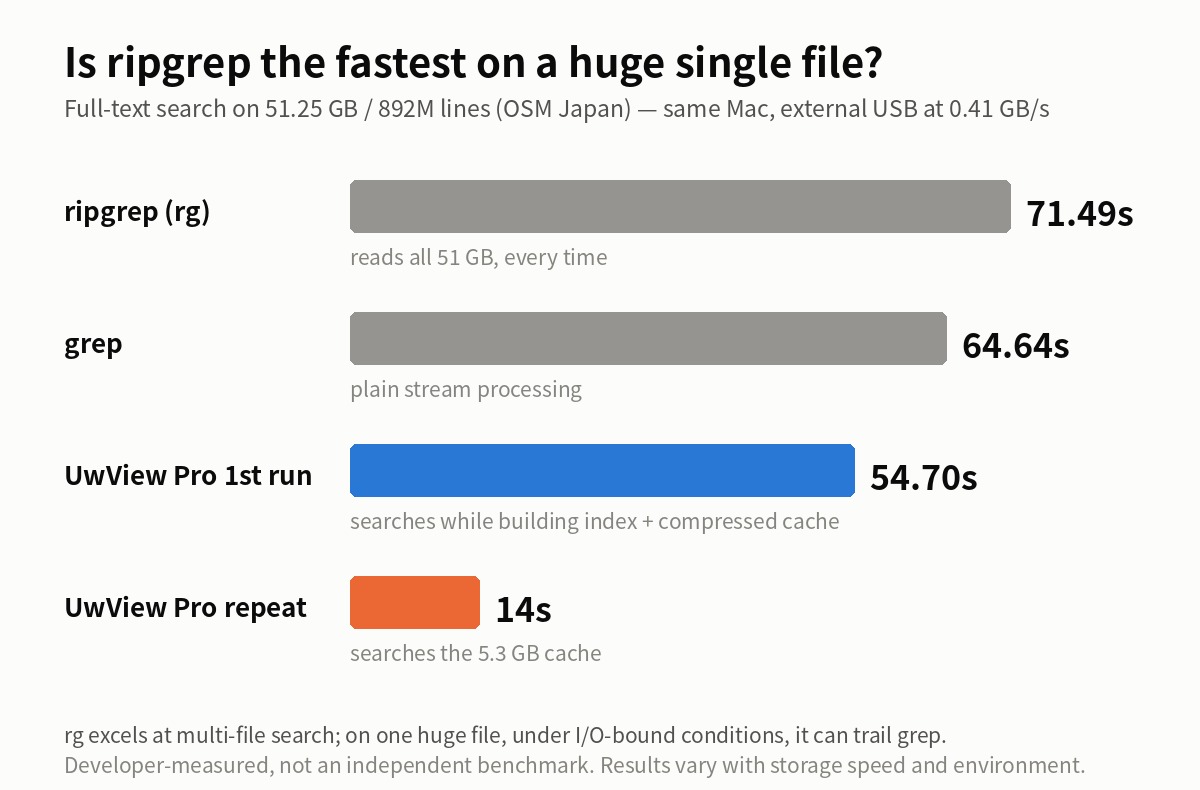
| Tool | First run | Repeat runs | Notes |
|---|---|---|---|
| ripgrep (rg) | 71.49 s | ~same every time | reads all 51 GB, every time |
| grep | 64.64 s | ~same every time | plain stream processing |
| UwView Pro | 54.7 s (while building its index) | 14 s | builds a 5.3 GB compressed sidecar cache on first pass |
In this environment, rg was slower than grep on a single huge file — and from the second search onward, the tool that keeps a cache is close to an order of magnitude faster than either.
Why this happens
This is not a defect in ripgrep. It is a mismatch of specialties.
- rg’s parallelism works across files. With one file, those threads have little to do
- In an I/O-bound environment (0.41 GB/s), every tool’s floor is “the time it takes to read 51 GB.” Disk dominates; regex-engine cleverness barely matters
- grep beat rg here simply because plain stream processing carries less overhead, and under these conditions overhead was the only variable left
UwView Pro’s slight first-run edge comes from building its line-offset index and compressed sidecar cache while reading. The real difference appears on the second search: read 51 GB again, or read a 5.3 GB cache — that design choice is the whole gap.
Full disclosure
- These numbers come from an I/O-bound setup (external USB). On a fast internal SSD the read floor drops, and the ranking could change
- rg’s home turf is multi-file search. For repository-wide scans I know of no faster general-purpose tool
- All figures are my own measurements on my own machine — not an independent benchmark
- Even UwView Pro’s 54.7 s first run cannot escape reading the file once at storage speed. What changes is that you can view and search while it reads — and everything after that first pass
When to use what
- Scanning many files across a repository → ripgrep
- A simple filter in a pipeline → grep is fine
- Returning to the same huge single file again and again during an investigation → a tool with an index and a cache is an order of magnitude faster
“The best search tool depends on the job” is an unsurprising conclusion — but I had not seen numbers for the huge-single-file case, so here they are.
The tool used
UwView Pro is on sale (Windows, macOS, Linux — one license covers all three; one-time or monthly, with a 14-day free trial — editing features included). For a one-off investigation the free UwView is enough — Pro pays off for people who keep coming back to the same log.
Links
- An Honest Comparison with klogg [Ver1.1.1, Complete Edition] — every row, including the ones we lose
- Opening a Single 258 GB / 4.5-Billion-Line File — the same approach on even bigger real data
- From 100,492 Hits to 3 in Two Clicks — Drill-down Search — what happens after the search
- “This File Is Too Large to Open” — Where Standard Tools Give Up
From the developer: a list of my apps, Kindle books and public projects is on GitHub: amru195704.
A note
The information in this article is provided for reference purposes only, and we do not guarantee its accuracy or completeness. All measurements reflect the specific environment described above and may differ on other hardware. If you notice any errors or inaccuracies, please let us know in the comments and we will review and correct them.